
Buy 2, Get 1 offer falls under the broader category of “BOGO‘’ (Buy One, Get One) offer.
A BOGO ( Buy one, Get one ) discount is one of the most popular sales promotions (approximately 93% American consumers have tried it once), where customers get a free item or a discounted second product with the purchase of a first.
This phenomenon alone can trigger half of the shopkeepers to switch brands for a BOGO deal, according to statistics. This is already a compelling reason to incorporate BOGO deals in your store.
Now, let’s stretch this view and dissect it from different perspectives to understand why it is so effective, how to set it up step by step using Disco, how to avoid hidden margin traps, and more.
Why is it so effective?
- Psychological value: When you examine the psychology and profit mechanics of BOGO deals, you’ll see customers often perceive the free item as more profitable than the discounted products.
According to statistics, 66% consumers prefer BOGO over any other type of discount. On that account, it creates a better psychological appeal.
- Zero Cognitive Load and Irrestibility: The simplicity of the offer creates no friction in customers’ choices, making it more transparent and irresistible. This leads to impulse buying.
- Fast inventory movement: This strategy ensures that for every unit you move, you move a second unit right behind it. For instance, Domino’s BOGO campaign boosted traffic and drove a 30–50% increase in sales volume.
- Explosive AOV surge: A skincare brand ran a BOGO offer, resulting 20% increase in average order value. This was also a great strategy for introducing new products.
What You Need Before Setting Up the Offer
- Verify that your WooCommerce store is on version 8.0 or higher with a valid dynamic pricing plugin subscription.
- WordPress Admin Access
- Clearly defined discount rules
- A reliable discount plugin (e.g, Disco)
Step-by-Step Guide: How to Set Up Buy 2 Get 1 in WooCommerce with Disco
Step 1: Install and activate the Disco plugin
Step 2: Create a discount rule.
- Go to your WordPress dashboard, click on Disco
- Navigate to Disco → Create a Discount
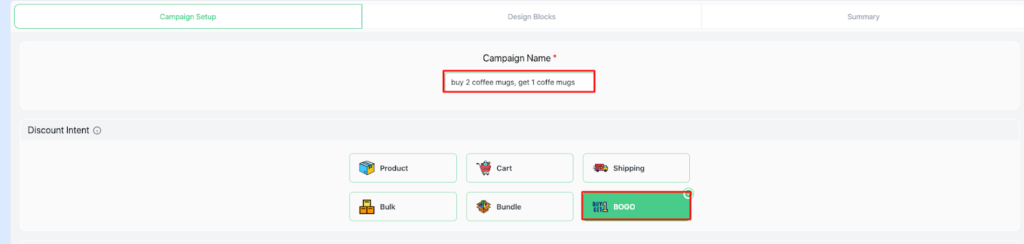
- Add a name to your campaign (e.g., Buy 2 Coffee Mugs, Get 1 Coffee Mug free)
- Set BOGO intent
Step 3: Filter products
- Select a few products and choose “ Coffee mug” from the search bar

Step 4: Set Usage limit and Validity date
- Set the User limit →100 (or any number you want ), Validity date ( From 9/12/2025 -12/12/2025)
Step 5: Set BOGO rules
- In the Customer Buy section, set the “ Min Quantity to 2 ”, “ Max Quantity to 2.”
- In the Customer Get section, set “ Get Quantity-1”, “ Discount type – free items .”
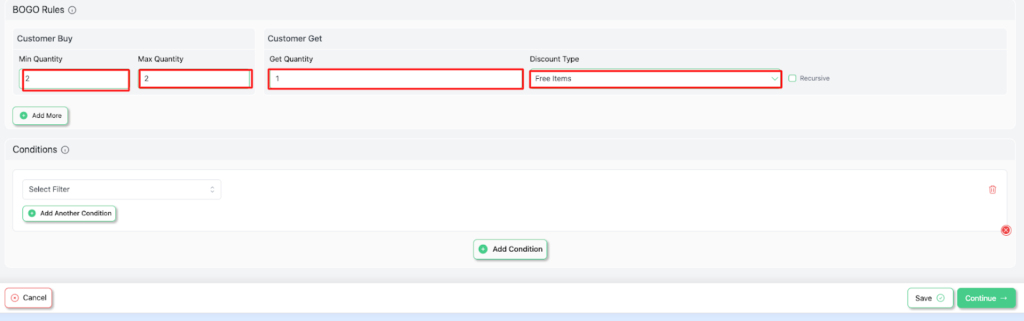
Step 6: Save and Exit to launch your campaign.
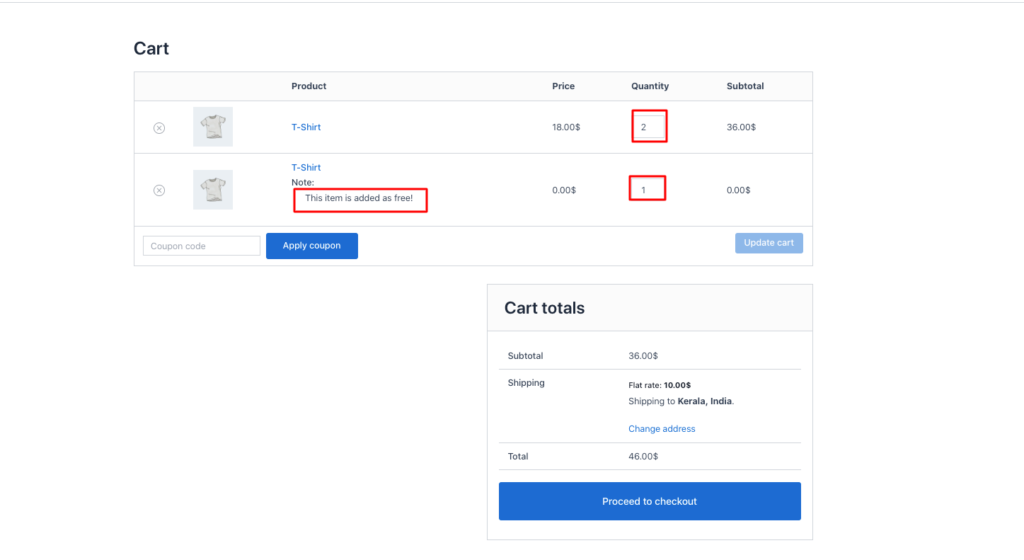
Common Mistakes to Avoid with Buy 2, Get 1 promotions
- Lacking clear product restrictions:
It is essential to define exact products or categories for discounts. Otherwise, customers might expect discounts on ineligible items. This leads to chaos and confusion during the checkout process.
Use a dynamic plugin like Disco to set clear boundaries, based on SKU, Categories, and any tags
- Allowing the Free Item to Be the Most Expensive Product
This mistake can wipe out margins in the blink of an eye, as it leads many customers to purchase the expensive item.
Instead of doing that, configure your rule to combine with lower-priced items
- Not setting the User limit :
This could encourage customers to take unfair advantage of the promotion. To avoid this issue, ensure you define a user usage limit.
- Poor Promotion Visibility:
To stand out amid constant distractions, you must consistently promote your discount offers. Otherwise, Customers would hardly add one or two items without reaching the qualified quantity.
You would lose the essence of the B2G1 deal, which is psychological urgency. And finally, the promotion will fail to promote its purchase intent.
Use Product page badges, Cart, and Mini Notices, Site-Wide Banners, Email, and On-site Pop-ups to boost visibility.
Conclusion
A Buy 2 Get 1 Free promotion is the fastest tactic to increase your AOV, boost sales, encourage bulk buying, and earn customer satisfaction
Just follow these simple steps :
- Install a dynamic discount plugin
- Apply the Buy 2 Get 1 rule
- Showcase it boldly across your entire store
- Be mindful of potential pitfalls, and observe how customers willingly add the third item to their cart.
FAQs
Can WooCommerce create a Buy 2 Get 1 offer without a plugin?
Unfortunately, WooCommerce doesn’t have built-in support for a Buy 2 Get 1 offer. You need to install and activate an advanced discount plugin to do that.
Can I apply a Buy 2 Get 1 offer only to specific products?
Yes, indeed. With most WooCommerce plugins, you can:
– Select specific products
– Limit them to certain categories.
– Exclude items already on sale.
Is Buy 2 Get 1 better than percentage discounts?
Compared to percentage discounts, Buy 2 Get 1 deals achieve better performance, as shown by statistics. This offers more perceived value than a percentage discount.
Will Buy 2 Get 1 offers work on mobile devices?
Yes, of course. Just make sure to have an updated plugin, a mobile-responsive theme, and test your cart behavior on a phone.