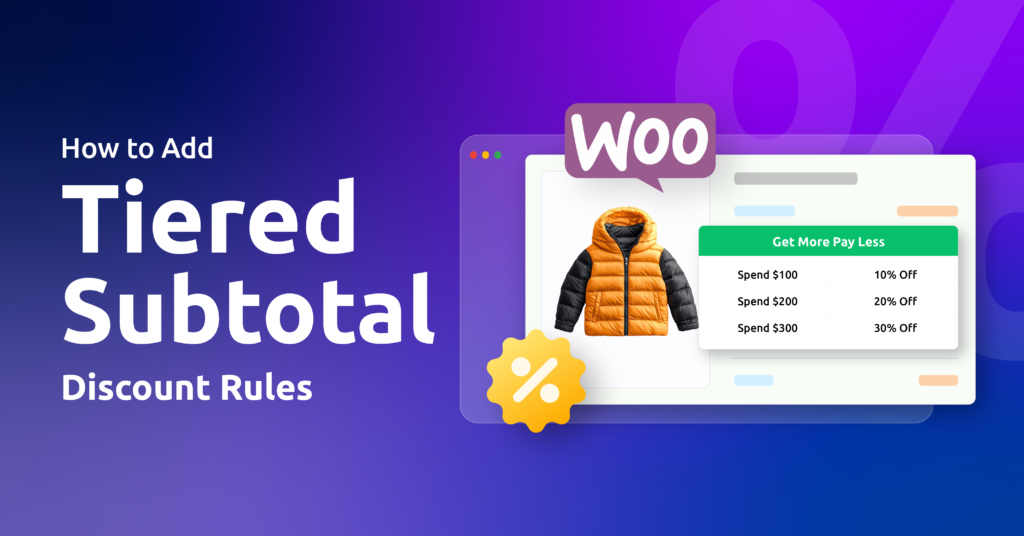
This guide covers how to add tiered subtotal discounts in WooCommerce, a dynamic pricing strategy based on total cart value. Instead of flat discounts, it uses an “if-then” structure tied to spending ranges, for example, $100 to $200, to gamify the cart.
Example:
- If you spend $100 in cart subtotal, then you’ll get 10% off
- If you spend $150 in cart subtotal, then you’ll get 15% off
- If you spend $200 in cart subtotal, you’ll get 20% off
As customers add more products and increase their subtotal, a higher discount is automatically applied, encouraging bigger orders and increasing average order value.
You’re motivating customers to make intentional purchases step by step. As the customer increases their order size, the more value you can reasonably offer in return.
This approach is sometimes called WooCommerce tiered pricing, since the discount tier changes based on how much a customer spends, not on a fixed coupon amount. It encourages customers to spend a little more than their usual purchase, since the next level offers more value.
In this guide, you’ll learn why tiered subtotal discounts work so well, how to add them to WooCommerce, best practices, real-life examples, and more.
Important Distinction:
A tiered discount refers to a discount based on quantity, such as u0022Buy 5 T-shirts, get 20% off.u0022 If that’s what you’re after, see our guide on u003ca href=u0022https://discoplugin.com/blog/woocommerce-bulk-discount-table/u0022 target=u0022_blanku0022 rel=u0022noreferrer noopeneru0022u003ebulk discount tablesu003c/au003e. A tiered subtotal discount, on the other hand, refers to a discount offered on the entire cart regardless of its items, based on the WooCommerce discount on total order rather than item count
How To Add Tiered Subtotal Discounts Using a Disco Plugin?
A dynamic pricing plugin gives you a user-friendly interface, automatic calculations, and the ability to build complex rules without writing code. For this, you can use the Disco plugin as your WooCommerce dynamic tiered discounts plugin for smart, scalable tiered pricing and promotional rules.
Cart subtotal is just one of several conditions available in Disco’s discount rules engine, which also supports user roles, categories, and product-based conditions
Here’s a step-by-step process for creating a tiered subtotal discount:
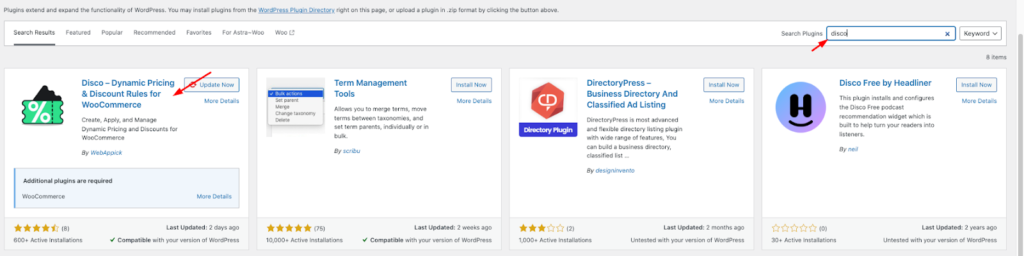
Step 1: Install and activate the Disco plugin
From your WordPress dashboard, go to → Plugins→Add Plugins → Disco
Step 2: Create a discount rule
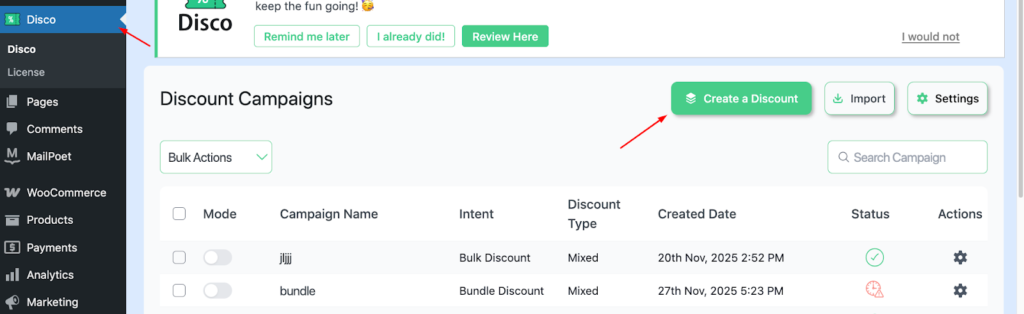
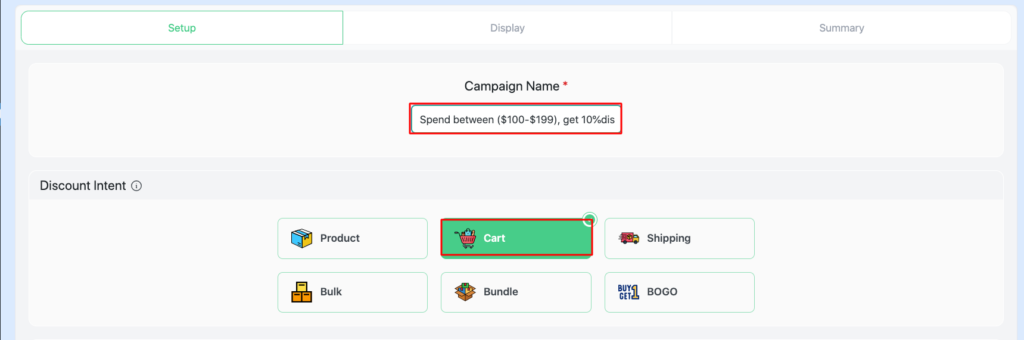
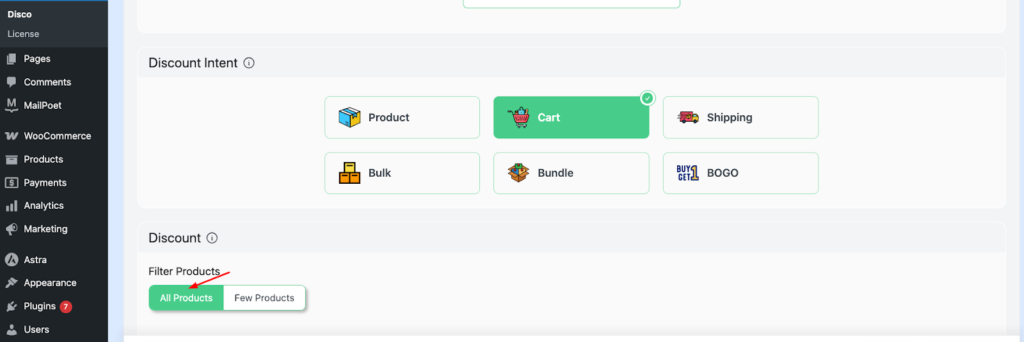
Step 3: Add a campaign name and choose your ” discount intent “
This acts as a unique identifier, making promotional rules easy to navigate. Add a campaign name, e.g., Spend between ($100-$199), get a 10%discount, Choose cart-based intent
Step 4: Filter your products.
For this scenario, choose “ All products.”
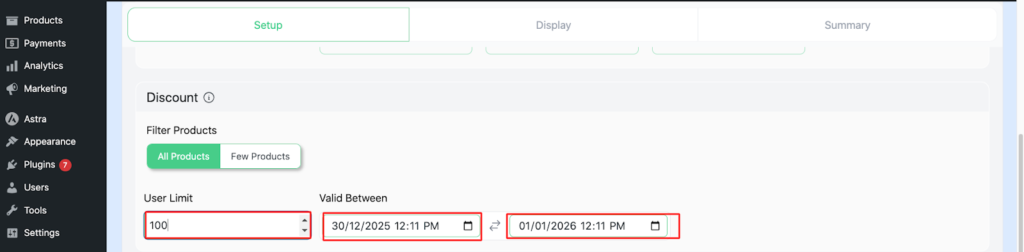
Step 5: Configure Usage limit and Validity date
Set the user limit to 100 (or any number you want ), set the Validity date from 30/12/2025 to 1/01/2026
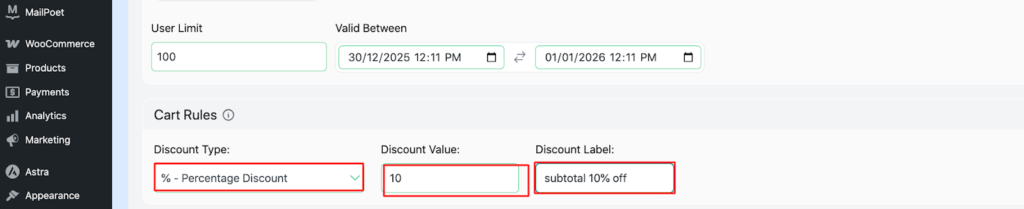
Step 6: Configure Cart rules
Set Discount type- percentage discount, Discount Value -10, Discount label – subtotal 10% off
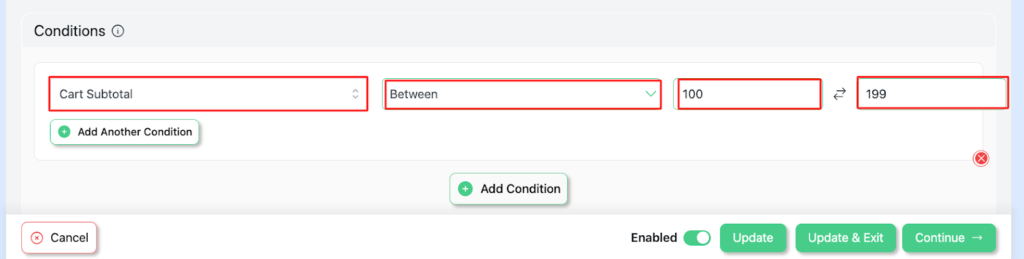
Step 7: Add conditions.
Select Cart Subtotal – between -(100-199)
Step 8: Save and Exit, visit your store to verify the discount
Your campaign has been launched successfully.
Similarly, create another campaign in Disco to have a Tiered Subtotal discount.
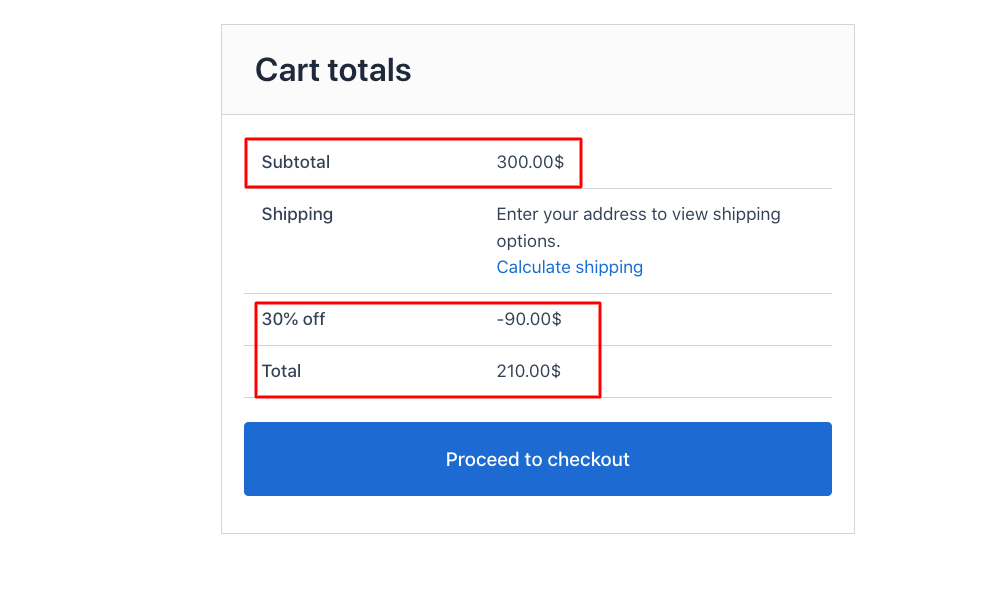
Here, set the conditions as Cart Subtotal – between ($200-$299). Then you’ll have results like this,

Following that, create a similar campaign, keeping cart subtotal between ($300-$399) ,
Best Practices for a Tiered Subtotal Discount Strategy
The AOV plus threshold strategy
Setting the first discount tier too low will damage your profit. Setting the tier above your current AOV works as a gentle nudge for customers to add more items.
It’s recommended that you set your lower tier 20 to 30% above your current AOV, structured like this:
- Tier 1: Spend $75, get 10% off
- Tier 2: Spend $100, get 15% off
- Tier 3: Spend $200, get 20% off
You can also replace a single discount with a multi-tier discount ladder:
- Tier 1: Spend $75, get 10% off
- Tier 2: Spend $150, get 10% off plus free shipping
- Tier 3: Spend $225, get 15% off plus a gift
A free gift with purchase has more perceived value, and it’s also a great way to clear out high-margin accessories.
Gamify the Experience with Progress Bars
Every moment matters when it comes to keeping shoppers engaged, so the shopping experience should feel fun, interactive, and goal-driven.
Creating a visual progress bar gamifies the shopping experience by showing customers how close they are to the next tier. Messaging like “subtotal less discount” or “$25 more to unlock free shipping” works as a psychological trigger that motivates them to finish what they started. This is backed by research: a landmark study on the goal-gradient effect found that loyalty program members accelerate their purchasing as they get closer to a reward, cutting the time between purchases by roughly 20% as their progress card filled up. It gives shoppers a more rewarding experience and a sense of accomplishment.
This approach tends to increase average order value, lower cart abandonment, and improve checkout momentum. The progress bar can be displayed on the cart page, the mini-cart sidebar, or the product upsell section. For more on cart-page messaging, see our guide on WooCommerce add-to-cart notices
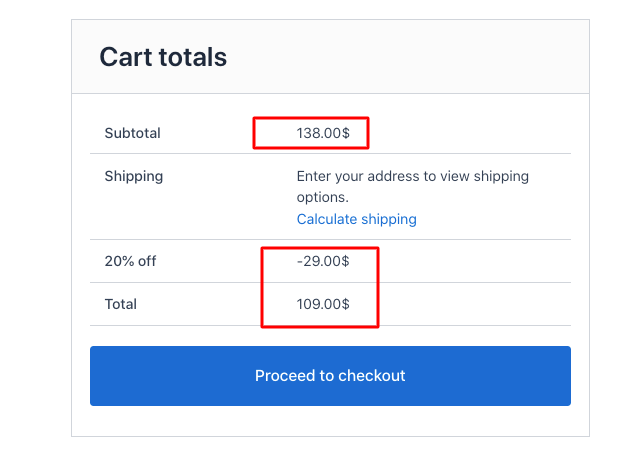
Target Specific Customer Segments
Assigning customers to different roles gives them a sense of recognition and serves as a strong lever for improving customer lifetime value.
Segmenting customers into groups such as new shoppers, wholesalers, loyalty members, or geographic regions lets you create personalized pricing strategies that boost revenue while protecting margins. It also helps you avoid over-discounting or under-discounting. Wholesalers, for example, place larger orders and benefit from higher-tier discounts.
Discount type – Percentage discount, Discount value-20, Discount label- 20% off
- Add conditions.
Cart Subtotal – between (20-200)
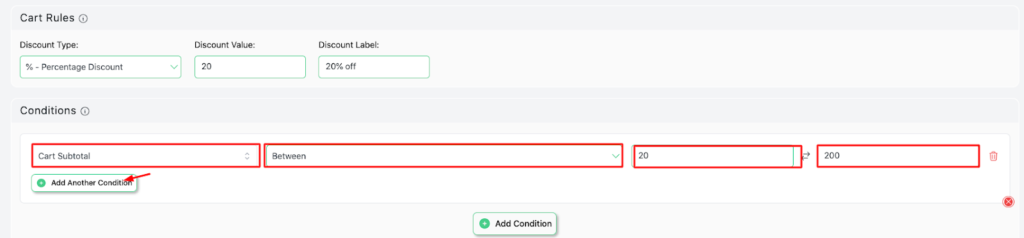
- Add another condition for more conditions
- User role – In list ( included ) – customer
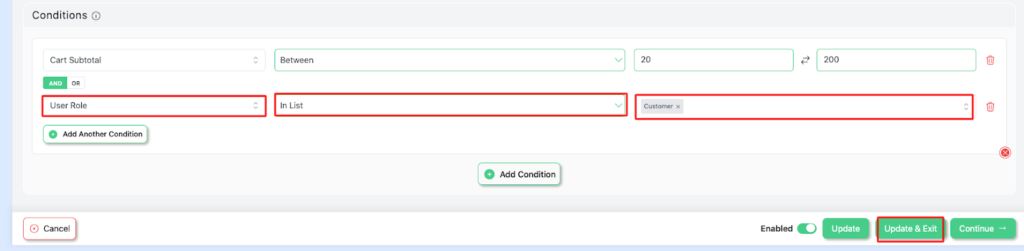
- Save and Exit
Run Promotions Using Limited-Time Tiered Subtotal Discounts
Time-limited Tiered Subtotal discounts could be used as a high-octane pricing strategy. It integrates time with tiered subtotal discounts to create a sense of urgency among customers.
Both the discount tiers and rewards are visible for a specific period, such as a weekend sale, seasonal promotion, holiday event, or product launch.
The urgency and scarcity of products increase the perceived value of the product. It fosters goal-driven motivation among customers. As a result, the store often witnesses higher conversion rates, larger cart subtotals, and more impulsive purchases.
Limited-time Subtotal discount Setup Steps:
- Add a Campaign name (e.g., Last 2 hours, Spend $100, get 20% off)
- Choose your discount intent (e.g, cart-based intent)
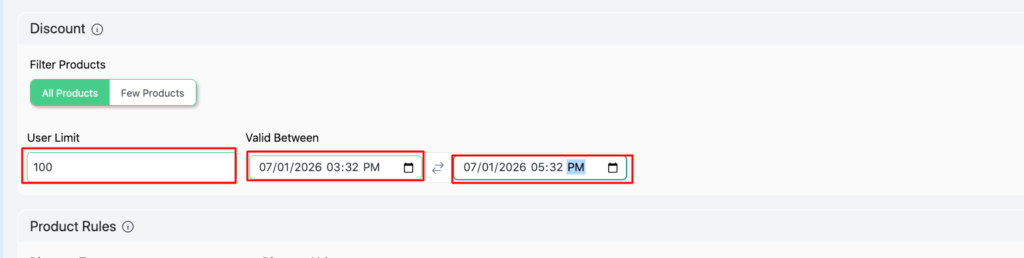
- Set User limit (e.g., 100) and Validity date From (07/01/2026, 3:52 PM to 07/01/2026, 5:32 PM)
- Set Cart Rules
- Save and Exit, visit your store to verify the discount

Create more campaigns to complete the tier.
Wrap up
Tiered subtotal discounts are a powerful conversion rate optimization strategy for turning browsers into high-value customers and one of the most effective ways to increase average order value.
Use descriptive campaign labels, well-defined customer segments, and time-bound promotions to protect margins. Add real-time cart messages to nudge customers toward the next tier, and use progress bars and gamification to make the experience more interactive and reward-driven.
If you’re ready to go further, our guide on advanced discounts in WooCommerce covers the full feature set.
Automating your WooCommerce discount on the total order helps your store stand out, reduces cart abandonment, and builds long-term customer loyalty.
Related guide: How to Increase Average Order Value in WooCommerce (12 Proven Ways)
FAQs
What does cart subtotal mean in WooCommerce?
Cart subtotal is the sum of your product prices before tax, shipping, and any discounts are applied. It’s the number-tiered subtotal discounts are typically calculated against, since it stays consistent regardless of a customer’s shipping destination or tax rate.
What’s the difference between cart subtotal and cart total?
Subtotal reflects only the price of the items in the cart. Total is the final amount due after tax, shipping, and discounts are factored in. Basing your discount tiers on subtotal rather than total keeps your thresholds predictable, since tax and shipping vary by customer.
Do WooCommerce discounts apply to the subtotal or the total?
It depends on how the rule is configured. With Disco, tiered subtotal discounts are calculated against the cart subtotal, not the final total, so the discount you set is based purely on how much a customer is spending on products, not on shipping or tax variables.
How is a tiered subtotal discount different from a bulk or quantity discount?
A bulk or quantity discount is based on how many units a customer buys, for example, u0022buy 5, get 20% off.u0022 A tiered subtotal discount is based on total cart value regardless of item count, so a customer buying one $200 item qualifies the same as someone buying five $40 items.
Does WooCommerce have built-in tiered pricing or discount rules?
No. Native WooCommerce coupons don’t support automatic, threshold-based tiered discounts. You need a plugin like Disco to set cart-subtotal conditions and have the discount apply automatically without a coupon code.