What is a fixed cart discount?
A fixed cart discount deducts a set amount from the overall cart value, for example, $10 off applied once per cart, regardless of how many items are in the order.
Why does the delivery method matter more than the discount itself?
According to the Baymard Institute (based on 49 studies), around 70.19% of online shopping carts are abandoned.
The main culprit? Visible coupon fields.
Once customers leave checkout to hunt for a promo code, most never return. The problem isn’t the WooCommerce discount offer; it’s the checkout friction.
In this guide, you’ll learn how to set up a fixed discount in WooCommerce in the right way: automatically, without any codes or interruptions.
This guide focuses specifically on the fixed-amount type. If you want the full picture, including percentage, quantity-based, and shipping cart discounts, see the complete guide to WooCommerce cart discounts.
What Is a Fixed Cart Discount in WooCommerce?
A fixed cart discount applies a flat price reduction from the customer’s entire order total – not per item, not as a percentage.
For example, if you offer a $10 discount on a $120 order, the final amount becomes $110. The number of products doesn’t influence the deduction process.
It’s transparent, predictable, and crystal clear. Easy to communicate, removing any need for calculations or guesswork.
Fixed vs. Percentage Discounts: What’s the Difference?
A percentage discount adjusts with cart value (e.g., 10% off $60 = $6 saved), while a fixed cart discount provides a consistent saving (e.g., $10 off $80).
According to the Rule of 100 — made famous by Jonah Berger of the Wharton School — shoppers avoid mental math:
- Under $100 → percentage discounts feel larger
- Over $100 → fixed dollar discounts feel more rewarding
In Practice: Apply percentage discounts to smaller orders and switch to fixed cart discounts as order value rises.
Here’s a quick comparison:
| Factor | Percentage Discount | Fixed Discount |
| Mechanism | % off cart value | Flat amount off order |
| Best for | Orders below $100 | Orders above $100 |
| Perceived value | Appears bigger on smaller carts | Feels more valuable on larger carts |
| Margin control | Less predictable | More predictable |
| Customer clarity | Can feel unclear | Instantly clear |
| Sweet spot | 15–20% discount | 15–20% above AOV threshold |
Not quite what you’re looking for? If you’re looking to discount a specific product variant instead of the entire cart, check out how to set up product-level discounts in WooCommerce.
How Do Fixed Cart Discounts Increase Conversions and AOV?
Psychological standpoint: A peer-reviewed study in the Journal of Business Research (Biswas et al.) found that for products over $100, shoppers perceive better value from fixed dollar discounts and are more likely to complete the purchase.
- According to Getkard, 58% of shoppers will add more items to reach a set reward threshold — spending 15–20% more than their usual amount.
- 46% of online shoppers abandoned their carts because they didn’t come across a discount. Offering automatic discounts reduces cart abandonment and encourages higher spend.
- Studies consistently show that modest discounts in the 10–30% range deliver the best conversion gains without damaging margins. Shopify data reveals that such orders generated a 33% higher AOV in 2024.
That’s why WooCommerce’s fixed cart discounts are powerful growth levers — and why automatic discount rules are a must-have for any serious e-commerce store.
What Are the Types of Fixed Cart Discounts?
Simple Fixed Cart Discount
A flat discount applied to the entire cart at checkout — no conditions, no minimum spend required.
Best suited for site-wide promotions or first-time buyer offers (e.g., $10 off $100).
What the data suggests: The Rule of 100 indicates that on orders above $100, fixed dollar discounts outperform percentage discounts by 8–12% in conversion rate. People respond more strongly to concrete amounts than proportions.
Minimum Spend Fixed Discount
A fixed discount that activates once a cart reaches a defined threshold (e.g., $5 off $50). Arguably one of the most powerful WooCommerce discount strategies to increase average order value (AOV).
What the data suggests: Around 58% of shoppers will add extra items to hit a specific cart threshold for a discount. The optimal threshold sits around 15–20% above your current AOV — nudging customers to spend more without hurting conversions.
Tiered Fixed Discount
Offer different fixed discounts at different spending thresholds (e.g., spend $50 → save $5, spend $100 → save $10). Each tier encourages customers to spend more, amplifying the impact on AOV.
What the data suggests: A lifestyle brand implemented tiered time-sensitive discounts and achieved a 37% increase in AOV, with 65% of customers selecting the highest discount tier.
Conditional Fixed Discount
Applies only when certain conditions are met — such as product category, minimum quantity, or specific customer roles (wholesale, VIP, logged-in member). This gives store owners precise control over margin management and targeted promotions.
What the data suggests: Most e-commerce stores find that offering discounts beyond 30% hurts profitability unless strategies like bundling, minimum purchase requirements, or subscriptions support them.
First-Order Fixed Discount
Designed exclusively for first-time buyers (e.g., $15 off the first order). Reduces hesitation and converts browsers into paying customers.
What the data suggests: A 15–20% discount range is ideal for a first-order offer — compelling enough to drive conversion while protecting against margin erosion from heavy discounts.
Time-Based Fixed Discount
You define a specific timeframe for the discount — a flash sale, seasonal campaign, or countdown deadline — and set a fixed amount off the entire cart. Best for urgency-based conversions and time-constrained purchasing behavior.
What the data suggests: Research shows that 15–30% discounts paired with a clear deadline outperform larger, always-on deals. The deadline acts as a filter — driving meaningful, high-intent conversions.
Smart Threshold Strategy: What Dollar Amount Should You Set?
Aim to set your threshold 15–20% above your current AOV. Since WooCommerce stores average $122 per order (Red Stag Fulfillment/Metorik, 2024–2025), a good target range is $140–$146.
To find your own number: Go to WooCommerce → Reports → Orders, then increase your average figure by 15–20%.
What Disco Does Instead of Coupon Codes
The Disco dynamic discount plugin applies WooCommerce automatic discounts when certain conditions are met — no coupon codes, no customer actions required. Savings are reflected in the cart instantly.
Here’s why the coupon code approach fails:
- Customers reach checkout, see the coupon field, and feel they’re overpaying without a code.
- They leave the checkout page to search for a promo code.
- Most never return.
One Baymard research participant described automatic discounts this way:
“This is nice that they have already applied this for you. You don’t have to think about it or do anything.”
The discount isn’t the issue. The coupon code is. That’s why removing checkout friction through automatic cart discounts is one of the highest-ROI optimizations available to WooCommerce store owners.
How to Set Up a Fixed Cart Discount With the Disco Plugin?
Disco — Discount Rules for WooCommerce is a dynamic pricing plugin that lets you create automatic discount rules: fixed cart discounts, BOGO deals, bulk pricing, tiered pricing, and more.
The discount applies at checkout instantly, without requiring any coupon codes from customers. Used by 700+ active stores with a 5.0 rating, it has achieved an average 23% increase in AOV across its user base.
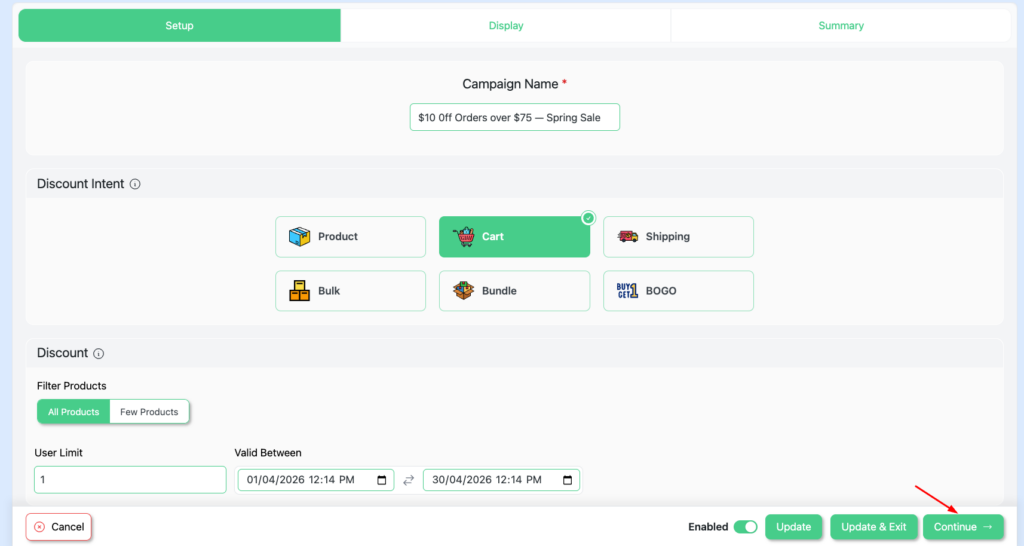
In this setup, we create a $10 automatic discount when the cart subtotal reaches $75. No coupon codes. No extra steps. Validity set from April 1 to April 30.
Step 1: Add a New Rule and Create a Campaign Name
Go to your WordPress dashboard → Click Disco → Create a Discount.
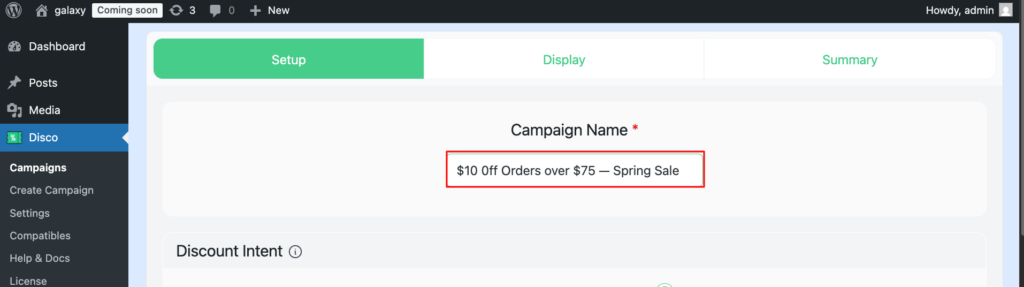
Add a campaign name (e.g., “$10 Off Orders Over $75 — Spring Sale”).
Step 2: Select Your Discount Intent
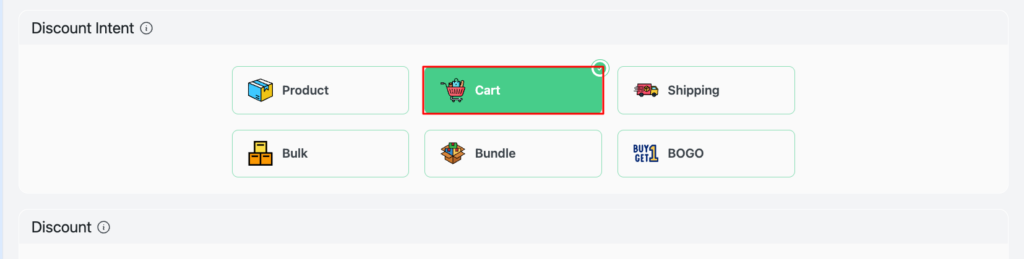
Disco offers 6 types of discount intents. For this example, select the Cart Discount intent.
Step 3: Filter Your Products
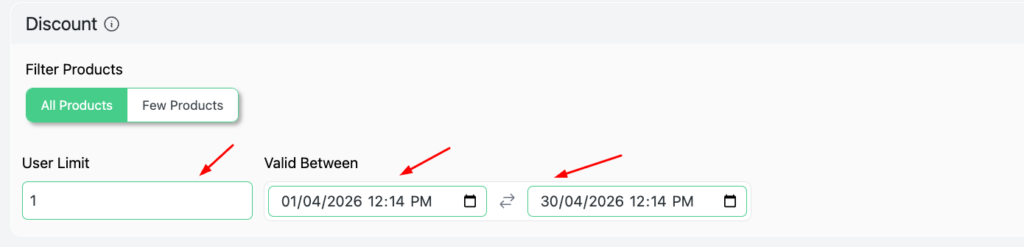
Select Specific Products to limit the discount to certain items only.
Choose All Products to apply the discount across all qualifying carts.

Step 4: Set User Limit and Validity Date
Set the User Limit to 1 to ensure each customer can claim the discount only once. Leave it blank for unlimited use.
Set the Validity Date from April 1 to April 30, 2026.
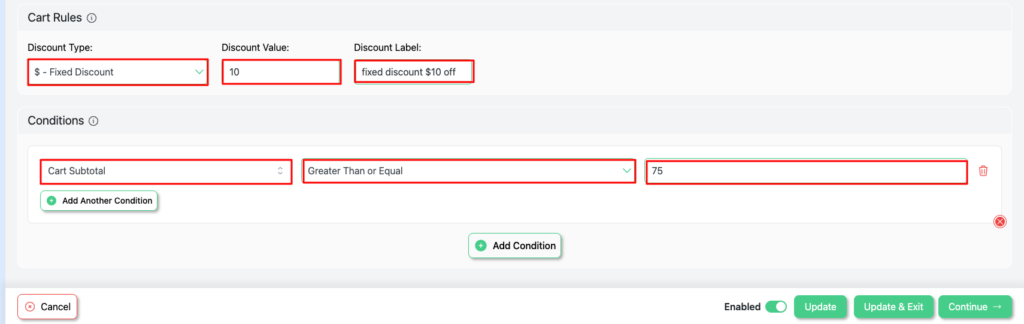
Step 5: Set Cart Rules and Conditions
- Discount Type: Fixed Cart Discount
- Discount Value: 10
- Discount Label: fixed discount $10 off
In the Conditions section, set:
- Cart Subtotal — Greater than or equal to 75
This controls cart thresholds, targeting rules, and who receives the WooCommerce cart discount.
Step 6: Test and Go Live
After saving your discount rule, the campaign goes live immediately.
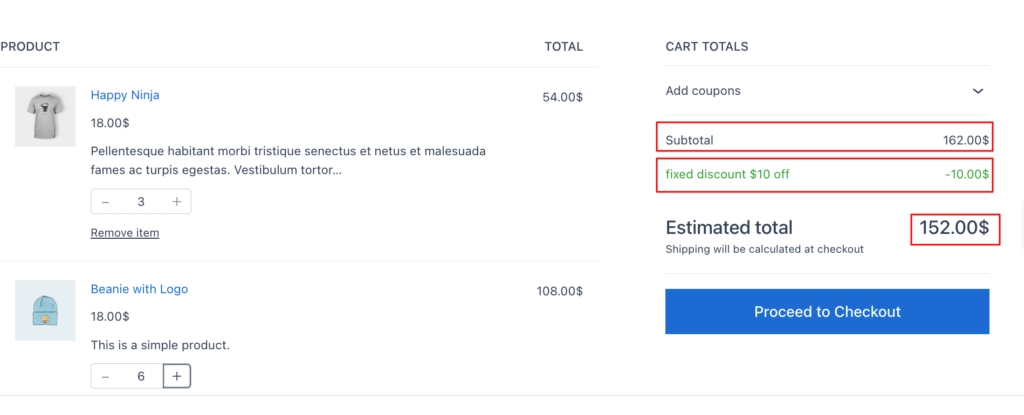
Visit your store and verify the discount shows correctly in the cart totals.
Open an incognito tab and add products below the $75 threshold — confirm no discount appears.
Add products above the threshold — confirm the $10 discount is automatically applied.
How to Display the WooCommerce Fixed Cart Discount on the Cart Page?
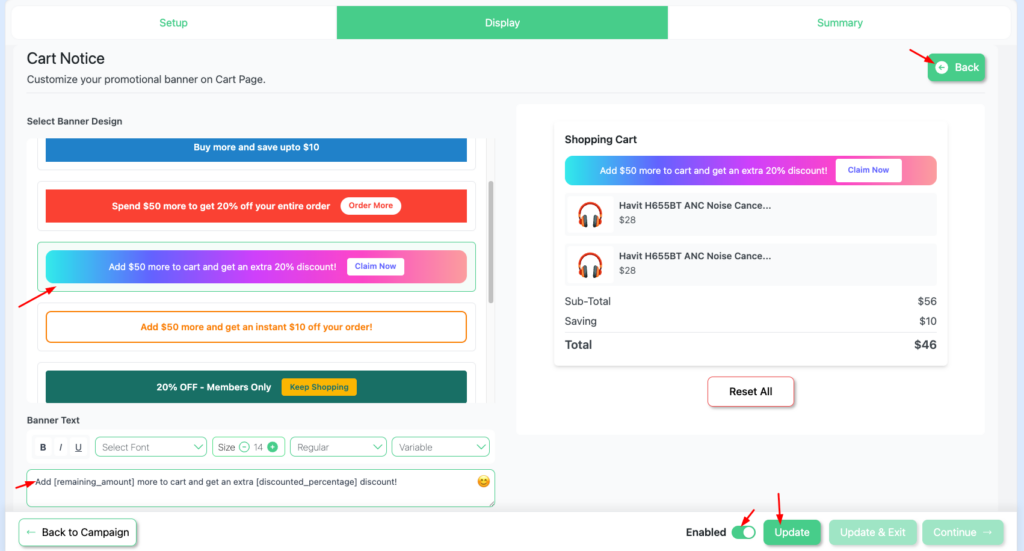
Disco lets you display a custom cart notice, ensuring customers always know about available discounts. As they say — “Out of sight, out of mind.” If customers don’t know the offer exists, they can’t use it.
3 easy steps:
- After saving your campaign, click → Continue
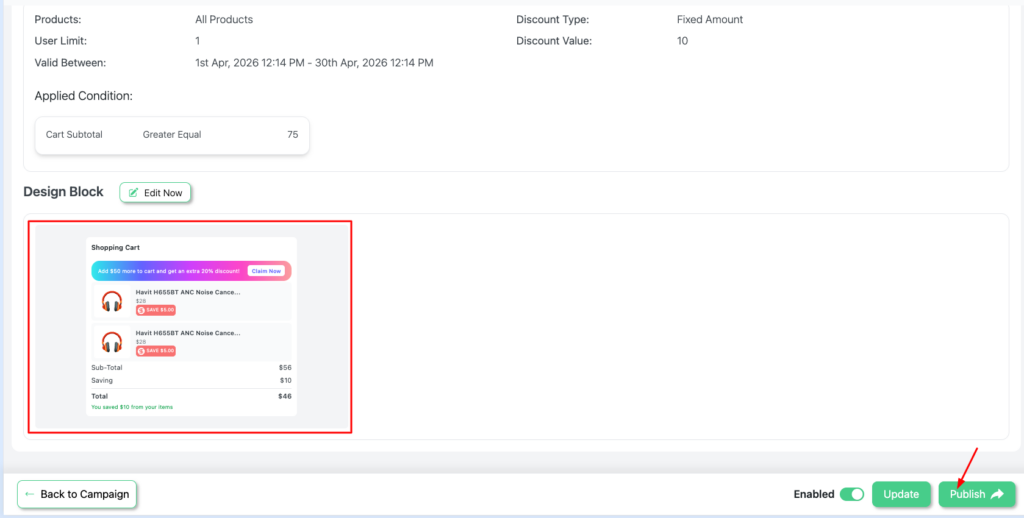
- Select → Cart Notice → Edit Now. Choose your preferred banner design and customize the elements. Update progress → Back.
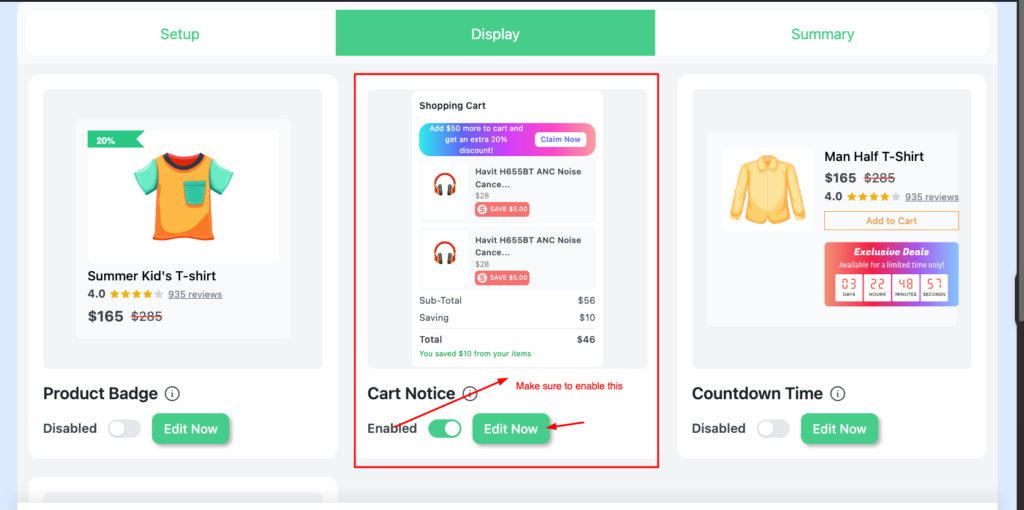
- Enable Cart Notice → Continue → Publish
A cart progress bar (e.g., “Add $7 more to save $10”) significantly boosts engagement.
It shows customers exactly how close they are to unlocking a reward — making them far more likely to add items.
Benefits of Using Fixed Cart Discounts in WooCommerce
Increases Average Order Value (AOV)
Why it works:
- 75% of consumers prefer free shipping over fast delivery — showing how powerful threshold-based incentives are.
- Brands like WHO IS ELIJAH boosted AOV by 46% using tiered threshold-based WooCommerce discount rules.
- Setting your threshold 15–20% above your AOV keeps the offer profitable and attainable.
Example: With a $90 AOV, setting a “$15 off orders over $100” threshold nudges customers to add extra items — boosting revenue without giving away too much margin.
Encourages Bulk Purchases
Why it works:
- 28–42% of customers will spend more to unlock a higher discount tier.
- Fixed-value thresholds are more compelling than percentage discounts — they provide clarity and reduce cognitive load.
- A progress bar showing “Add $X more to save $Y” significantly boosts cart engagement.
Example: A customer with $68 in their cart sees “Add $7 to save $10” and immediately adds another item to unlock the automatic WooCommerce cart discount.
Improves Conversion Rate
Why it works:
- Baymard Institute research shows that better checkout design can increase conversions by up to 35%.
- Auto-applied discounts remove friction and reduce cart abandonment by 5–10%.
- Case data shows a 19.29% drop in cart abandonment and a 7.17% uplift in conversion rates when coupons are eliminated.
Easy to Understand for Customers
Why it works:
- Research from the University of Pennsylvania confirms that fixed discounts outperform percentage discounts by 8–12% on orders above $100.
- Better clarity builds better trust — and trust converts.
Example: Two identical offers: “8% off” vs “$10 off.” On a high-value order, customers choose the fixed dollar discount every time.
Works Well for B2B Pricing Strategy
Why it works:
- B2B customers buy in larger volumes — making them ideal candidates for threshold-based WooCommerce discount rules.
- Segment-specific discounts outperform blanket promotions (Getkard).
- Higher discounts (30%+) are unsustainable without a minimum purchase requirement — role-based fixed cart discounts solve both problems at once.
Example: A role-based rule offers $25 off orders over $200 for wholesale customers, while retail pricing stays unchanged — eliminating manual invoicing.
Why Automatic Discounts Outperform Coupon Codes
Baymard Institute’s benchmark (49 independent studies) reports 70.19% cart abandonment overall — rising to 85.2% on mobile. Nearly 48% of that is driven by unexpected friction at checkout.
One Baymard research participant put it plainly:
“I find it slightly annoying that they’re flashing these coupon code fields… it feels like I could get this cheaper if I had the code… and I don’t.”
Removing the coupon code entirely removes the friction. The WooCommerce cart discount appears automatically. The customer experience shifts from hesitation to confidence.
Émoi émoi reported that automated promotions contributed 20% of total revenue. WHO IS ELIJAH achieved a 46% AOV increase. Disco stores average 23%. The discount attracts — the automation drives the conversion.
Can I Automatically Apply a Fixed Cart Discount?
Yes — and automatic application is what makes WooCommerce fixed cart discounts actually convert.
With native WooCommerce, shoppers must manually enter codes. This creates friction and is the primary reason most shoppers abandon carts (studies suggest 86% of cart abandonments are linked to coupon-code friction).
With the Disco plugin, you set your discount rule once and it applies automatically — no extra steps, no customer action required.
Can I Combine Multiple Discounts in WooCommerce?
Yes — but it requires the right tool. With native WooCommerce, you’re limited to one coupon per order by default. Stacking is possible but messy and hard to control.
With Disco, you apply multiple WooCommerce discount rules simultaneously with full control over conditions and priority. Combinations that work well:
- Fixed cart + free shipping → same threshold unlocks double benefits
- Fixed cart + first-order discount → spend reward + welcome offer
- Tiered fixed discounts → multiple levels ($75, $100, $150) triggering independently
- Fixed cart + role pricing → distinct pricing for retail and wholesale customers
Key consideration: Stack rules that serve different purposes, not multiple discounts on the same order. Margin control is essential.
Which Plugin Is Best for Advanced WooCommerce Cart Discounts?
For advanced cart discount rules in WooCommerce, Disco is the strongest available option.
- Native WooCommerce: one code per order, manual entry, zero automation.
- Most plugins: only marginally extend native functionality.
- Disco: tiered pricing, fixed pricing, BOGO, percentage discounts, cart-based rules, user roles, and scheduled campaigns — all applying automatically with no code required.
Trusted by 700+ active stores with a 5.0 rating and an average 23% increase in AOV across the user base.
Conclusion :
You now have everything you need to set up a WooCommerce fixed cart discount that converts.
- Set your threshold 15–20% above your AOV
- Apply fixed-value discounts to orders over $100
- Set a deadline to create urgency
- Present the savings as a reward, not an afterthought
- Eliminate the coupon code to eliminate the friction
With 70.19% of carts being abandoned, removing friction is your highest-ROI optimization. Émoi émoi, WHO IS ELIJAH, and hundreds of Disco stores have already proven it.
FAQs
u003cstrongu003eu003cstrongu003eWhat Is the Difference Between a Fixed Cart and a Percentage Discount?u003c/strongu003eu003c/strongu003e
A fixed cart discount reduces the order by a set dollar amount (e.g., $10 off orders above $75). A percentage discount adjusts proportionately to cart value (e.g., 10% off).u003cbru003ePredictability: Fixed discounts offer cost consistency. Percentage discounts scale with cart value.u003cbru003ePerception: Percentages feel larger on small carts. Fixed dollar amounts feel more powerful on high-value orders.u003cbru003eApply percentage discounts to smaller carts. Use fixed cart discounts for higher-value orders.u003cbru003e
u003cstrongu003eu003cstrongu003eDoes the Fixed Cart Discount Work for Specific Products?u003c/strongu003eu003c/strongu003e
u003cstrongu003eNative WooCommerce: u003c/strongu003eNo. It doesn’t support automatic cart-based triggers.u003cbru003eu003cstrongu003eWith Disco: u003c/strongu003eYes. You can set conditions based on products, categories, or cart subtotal — no codes, no friction.u003cbru003e
u003cstrongu003eu003cstrongu003eWhat Is the Best Way to Reduce Cart Abandonment With Discounts?u003c/strongu003eu003c/strongu003e
Eliminate coupon code fields and replace them with automatic WooCommerce discount rules. Pair that with a visible cart progress bar and a time-limited offer. This combination addresses the three biggest abandonment triggers: unexpected costs, checkout friction, and lack of urgency.u003cbru003e
u003cstrongu003eWhich plugin is best for advanced cart discounts?u003c/strongu003e
For advanced cart discounts in WooCommerce, u003cstrongu003eDisco u003c/strongu003eis the strongest available. u003cbru003eu003cbru003eThe native WooCommerce system is limited — one code per order, manual entry, no automation. Most plugins only extend this slightly. u003cbru003eu003cbru003eThe u003cstrongu003eDisco u003c/strongu003eplugin achieves optimal performance with it. From tiered pricing, fixed pricing, BOGO, percentage, cart-based, user roles, and scheduled campaigns — everything applies automatically with no code required. u003cbru003eu003cbru003eTrusted by over 700 active stores with a 5.0 rating and an average 23% increase in AOV, the results speak for themselves.