

Key Takeaways
Quantity discounts and pricing reward customers for purchasing larger quantities, without requiring any coupon codes. It applies automatically at checkout.
There are two core strategies: bulk pricing and tiered pricing. And selecting the wrong one will hurt your profit margins.
Using a straightforward break-even formula helps you identify how much you can discount without losing money.
With the Disco discount plugin, you can set WooCommerce quantity-based pricing within 10 minutes.
The real mistake isn’t over-discounting – but neglecting to test the discount rules on mobile devices.
What Are Quantity Discounts and Pricing in WooCommerce?
Quantity discounts and pricing offer a way to reward customers with better deals when they purchase in larger volumes. The discount applies automatically at checkout based on cart volumes – without any coupon codes.
In contrast to flash sales or seasonal promotions, whose core functionality lies in time-based discounts, quantity discounts are volume-based. They’re always working behind the scenes, quietly rewarding higher purchase quantities.
It works like the digital version of a wholesale strategy. One bottle of olive oil costs $18, but buying six bottles reduces the price to $14 each.
It’s a Win-Win situation for both customers and store owners. The business benefits from a higher average order value (AOV), and the customer enjoys a lower per-unit price.
This matters more than ever in 2026. According to Staista, 60% of online shoppers place greater importance on discounts than they did before.
Meanwhile, WooCommerce’s average order value is around $122, indicating clear potential for growth with the right pricing approach.
WooCommerce stores offer four key quantity-discount strategies: bulk pricing, tiered pricing, BOGO (Buy One Get One), and bundle pricing.
Each serves a different purpose, which we’ll explain in the next section.
Different Types of Quantity Discount Strategies in Marketing
WooCommerce Bulk Pricing
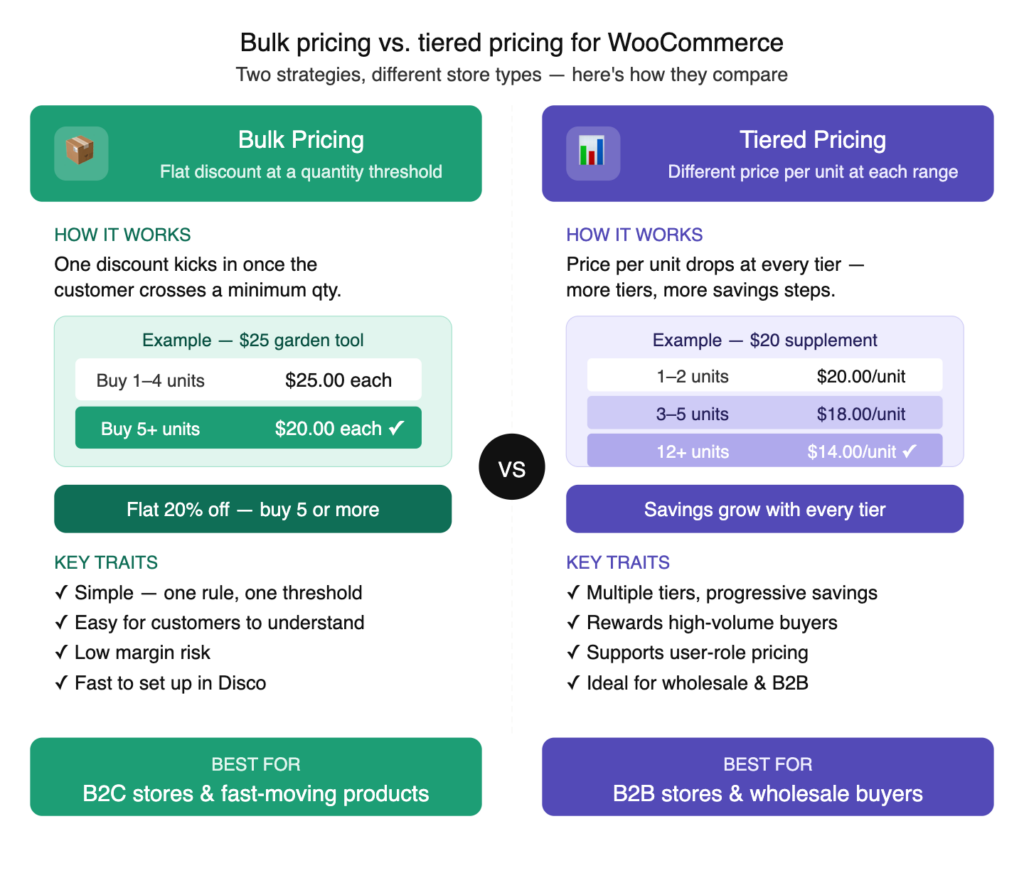
Bulk pricing applies a flat discount once the customer reaches a specific quantity threshold. Below that point, the regular prices apply. Once it’s crossed, the discount covers every unit in the order.
Example: A $25 gardener’s tool costs $25 for each. But once the customer purchases 5 or more units, the price drops to $20. A flat 20% discount triggered across the entire quantity.
This approach is straightforward, easy to communicate, and especially effective for B2C stores with fast-selling items.
To implement this in WooCommerce, refer to:
WooCommerce Tiered Pricing
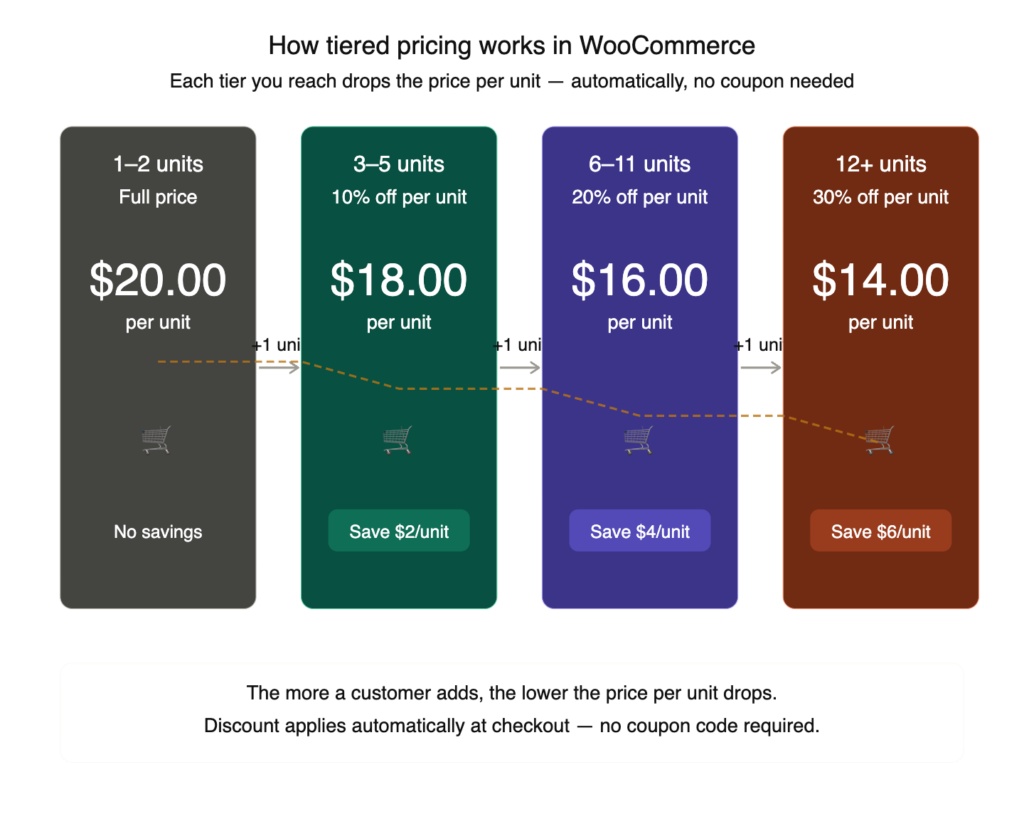
Tiered pricing assigns multiple pricing levels across quantity ranges. As the order size increases, the price per unit decreases -though each tier maintains its own pricing instead of one flat discount price.
Example: A $20 supplement bottle with quantity tiers.
| Quantity | Price Per Unit | Savings |
| 1-2 | $20 | ———————————- |
| 3-5 | $18 | $2 (10% ) |
| 6-11 | $16 | $4 (20%) |
| 12+ | $14 | $6 (30%) |
The pricing ladder drives a psychological pull toward quantities. As they see the next level, they naturally wonder if it’s worth adding one more item. And in many cases, the answer is yes.
Research cited by Softonic indicates that tiered pricing leverages savings psychology – leading to higher order sizes and repeat behavior.
For a deeper comparison of how tiered and volume pricing work in practice, see the guide on:
- Tiered Pricing vs Volume Pricing: What’s the Difference and Which One Should You Use?
- How to Show Discounts in a Tiered Pricing Table in WooCommerce?
WooCommerce BOGO (Buy One Get One)
BOGO (Buy One Get One) is a quantity-driven promotion in which purchasing a specific number of items unlocks a free or discounted product.
For example, “buy 2, get 1 free” or “buy 3, get one at 50% off.”
It’s highly effective for clearing slow-moving items, introducing new items with best sellers, and increasing perceived value without directly reducing base prices.
AMG Strategic Advisors reports that nearly 93% of consumers have taken advantage of a BOGO deal, while 66% considers this as their favorite kind.
See the guide on:
- How to Create a BOGO Offer in WooCommerce? Easy Steps
- How to Set Up Buy 2 Get 1 Offer in WooCommerce?
Best for: B2C with higher-margin products, along with product launching campaigns, and business bedding to clear inventory.
WooCommerce Bundle Pricing
Bundle pricing combines multiple products into a single discounted price for customers. In contrast to tiered pricing, which is best for the quantity of a single item, bundle pricing encourages purchasing related products in groups.
Example: A camera store may offer a bundle with a camera body, memory card, and carrying case priced at $189 — saving customers $30 compared to buying each item individually.
It’s essential for cross-selling and boosting customer lifetime value. WordPress.com reports bundles can increase AOV by 20-30%on average, while bundle buyers generate2.7× more lifetime value.
Best for: Stores with naturally related products, such as accessories, fills, kits, or complementary goods.
Bulk vs. Tiered Quantity Discounts and Pricing — Which One Is Right?
Each is better for its individual purpose, in its own way. However, let’s have a clear breakdown of these two strategies :
| Features | Bulk Pricing | Tiered Pricing |
| How it works | A flat discount applies after a minimum quantity threshold is met. | Different unit prices across the quantity range. |
| Best for | B2C and simple product catalogs. | Ideal for B2B and repeat bulk buyers |
| Discount Trigger | Single minimum (e.g., buy 5+) | Multiple tiers (e.g., 1–4, 5–9, 10–19, 20+) |
| Complexity | Low complexity, lower margin risk | More complex but offers greater control |
| Margin Risk | Low to Medium | Medium- requires careful planning |
| Customer Psychology | “Buy more to unlock the deal.” | “Each tier I reach saves me more.” |
| Example | Buy 5+ shirts → 20% off all | : 1–4: $30 / 5–9: $27 / 10+: $24 |
When to Use Bulk Pricing in WooCommerce?
- Most of your customers are B2C or one-time purchases.
- Your product catalog is simple with uniform margins.
- You want a setup that’s easy to configure and easy to grasp.
- Your focus is on fast-moving products where speed matters more than detailed pricing.
When to Use Tiered Pricing in WooCommerce?
- Your audience includes B2B customers, wholesalers, or repeat high-volume customers.
- Customers are strategic and react to structured discounts.
- You’re focused on gradually increasing order size.
- You offer role-based pricing for different customer segments.
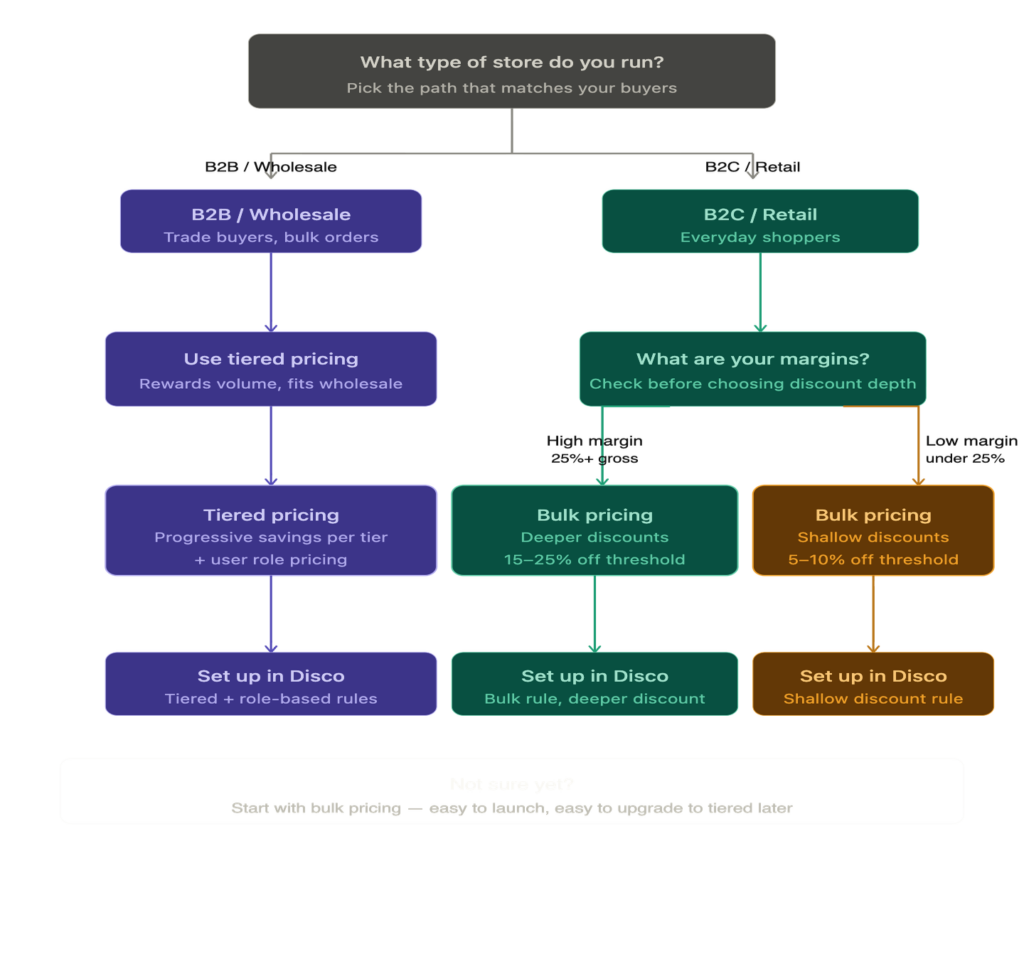
The decision framework in plain terms:
- If you’re selling for B2C stores targeting casual or one-time buyers, start with bulk pricing. It’s simple, instantly clear, and doesn’t require any mental math from your customers.
- For B2B stores, wholesale setups, or repeat bulk buyers -Go with tiered pricing. It supports larger orders, rewards loyalty, and encourages long-term buying behavior.
- Still confused? Look at your order history. Frequently, small orders(1-2 units) ? Start with bulk pricing. If customers are already buying 5-10 units, tiered pricing suits them better.
Who Should Use Quantity Discounts and Pricing?
You don’t always need a complex pricing structure for every WooCommerce store. But if your store fits any of these profiles, quality discounts should be a priority.
B2C stores with low average order value
If your WooCommerce store is averaging below $100 per order, there’s significant room for growth. The global e-commerce AOV is roughly $150, while WooCommerce stores typically average around $122. Most stores can encourage larger baskets through volume incentives.
B2B and wholesale stores
Here, it’s not optional – it’s a necessity. And the numbers say it all. According to the International Trade Administration, the B2B e-commerce market is projected to reach $36 trillion by 2026, 14.5% CAGR. On top of that,68% of buyers prefer self-service purchasing.
Subscription and repeat-purchase stores
For repeat customers, offering discounts on multiple purchasing units increases revenue and reduces churn.
Niche stores with high-margin products
A higher margin provides flexibility and lets you discount without damage. A controlled 10-15% incentive can significantly improve order value.
Stores where single-item checkout is the norm
Frequent single-item purchases indicate customers aren’t being promoted to buy more. A quantity discount could be a direct antidote for this problem.
According to Staista, discounts can recover abandoned carts by up to 54%, making them one of the most effective optimization tools available.
How Quantity Discounts Impact Your Store’s Profit Margins
Here’s the critical part that most tutorials often don’t mention.
Setting your discounts without the right methodology and calculation might backfire.
Quantity discounts will increase your AOV (Average Order Value), but they can also reduce your profitability.
The trap is simple: If you launch with a “ Buy 5, save 20% offer ” Order increases. AOV goes up. But if your gross margin is only 25%, you’re now below break-even on every discounted sale.
Let’s oversimplify this:
gross margin = the percentage of money you keep after covering the cost of your product
For example, if you sell a product at $100, and you’ve had the cost to make/buy this product $60. You will get a $40 profit.
Your gross margin = 40÷100 = 0.40 = 40%
Now let’s apply a 20% discount,
- New selling price = $80
- Cost = still $60
- New profit = ($80-$60) = $20
- New margin: 20÷80=25%
See what happened? Now you’re making half the profit you used to.
That’s why this formula matters,
Minimum required gross margin = your discount % ÷ (1 − your current gross margin %)
Before applying a discount, make sure your current margin is sufficient to handle the reduction.
If yes → safe
If not, you’ll lose money
Scenario:
You sell a product:
- Selling price = $100
- Cost = $60
- Current gross margin = 40%
Now you’re considering offering a 20% discount.
Calculate required margin = 0.20÷(1−0.40)=0.20÷0.60=0.33
Minimum required margin = 33%
Since you’re above the threshold, it is safe to apply 20% discount.
Profit Margin Impact by Discount Percentage:
| Discount | Break-even margin | Risk |
| 5% | ~8% | Low Risk |
| 10% | ~17% | Safe for most |
| 15% | ~25% | Moderate- check margins first |
| 20% | ~33% | Use with caution |
| 25% | ~43% | High Risk – best for clearance or BOGO |
| 30% | ~50% | Very High Risk |
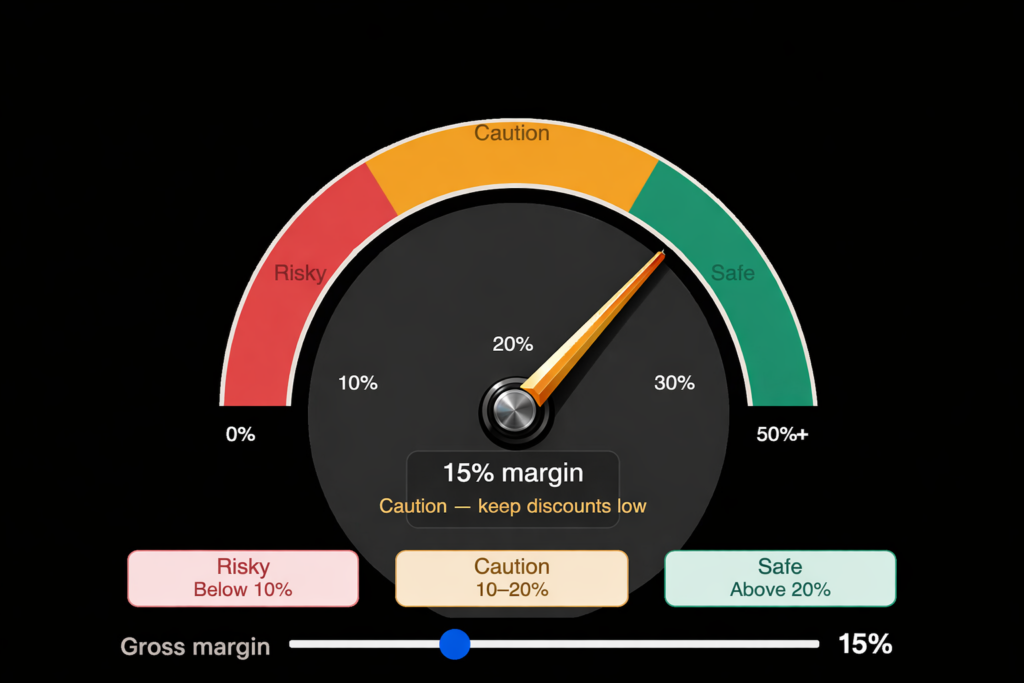
Recommended Approach: Start with a 5-10% discount at your lowest-quantity tier, then increase gradually based on your performance.
Watch for this risk: According to research cited in a SalesSo report, frequent discounting reduces perceived value and trains customers to wait for promotions. Keep your initial discounts modest and scale them only at higher quantities.
Why it matters: According to Red Stag Fulfillment, A modest 10% increase in AOV can outperform traffic growth in terms of profit, without additional marketing costs. It makes this pricing strategy one of the strongest levers for driving growth.
Pro tip:
Don’t guess your discount tiers. Calculate them.
Download the free Quantity Discount Margin Calculator to find your safe discount range, estimate break-even margin, and plan smarter bulk or tiered pricing rules before you publish them.
How to Set Up WooCommerce Quantity Discounts That Sell?
WooCommerce’s built-in setup doesn’t support tiered pricing tables, automatic cart discounts, or bulk thresholds without a plugin.
But the good news is, Discount Rules for WooCommerce – Disco does all of these with quite dexterity within a single dashboard—automated, without requiring coupon codes.
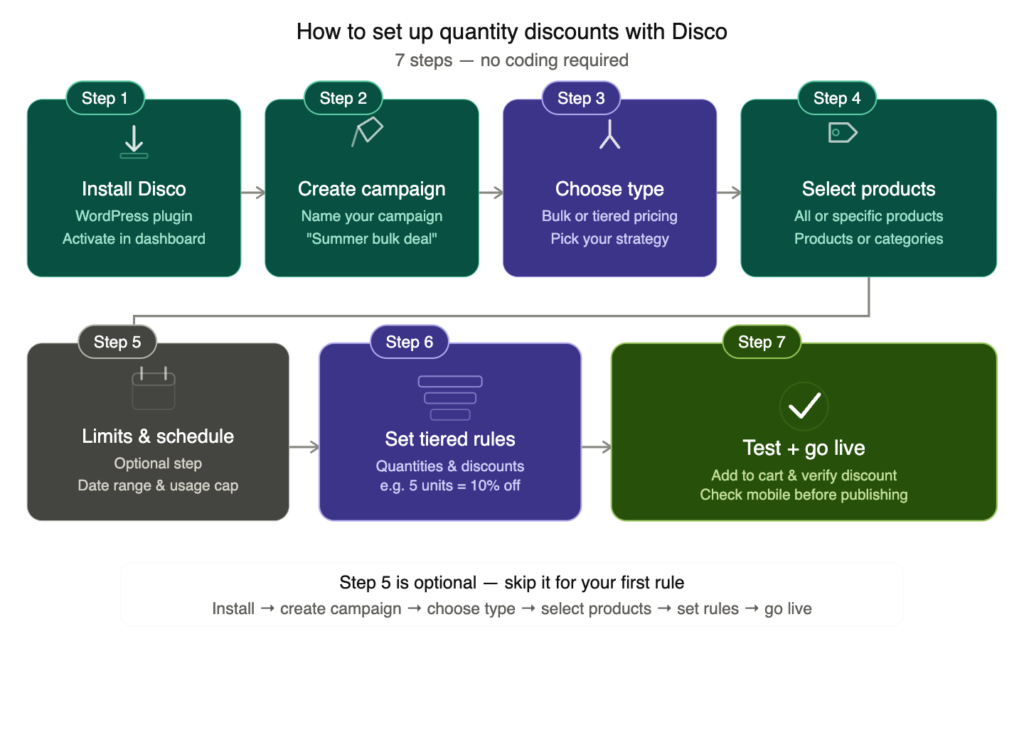
Step 1: Install and activate Disco
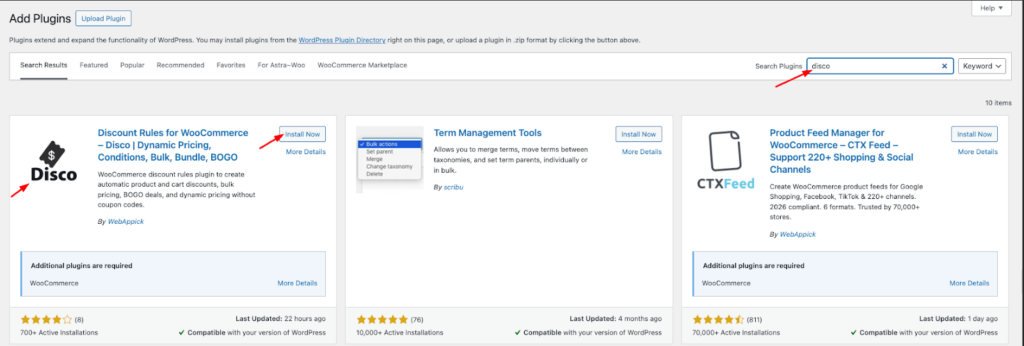
Go to your WordPress dashboard → Plugins → Add New. Search for “ Disco Dynamic Plugin” Then install and activate it. Disco will appear on your sidebar.
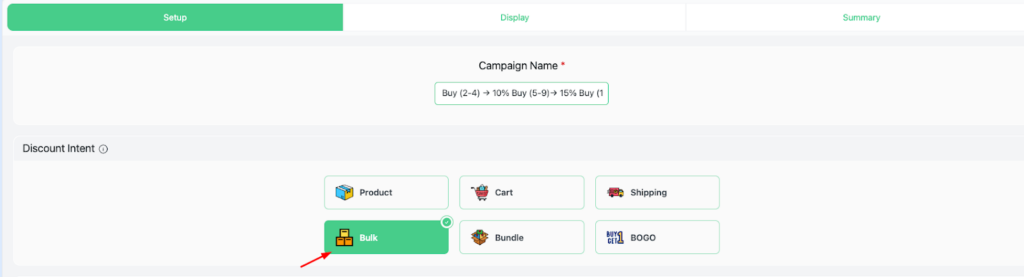
Step 2: Create campaign

Add a descriptive campaign name, such as – “ Buy (2-4) → 10% Buy (5-9)→ 15% Buy (10-20) → 20%.” It makes identification easier, keeps things organized, and makes managing multiple discounts easier.
Step 3: Choose type
Select your discount intent for “Bulk intent”( Use bulk intent for both bulk and tiered discounts. You can fine-tune the values afterward ) for this scenario.
If you’re unsure of which to use, refer back to the decision framework in: Tiered Pricing vs Volume Pricing: What’s the Difference and Which One Should You Use?
Step 4: Select Products
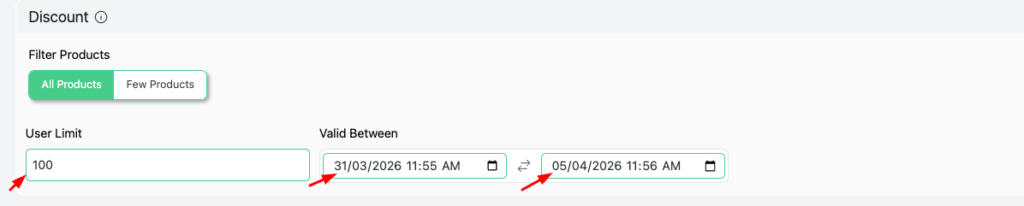
Filter your products to “ All products” or “ Few products.”(You can select specific products or categories from this option.)

Step 5: Limits and Schedules
Disco allows you to configure your user limits and validity dates. For example: User limit -100 ( indicates how many people can claim this offer), Validity date ( 31/03/2026- 5/04/2026)
“ User limit” and “Validity date” are Pro features of Disco. Make sure to install Disco Proand use it.
Step 6: Set tiered rules
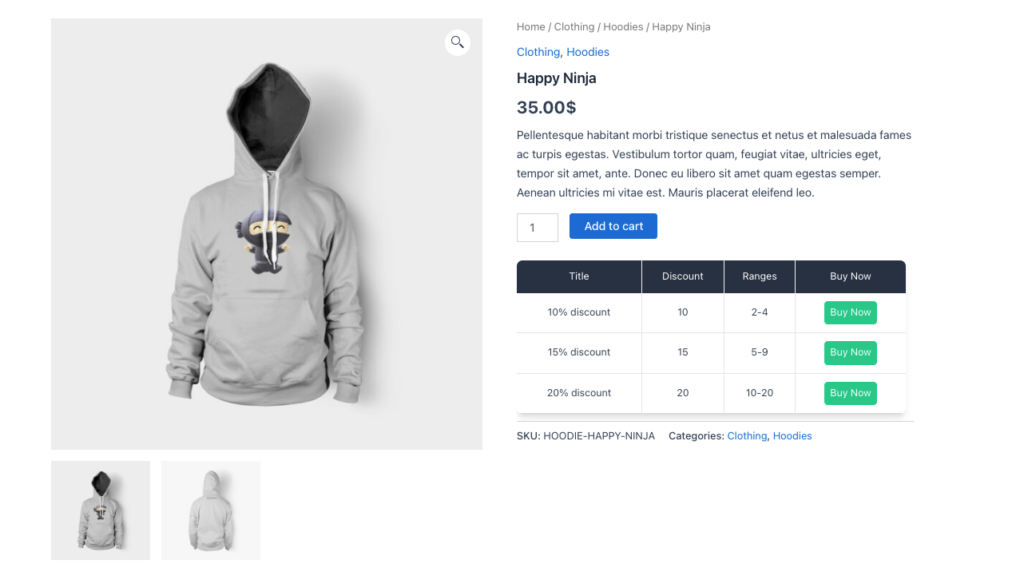
Enter a value for each quantity range and corresponding discounts. Such as-
- Minimum Quantity – 2, Maximum Quantity – 4, Discount Type – percentage discount, Discount Value -10, Discount label – 10% discount
- Minimum Quantity – 5, Maximum Quantity – 9, Discount Type – percentage discount, Discount Value -15, Discount label – 15% discount
- Minimum Quantity – 10, Maximum Quantity – 20, Discount Type – percentage discount, Discount Value -20, Discount label – 20% discount

For additional clarity, review the documentation: Bulk Percentage Discounts on All Products by Quantity
Step 7: Test and Go live
Once you’ve saved your progress, your campaign is ready to launch.
Disco Pro enables you to create customised tiered pricing tables. While the free version does not support table creation, all discount rules will still function as expected.
Want to set things up quickly? Install Disco and launch your first quantity discount rule in under 10 minutes. Get Disco.
Best WooCommerce Plugins for Quantity Discounts and Pricing
| Plugin | Best For | Pricing | User Experience | Key Feature |
| Disco | All-in- one dynamic pricing | Freemium | Very easy to use | Bulk, tiered, bundles, and user role pricing in one plugin. |
| WooCommerce Wholesale Prices | B2B/Wholesale stores | Freemium | Easy to use | Wholesale-specific role pricing with tiered discounts |
| YITH WooCommerce Dynamic Pricing | Complex conditional rules | Paid | Moderate difficulty | Advanced rule conditions (user, cart, product) |
| Discount Rules for WooCommerce (Flycart) | Simple percentage/fixed discounts | Freemium | Easy for beginners | Straightforward setup for common discount rules |
| WPLron Quantity Discounts | Basic quantity breaks | Free | Simple but limited | Lightweight, limited rule types |
Key factors when selecting a plugin:
- Discount type: Check if it supports multiple pricing models ( bulk, tiered, BOGO, bundle)
- User-role pricing: Essential for stores serving both B2B and B2C customers.
- Automatic discounts: No coupon codes required.
- Clear pricing tables: A tiered pricing table visible in the product page will increase transparency and conversion.
- Mobile responsiveness: The plugin must perform well on all devices.
Recommendation: Disco meets all the criteria mentioned above, and on top of that, it requires no coding. For a deeper evaluation, refer to the WooCommerce discounts comparison source.
Common Quantity Discounts and Pricing Mistakes to Avoid
In most cases, WooCommerce store owners abandon quantity discounts because of these errors, not because the strategy is ineffective.
| What to Avoid | What to Do Instead |
| Over-discounting without margin validation | Run the break-even calculation before launching |
| Missing pricing visibility | Show a visible tier pricing table on the product page |
| Keep the discount’s testing limited to desktop | Test across devices, including mobiles- most traffic comes from mobile devices |
| Applying discounts to thin-margin products | Applying discounts only on products with healthy margins (25%+) |
| Skipping testing before going live | Test the full checkout flow before launching |
| Be fixated on deep discounts | Use a progressive discount tiers 5% → 10% → 15%) instead of flat 25%+ |
| Lack of clarity in how the discount is presented | Display pricing table prominently in the product page. |
Best Practices for Quantity Discount Pricing
“It’s not what you know, it’s what you do with what you know.” A solid setup creates the groundwork, but true success depends on unlocking its full potential. The difference between modest AOV gains and major shifts in purchasing behavior lies in execution.
Showcase your per-unit pricing in each tier. Displaying the discount prize is not enough. A statement like,“ $14 per unit when you buy 12+” is more tangible and convincing than stating “ Save 30%.”
Ensure your tiered pricing tables appear on the product page. Keep it within view so it doesn’t require any scrolling, since the visibility at the decision-making moment is crucial. Install a plugin that automatically generates a polished pricing table. – Refer to how to display a tiered pricing table for implementation details.
Pair quantity discounts with a free shipping incentive. According to Speed Commerce, setting a free-shipping threshold at 30% increases AOV to 12-18%. When combined with tiered pricing, this works as a dual push to drive larger purchases.
Adjust your user role segmentation for wholesale vs. retail. Display one set of pricing tiers for B2C customers, and offer wholesale buyers access to stronger volume discounts. Disco enables role-based pricing natively, without requiring separate product pages or complex workarounds.
Test your discount depths using A/B experiments. Instead of relying on assumptions, compare options such as 10% vs 15% under identical conditions. Let the real data identify the sweet spot for your offers. Even minor adjustments can drive a 10-20% increase in conversion rates.
Always validate your setup on mobile devices before launching. Shopify reports that mobile devices now account for 42% U.S commerce sales, up from 31% in 2023. Ensure your pricing tables display properly on a 390px screen, with proper formatting and readable text without requiring users to zoom or scroll sideways.
Conclusion: Getting Quantity Discounts and Pricing Right
Quantity discounts aren’t complex, but they do require a strategy aligned with the right model. B2C stores with Bulk Pricing are often better suited for their clarity and simplicity. In contrast, B2B and wholesale businesses see better results with tiered pricing that rewards larger orders incrementally.
No matter which path you take, safeguard your margins. Calculate your break-even point, begin with modest offers(5-10%), and refine your strategy based on real-world data. And be sure to test your setup on mobile devices before launching.
Fortunately, you don’t require complex resources to make this work. All you need is the right plugin that supports quantity-based pricing without custom codes or developers, paired with a solid plan.
Explore how quantity discounts work on an actual WooCommerce store:
Want to implement quantity-based pricing in your WooCommerce store?
Install Disco and set up your first quantity discount rule in under 10 minutes. No code. No developer. No complicated configuration.
Frequently Asked Questions
What are quantity discounts and pricing?
With Quantity-based pricing, customers pay less per unit as they add more items to their cart. The discounts are triggered automatically depending on the number of items added to the order, without the need for promo codes. It’s designed to drive higher AOV, repeat buyers, and compete with larger brands that offer volume-based deals.
What is the difference between bulk pricing and tiered pricing?
Bulk pricing offers a single fixed discount once a minimum purchase quantity is reached. On the other hand, Tiered pricing adjusts the price per unit across various quantity ranges, reducing the cost as volume increases. Bulk pricing is simpler to implement, while tiered pricing is more adaptable and better aligned with B2B or Wholesale buyers.
Does WooCommerce support quantity discounts natively?
WooCommerce’s built-in features are quite limited, and it only supports basic sale pricing and coupon codes. It offers automated quantity-based pricing, tiered structures, or cart-based rules. To enable these functionalities, you’ll need a dedicated plugin such as Disco.
Will quantity discounts hurt my profit margins?
This only becomes an issue if you set your discount levels without evaluating your break-even point.
Apply the formula: minimum required gross margin = discount % ÷ (1 − current gross margin%)
As a rule of thumb, stick to 5-15% discounts unless your margins can support deeper cuts. Avoid offering quantity discounts to low-margin products altogether.
How do I set up quantity discounts in WooCommerce without coding?
Start by installing the Disco plugin from the WordPress Plugin Directory or the Disco site. Inside the dashboard, set up a new discount rule.
Then follow these steps:
Choose type ( bulk intent)
Select products (all or specific products)
Configure User limits and Validity date (optional)
Set tiered rules ( Quantities and discounts)
Test and go live ( add to cart and verify discount)
Which is better — bulk pricing or tiered pricing?
The right approach depends on your business model. Bulk Pricing works best for B2C stores with straightforward purchasing and simple product offerings. Whereas, tiered pricing is best suited for B2B, Wholesale, or high-volume repeat buyers. If you’re not sure, follow the decision framework outlined here: Bulk Pricing vs. Tiered Pricing section.
What is the best WooCommerce quantity discount plugin?
For WooCommerce Stores, Disco stands out as a comprehensive all-in-one solution. It enables bulk pricing, tiered pricing, BOGO offers, bundle discounts, and role-based pricing, and so on. All of it handed effortlessly, with no hassle for coupon codes. It is designed for storeowners who want to control advanced discount strategies without developer involvement.