Picture a shopper with ten candles in the cart who expected the 20% tier and got 10%, because that tier started at eleven. Or a trade buyer who mixed three candle products and got nothing, because each product counted on its own. Neither is a percentage problem.
A WooCommerce bulk discount lowers the price as the order grows; some guides call it volume or tiered quantity pricing. Coupons and sale prices apply the same rate however many units someone buys, so in core WooCommerce a ladder of breaks needs a plugin. Building the ladder is easy. Trouble lives at the edges: what counts, what happens past the top rung, and whether savings are a total or per item. Settle those before typing any numbers.
Set up a WooCommerce bulk discount in Disco
Bulk campaigns are free in Disco.
- Install Disco from WordPress.org and click Create a Discount.
- Choose the bulk type.
- Pick the products: all of them, or a selection.
- Fill the first row: minimum, maximum, discount type and value. Add a label such as “10% off”.
- Click Add More for each further tier.
- Leave the maximum on the last row empty.
- Save, then test a cart at every boundary.
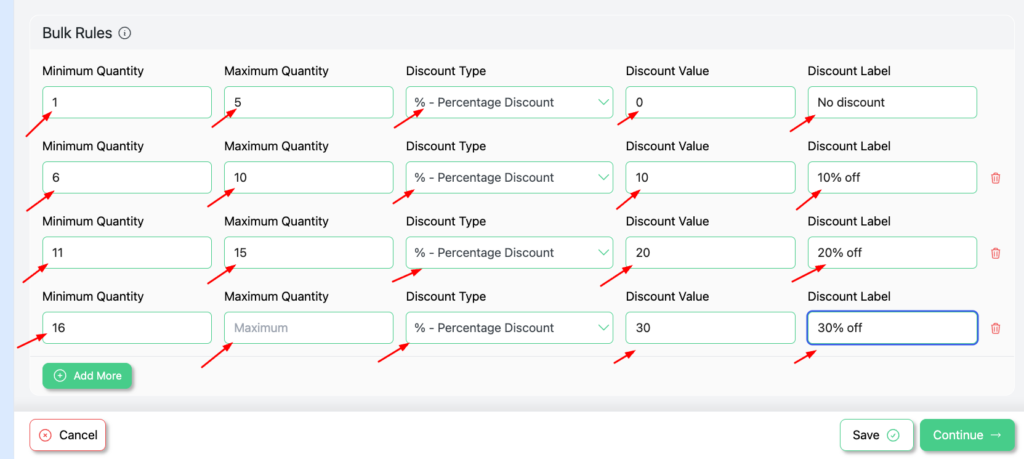
The screenshot shows a common ladder: 1 to 5 units at no discount, 6 to 10 at 10%, 11 to 15 at 20%, and 16 or more at 30% with the last maximum left blank.
Edge 1: what counts toward the quantity
In the free version, each product counts on its own. Three candle products with four units apiece make three separate counts of four, so none reaches a break that starts at six.
Pooling different selected products, so those twelve candles qualify together, is a Pro count mode. Even then it pools items you pick, never “any six from a category”. A Categories condition does something else: it limits which products the ladder covers, while each one still counts separately.
Edge 2: what happens above the top tier
A maximum on the last row caps the ladder, so carts above it may match no rung. Leave it empty and the top discount covers every larger order.
Thresholds deserve probing in any quantity-driven campaign. One user with a bundle discount reported on the WordPress.org forum: “However, when you get to 18 items in the cart, the discount doesn’t apply anymore” (thread). Support asked for the setup to reproduce it, and the thread records no cause. So probe your own ladder on both sides of every boundary and well past the top: 5 and 6, 10 and 11, 15 and 16, then 50 in the example.
Edge 3: a total or per item
Disco offers three discount types per row, and they diverge sharply at volume.
| Discount type | Example at 10 units | What the shopper saves |
|---|---|---|
| Percentage | 10% off | Grows with every unit |
| Fixed discount | $50 off | $50 total, whether they buy 10 or 40 |
| Fixed discount per cart item | $5 off each | 10 × $5 = $50 at ten units, $200 at forty |
Percentage is the safest default for mixed price points. A fixed total suits one headline offer like “$50 off 10 or more”. Per-item amounts scale exactly with volume, which means the giveaway keeps growing; check the top rung against your margin.
Bulk, bundle or a role price?
Bulk rewards more of one item. A bundle discount rewards buying a set together, and it’s free too. For tiers only trade accounts should see, add a User Role condition to the bulk campaign; wholesale pricing in WooCommerce covers the role setup.
Shoppers can’t aim for breaks they never see. An on-page ladder table is a Pro design block; without one, spell the breaks out in the description. Other guides split “tiered” from “volume” pricing by whether the rate covers every unit or only the units inside each band, and tiered pricing vs volume pricing explains that distinction. Extra inspiration lives in quantity discounts and in ways to show discounts in a tiered pricing table.
Note your three edge decisions, build the ladder, and check each boundary before launch. Get Disco free for bulk tiers, and see Disco Pro pricing if you need the on-page table or mixed-product counting.
Related guide: How to Set Up Minimum Order Quantity in WooCommerce?
FAQ
Are bulk discounts free in Disco?
Yes. Bulk campaigns with quantity tiers ship in the free plugin. The on-page table and pooling different products are Pro.
Can different products count toward one tier?
Only with the Pro mix-products count mode, and only across products you select. In the free version each product counts separately.