
![How to Set Up Automatic Cart Discounts Based on Subtotal in WooCommerce [2026]](https://discoplugin.com/wp-content/compressx-nextgen/uploads/How-to-Set-Up-Automatic-Cart-Discounts-Based-on-Subtotal-in-WooCommerce-2048x1072.png.webp)
More than 70% of online shopping carts are abandoned, and nearly half of shoppers leave due to unexpected charges at checkout. For WooCommerce store owners, this results in lost revenue over time. They didn’t feel appreciated by the purchase; they felt discouraged by it.
An automatic subtotal discount fixes this problem by rewarding customers as soon as their cart reaches a specific subtotal.
For example – Spend $100 → Get 10% off, or Spend $150 → Get free shipping.
No extra steps. No codes to remember. No confusion. Only a discount that activates exactly when it should.
In this guide, you’ll learn how to set up automatic cart discounts based on subtotal -step by step, with no coding required or extra steps. Why automatic subtotal discounts work so well, types of automatic subtotal discounts you can use, and common mistakes to avoid.
What Is an Automatic Cart Discount in WooCommerce?
An automatic cart discount is a pricing rule that triggers when the cart conditions are met, without requiring customers to enter a code or take any additional action.
In simple terms :
| If …. | Then… |
| Cart subtotal reaches $50 | 10% discount applies automatically |
| Cart subtotal reaches $100 | 20% discount applies automatically |
| Cart subtotal reaches $200, | Free shipping is automatically activated |
Subtotal vs Total — What’s the Difference?
It’s important to understand how the cart subtotal really works. Otherwise, this is where many stores get confused.
| Terms | What It Means |
| Subtotal | The combined price of all products before adding shipping costs (Whether or not your tax will be included depends on your store’s configuration) |
| Cart Total | (Subtotal + Tax+ Shipping) The subtotal is combined with any applicable taxes and shipping fees |
| Minimum Spend | The minimum purchase amount a customer must reach for the discount to apply. |
| Automatic Discount | A discount that is automatically applied without requiring any coupon codes. |
Here’s something else to consider.
Automatic discount vs. coupon code — at a glance:
| Feature | Automatic Discount | Coupon Code |
| Action required for the customers | None | Must enter code |
| Automatically applied | Yes | No |
| Applicable to all customers | Yes | Only those with codes |
| Risk of being forgotten | None | High |
| Best for | Encouraging AOV, always on rules | Campaigns, influencer codes |
| Setup Complexity | Moderate (plugin) | Low |
Why Automatic Subtotal Discounts Work?
Automatic subtotal discounts aren’t just marketing tactics. They directly influence two major e-commerce metrics :
They reduce cart abandonment: According to statistics, the average cart abandonment rate in 2025 reached approximately 70%. To put it simply, 7 out of 10 shoppers won’t complete the purchase even after adding products. This results in 18B annual losses, as mobile shoppers’ abandonment rate rises even further to 85.2%.
Here’s where Automatic Subtotal Discounts intervenes. It can be a game-changer in influencing shoppers’ emotional experience at checkout. When they come across offers such as :
“Spend $15 more to unlock 10% off.”
The final amount feels like a reward, rather than a penalty. Their emotional shift from “This costs more than I expected” to “I’m getting something back” is a powerful psychological driver behind WooCommerce conversions.
Studies on loss aversion in consumer behavior, published in the Journal of Marketing Research, highlight that unexpected rewards at checkout can significantly improve purchase completion rates.
They increase Average Order Value (AOV): Global e-commerce data from Statista
shows that the average order value was around $144.57 in late 2024, representing a year-over-year increase of about 8.7%. This data point helps define spending thresholds.
Setting a $150-$175 threshold is typically attainable for customers without altering normal buying patterns.
Research published by the National Retail Federation also shows that 80% of shoppers are more willing to add more items to the cart to qualify for free shipping.
The gap between the shopper’s current subtotal and the required threshold works as a powerful motivator for a stronger purchase. Such as – “ Spend $15 more to unlock 10% off.”
Findings in the Journal of Personality and Social Psychology on goal-gradient behavior demonstrate that motivation increases as people approach a reward.
The strategic takeaway: Try setting your threshold 15-20% above your current average order value. At that level, shoppers are often close to qualifying, and a small automatic reward can encourage them to complete the purchase.
Types of Automatic Subtotal Discounts You Can Create
There are three core discount types, each designed with a distinct mechanism and purpose. Let’s break it down here :
Percentage off is the most flexible option. When a customer’s cart hits the desired threshold, a set percentage is deducted from the total- “ Spend $100, get 10% off.” This approach supports AOV (Average Order Value) growth since the discount increases with order value, creating a sense of fairness for customers.
A fixed discount provides a flat deduction. Such as “ Spend $100, get $10 off.” The discount amount remains the same, no matter how large the order becomes. It helps to protect your margins. It works especially well for clearance campaigns or budget-controlled promotional offers.
Free Shipping thresholds serve as a powerful conversion trigger. Nearly 80% of shoppers are willing to add extra items to their cart to unlock the free shipping threshold. Conversely, 55% of shoppers abandon their carts due to unexpected shipping costs. This approach directly addresses a major cart abandonment issue while encouraging higher-order values.
| Discount type | Example | Best Use Case |
| Percentage discount | Spend $100, get 10% off | Increasing AOV |
| Fixed amount discount | Spend $100, get $10 off | Ideal for clearance sales and margin control |
| Free shipping unlock | Spend $100, get free shipping | Lowering cart abandonment |
Conditions you can configure :
- Minimum subtotal threshold: This threshold acts as the entry point of the discount. Setting it to 15-20% above your current average order value encourages higher spending without sacrificing your margin on orders that would convert naturally.
- Maximum subtotal cap: This optional cap defines the upper boundary of the discount rule. The discount stops applying once the order value exceeds the amount. It’s useful for controlling discounts on larger purchases or running targeted range-based offers.
- Validity date: It lets you define the timeframe of discounts, with a specific start date and end date.
- Usage limit per customer: This setting controls how often a customer can trigger this discount.
This guide covers single threshold discounts. If you want a progressive discount as the cart value increases, such as “ 10% off at $100, 15% off at $150, and 20% off at $200,” that requires a tiered subtotal strategy with a different type of rule.
See our full tiered subtotal discount guide → How to Add Tiered Subtotal Discounts in WooCommerce?
How to Set Up an Automatic Subtotal Discount in WooCommerce with Disco Plugin?
WooCommerce does not have any native features that support automatic discounts based on the subtotal. It applies the same unit price across all units, and there is no built-in mechanism to trigger threshold-based discounts. To implement this behavior, a plugin or custom code solution is required.
The Discount Rules for WooCommerce – Disco plugin enables automatic subtotal discounts using the cart-intent rules. A single rule can apply across the entire store or to any selected product range, without requiring codes or manual adjustments.
For full reference documentation: Disco cart intent discount docs
Step 1 — Install and Activate Disco
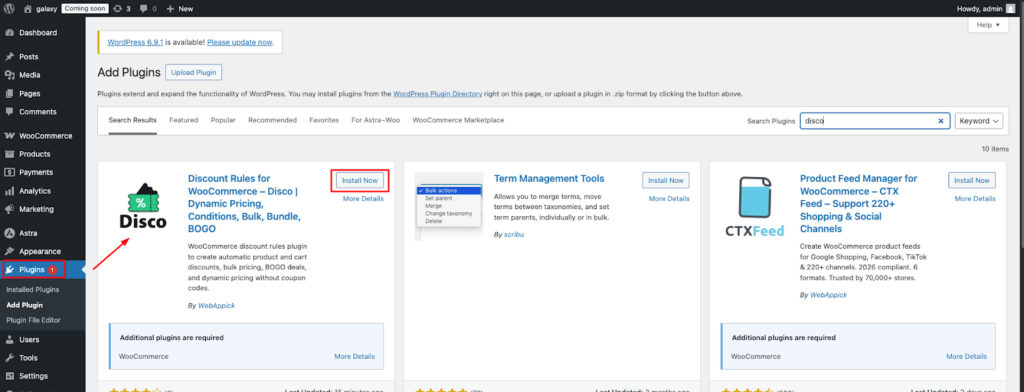
Navigate through your WordPress dashboard → Plugins → Add New, search for Disco, and then install and activate the plugin.
Step 2 — Create a New Discount Rule
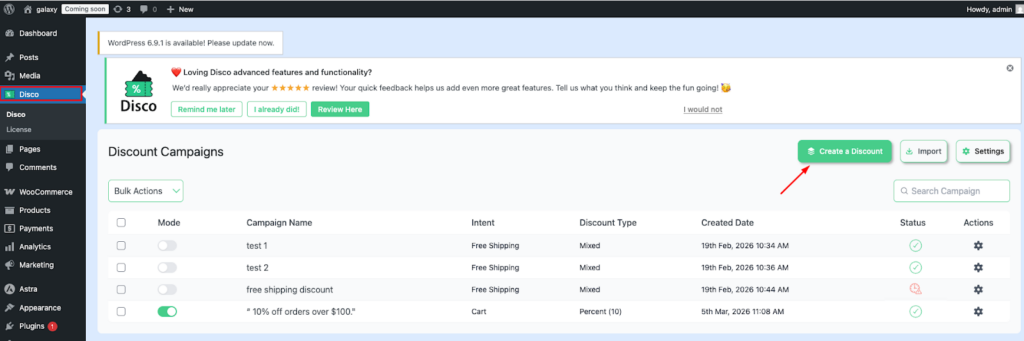
Go to → Disco → Create a new discount rule. Set a new campaign name. Such as, “ 10% off orders over $100.” This makes it easier to distinguish whether several rules are running at once.
Step 3 — Choose Your Discount Intent
For this example, choose your discount intent to cart intent.
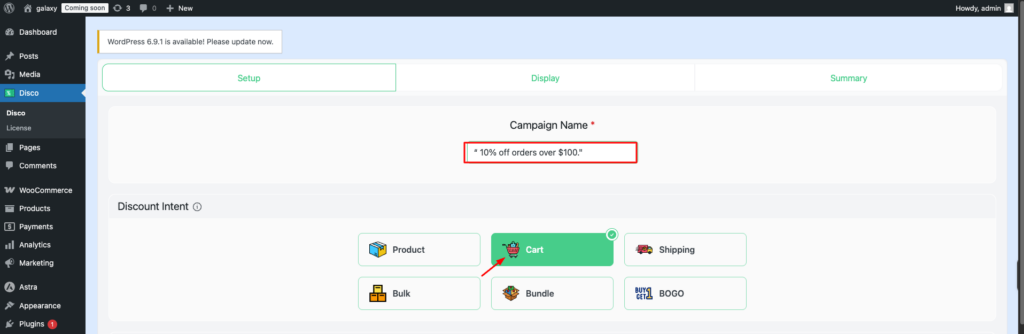
Step 4 — Filter Your Products
In the discount section, select all products so the discount applies to every item in the store.
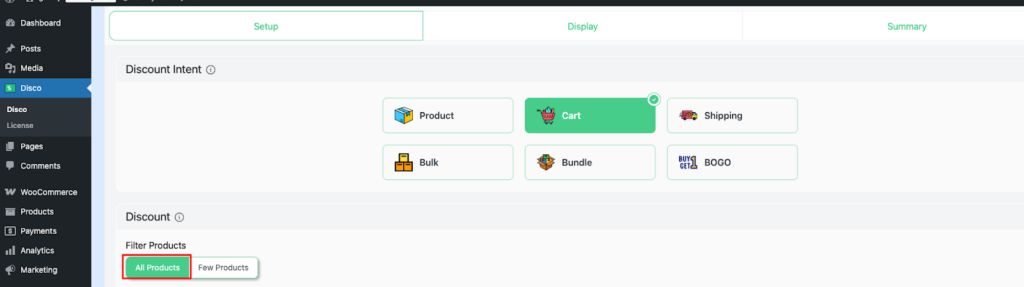
Step 5 — Configure User Limit and Validity date
You can set your User limit to any number, or leave it blank to keep it unlimited. Set the Validity date to 5/03/2026 to 7/03/2026.
| Note: The user limit option is a Pro feature. Make sure Disco Pro is installed and activated to use it. |
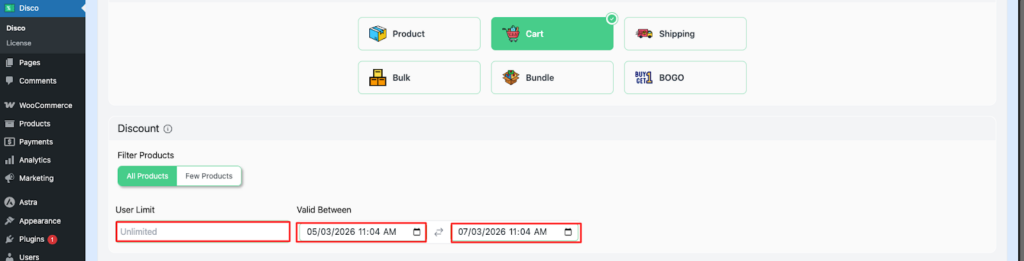
Step 6 — Set Cart Rules
Select a percentage discount for this example. Set your discount value -10, discount label to- 10%off
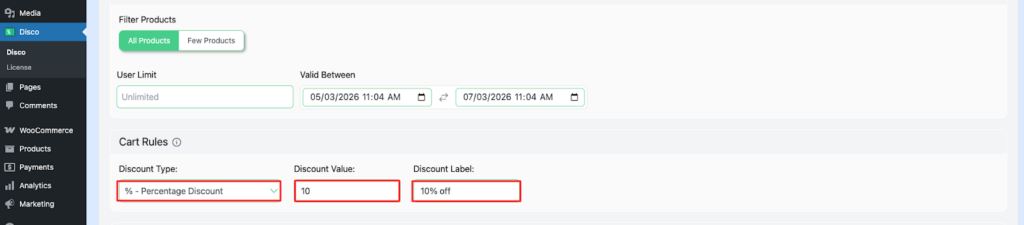
Step 7 — Add Conditions
Select cart subtotal – greater than or equal to -100
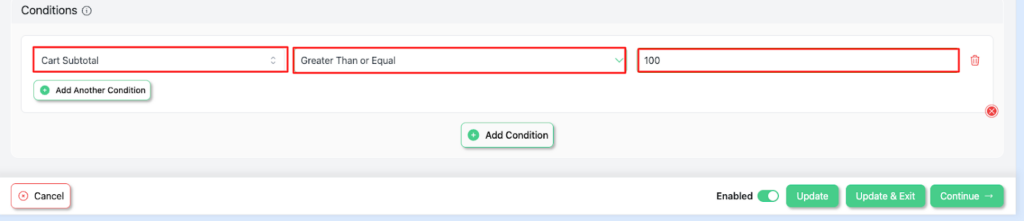
Step 8 — Save and exit, then verify your discount.
Your campaign will be successfully activated after you have saved it. Visit your store to verify the discount.
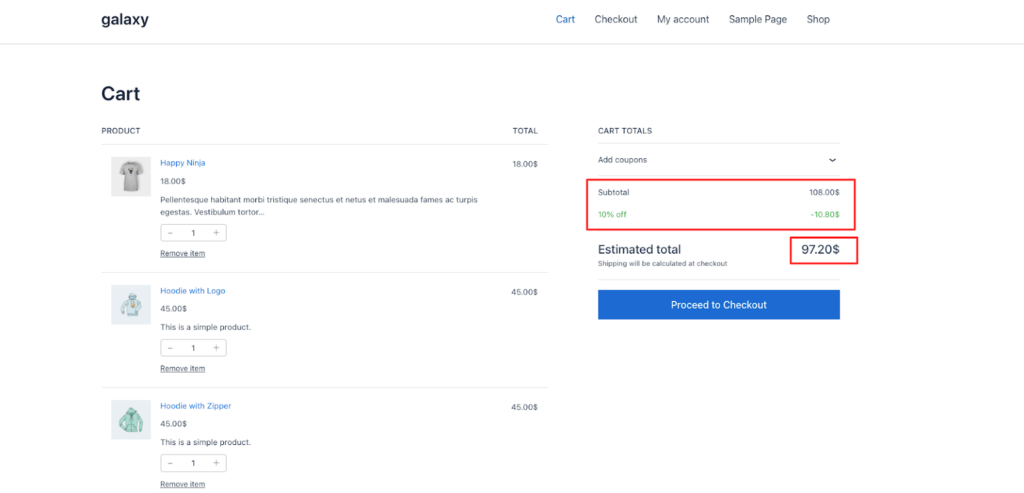
Common mistakes and how to fix them:
| Mistake | What Happens | Fix |
| The rule hasn’t been toggled to Active. | The discount never triggers | Turn on the Active toggle in Disco before saving. |
| Incorrect subtotal value | It either triggers too early or never | Review the rule conditions to ensure the threshold amount is correct. |
| The tax configuration is mismatched. | Unexpected behavior in the threshold setting | Go to WooCommerce→Settings →Tax, and confirm whether the store uses tax-inclusive or tax-exclusive pricing. |
| Rules with the same priority are conflicting. | Inconsistent discount behavior | Define a specific priority order for every rule in Disco. |
| The usage limit is configured too low. | The discount stops for returning customers | Increase the limit or set it to unlimited for continuous rules. |
Conclusion
Automatic cart discounts based on the subtotal are one of the simplest ways to increase revenue in a WooCommerce store. They require no extra budget, product changes, or a complicated funnel. Once the rule is configured, it runs automatically and rewards customers whenever they meet the spending threshold.
The broader e-commerce data highlights the same pattern:
- More than 70%of carts are abandoned
- 48% shoppers leave due to unexpected costs
- Around 80% will add items to qualify for free shipping
These are conversion barriers that a well-configured discount rule can directly address.
Start by setting your discount threshold at 15-20% above your current AOV. Select the discount type that fits your strategy, activate the rule, and test the setup before going live.
Set Up Your First Automatic Discount Today
No coding . No manual pricing updates. Just one click, one rule, and live in minutes.
Install Disco — Free → Disco: Discount Rules for WooCommerce
Trusted by 700+ WooCommerce store owners worldwide. No credit card required — 14-day money-back guarantee.
Not sure where to start? Watch the 5min Disco Demo- Create Automatic Cart Subtotal Discounts in WooCommerce Using Disco Plugin
Related guides:
- How to Add Tiered Subtotal Discounts in WooCommerce
- How to Set Up a First-Order Discount
- WooCommerce Volume Discounts
FAQs:
Does the discount apply before or after shipping?
Automatic subtotal discounts are calculated using the cart subtotal; shipping charges are added afterwards. For this reason, it does not contribute to reaching the threshold. For example, a $5 shipping fee will not push a $95 cart over a $100 threshold. Including the shipping in the calculation would require custom coding or adjustments within the plugin settings.
Can I run multiple automatic discounts at the same time?
Yes, the Disco plugin allows multiple rules to run concurrently. For example, you can offer 10% discount on orders over $100 and offer free shipping for carts over $50. If both conditions are met, the priority setting controls which one is executed first.
Does Disco’s free version support subtotal discounts?
Yes, check this out for detailed steps: https://discoplugin.com/docs/set-up-cart-intent-discounts/
What’s the difference between cart subtotal and cart total in WooCommerce?
The cart subtotal represents the sum of all products multiplied by quantities. It is calculated before shipping and typically before tax. Automatic subtotal discounts are triggered using the subtotal.