What is a WooCommerce first-order discount?
Store owners search for this under a few different names, including first purchase discount, first-time order discount, and new customer discount, but the mechanism is the same: a single, automatic price reduction tied to a shopper’s first completed order.
You can offer the discount in three main formats:
– Percentage discount (e.g., 20% off on first purchase)
– Fixed amount discount (e.g., $20 off first purchase)
– Free shipping on first order
Why WooCommerce First Order Discounts Matter for Your Store
First-time buyer hesitation is one of the biggest conversion killers in e-commerce. A well-placed first-order discount removes that friction and gives new visitors a concrete reason to buy today.
- Up to 2% lift in conversion rate: in a real-world pricing case study, a well-timed discount increased conversion rate by as much as 2% against a 3.5% baseline forecast, a meaningful swing at scale
- 5-20% is the sweet spot: research from Optimove, cited by Peel Insights, found new customers convert into repeat buyers about equally well whether the first-order discount is 10% or 20%, meaning you don’t need to go deep to see the retention benefit
- Timing matters as much as size: e-commerce educator Ezra Firestone recommends waiting two to three days into the welcome flow before surfacing the discount, rather than firing it immediately, a pattern he reserves for abandoned-cart recovery instead
Beyond the initial sale, a positive first purchase experience significantly increases customer lifetime value (CLV), the total revenue a customer generates over their relationship with your store.
Native WooCommerce Limitations for First Order Discounts
Out of the box, WooCommerce has no dedicated “first order discount” feature. You can create basic percentage or fixed-amount coupons through the native coupon settings, but these come with serious gaps:
- No automatic detection of first-time customers
- Customers must manually enter a coupon code
- No built-in enforcement that limits the discount to a customer’s first order only
- Generic coupon codes are easily shared and abused
To set up a true, automatic WooCommerce first-order discount — one that detects first-time customers and applies the discount without any coupon code — you need a dedicated WooCommerce discount plugin like Disco.
WooCommerce First Order Discount: Plugin vs Native Coupon
Here is a direct comparison between native WooCommerce coupons and using a plugin like Disco for your first-order discount configuration:
| Feature | Native WooCommerce coupon | Disco Plugin |
|---|---|---|
| First-time customer detection | ✗ Manual | ✓ Automatic |
| No coupon code required | ✗ | ✓ Applied automatically |
| Single-use enforcement | Manual setup only | ✓ Built-in |
| Coupon abuse prevention | ✗ Codes get shared | ✓ Tied to customer account |
| Works for WooCommerce first-time order discount | Partial | ✓ Full support |
| Campaign analytics | ✗ | ✓ |
| Combine with other rules | Limited | ✓ Full rule stacking |
How to set up a WooCommerce first-order discount (step-by-step)
The following guide uses the Disco Plugin to configure an automatic first-order discount in WooCommerce. This method works for any WooCommerce store and requires no coupon code to be shared with customers.
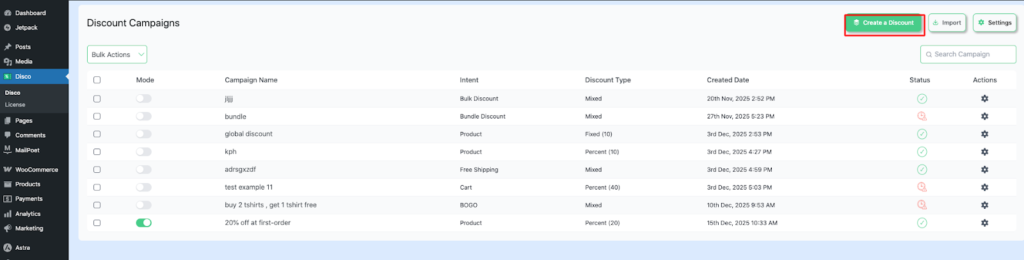
Step 1: Go to Disco from your WordPress dashboard → Create a discount
After installing and activating the Disco Plugin, navigate to Disco → Create a discount from your WordPress admin sidebar.
Step 2: Add a campaign name and select your discount intent
Give the campaign a descriptive internal name (e.g., 20% off first order) and set the discount intent to Product-based discount. This name is for your reference only and will not be visible to customers.
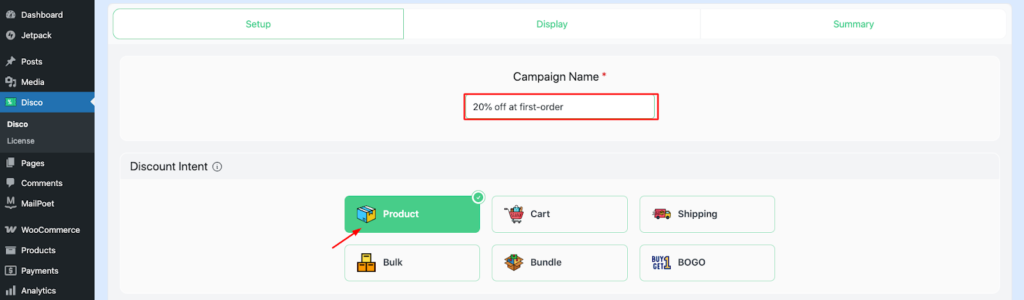
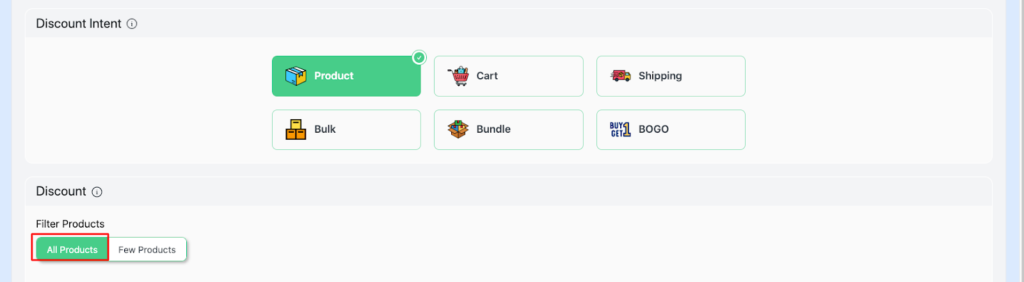
Step 3: Set the product filter to “All products”
Select All products as your product filter to apply the discount store-wide. You can narrow this to specific categories or products if needed.
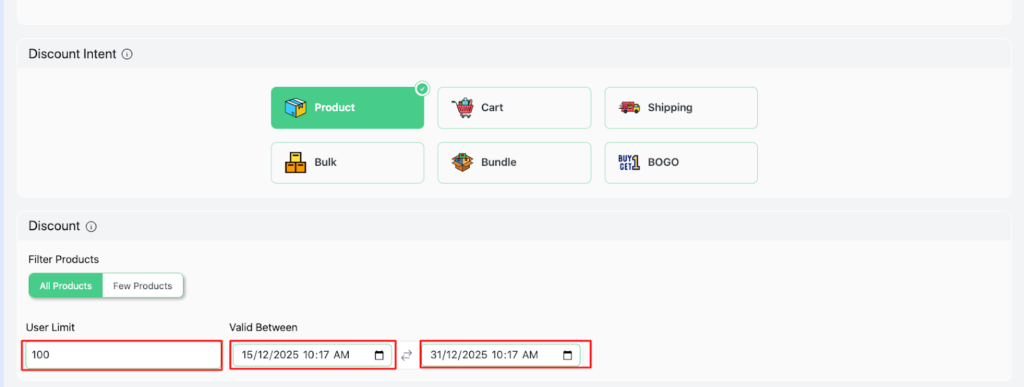
Step 4: Set a user limit and validity date
Define how many customers can use the campaign (e.g., User limit: 100) and set a validity window for the promotion. This prevents unlimited open-ended exposure.
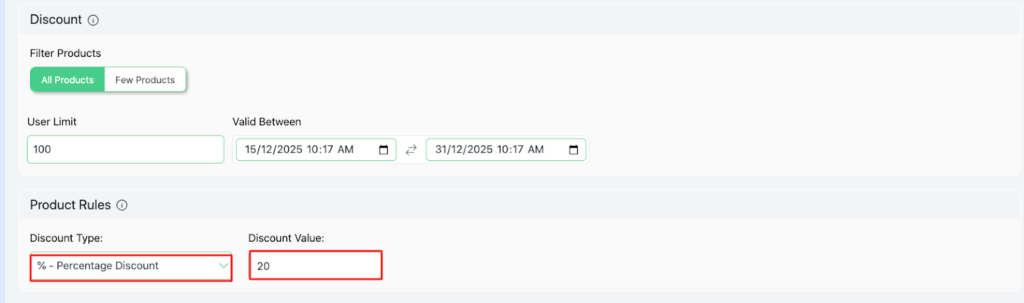
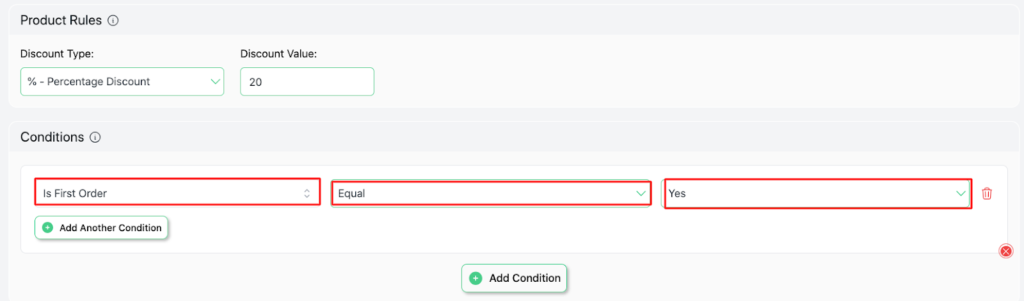
Step 5: Choose your discount type and value
Select Percentage discount and enter your discount value (e.g., 20 for 20% off). You can alternatively choose a fixed amount or free shipping here.
Step 6: Set the condition: “Is first order = Yes”
This is the most critical step. Under Conditions, add the rule: Is First Order → Equal → Yes. This ensures the discount applies only to first-time customers — not returning buyers.
Step 7: Save and Activate Your First Order Discount
Click Save. The campaign is now live. Any new customer placing their first order will automatically receive the discount — no coupon code needed.
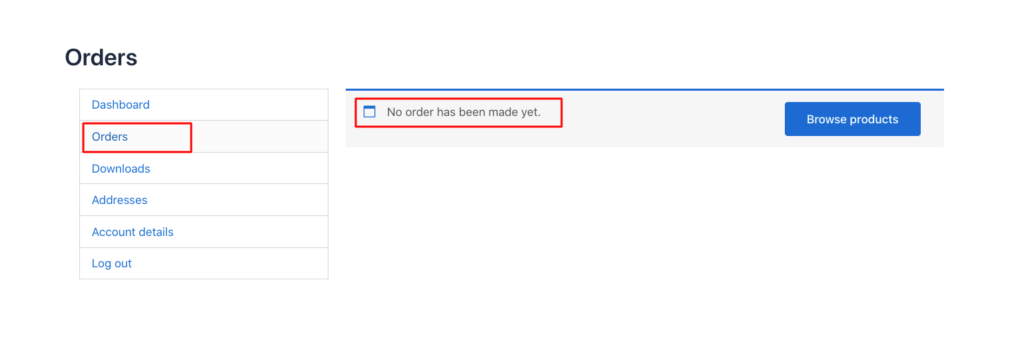
As you can see, the customer didn’t make any other purchases before this. Therefore, a 10% discount will be automatically applied to any products.
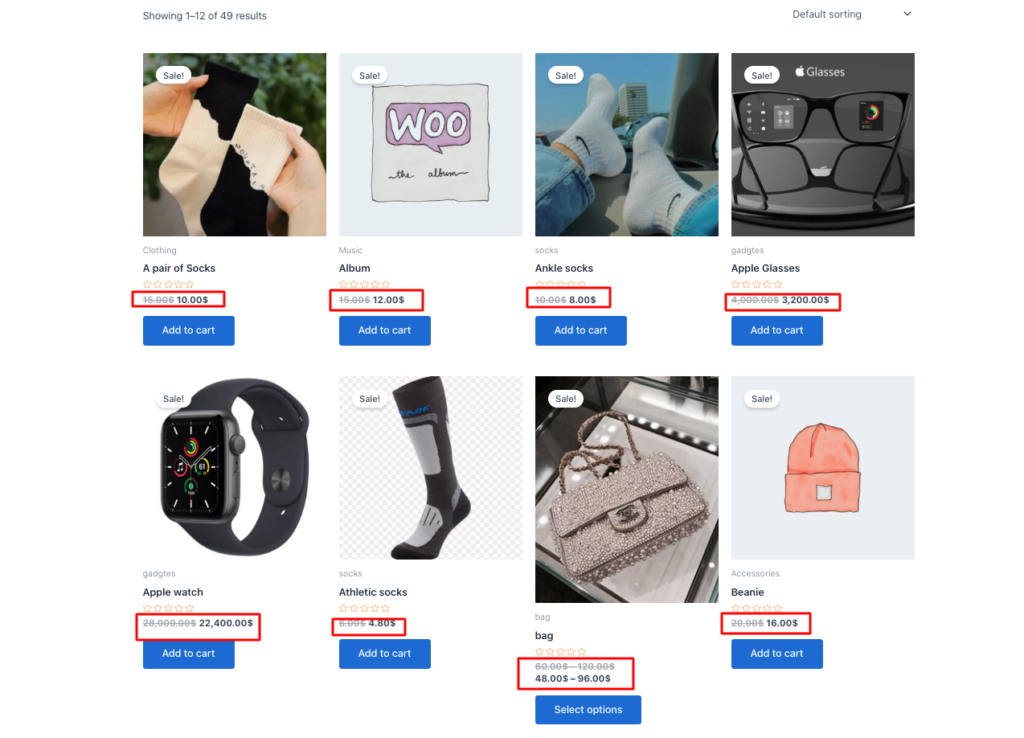
As you can see, all products are at a 20% discount.
The discount is applied automatically at checkout when the “Is First Order = Yes” condition is met. Returning customers are excluded without any manual work on your end.
How to Restrict Your WooCommerce First Order Discount to New Customers Only
One of the most common questions about configuring a WooCommerce first-order discount is: how do you make sure it applies only to first-time customers and not to returning ones?
The “Is First Order = Yes” condition in Disco handles this automatically. It checks the customer’s order history at the moment of checkout.
If the customer has zero previous completed orders, the condition is satisfied and the discount fires. If they have even one prior order, the condition is not, met and the discount is skipped entirely.
This is the key difference between using a plugin-based WooCommerce first-order discount vs a generic coupon.
With a coupon, you have no reliable way to verify first-time status — returning customers can simply enter the code again. With the condition-based approach, enforcement is automatic and tamper-proof.
What About a WooCommerce Coupon for First-Time Customers Only (Single Use)?
If you prefer to use the native coupon system alongside a plugin, you can generate single-use coupon codes within Disco and assign them via email to new subscribers. This setup is sometimes searched for as a coupon for new users or a first-order coupon, and it works well if you want a shareable code rather than a fully automatic discount.
Set the usage limit to 1 per customer. However, the fully automatic “no-code” approach described above is simpler and more reliable for most stores.
Common Pitfalls When Setting Up a WooCommerce First Order Discount
Pitfall 1: Discount abuse and profit margin loss
Generic coupon codes can be shared on deal sites, Reddit threads, or coupon aggregators. Non-first-time customers exploit them freely, eroding your margins.
Fix:
Use the automatic “Is First Order = Yes” condition instead of distributing coupon codes. If you must use codes, generate unique single-use codes and set the per-customer usage limit to 1 in your discount settings.
Pitfall 2: Plugin conflicts breaking checkout
Running multiple discount or pricing plugins simultaneously can cause checkout breakdowns, slow admin dashboards, or the “White Screen of Death.”
Fix:
Test in a staging environment first. Switch to a default theme (Twenty Twenty-Four or Storefront), deactivate all plugins except WooCommerce, then reactivate one by one to isolate the conflict. Use browser DevTools (F12) to monitor JS errors during testing.
Pitfall 3: Poor discount visibility = low redemption
If customers don’t see the discount prominently, they won’t engage with it. Redemption rates can fall below 5% due to subtle placement or mobile rendering issues.
Fix:
Display discount notices in high-impact locations: homepage hero banner, product page, and cart total area. Use contrasting colors and urgency-driven copy like “Get 20% off — first order only.” Personalize with “Welcome, new shopper!” messaging where possible.
Pitfall 4: WooCommerce sign-up discount not firing
First order discounts and sign-up discounts are related but distinct. If you intend the discount to fire on account creation rather than first checkout, the condition needs to be configured differently.
Fix:
Fix: For a WooCommerce sign-up discount (triggered by account registration), use a welcome email flow with a unique single-use coupon. For a first order discount (triggered at checkout), use the “Is First Order = Yes” condition as described above.
FAQs:
Can I set up a WooCommerce first-order discount without a coupon code?
Yes. Using the Disco Plugin, you can configure the “Is First Order = Yes” condition to automatically apply a discount at checkout with no coupon code required. The discount is invisible to the customer until it fires at the right moment.
How do I make a WooCommerce coupon work for first-time customers only?
Native WooCommerce coupons have no built-in “first-time customer only” restriction. You can approximate it by setting the usage limit to 1 per customer, but that does not verify whether the customer is genuinely new. A plugin-based condition check is more reliable.
What is the best WooCommerce first-order discount plugin?
Disco Plugin is purpose-built for WooCommerce dynamic pricing and includes a native “Is First Order” condition. It supports percentage discounts, fixed discounts, free shipping, BOGO deals, and bulk pricing — all from one interface.
Does a first-order discount apply to guest checkouts?
This depends on your plugin configuration. By default, first-order detection is based on logged-in customer order history. For guest checkout, you may need to match by billing email instead. Check your plugin’s documentation for guest checkout handling.
Can I combine a first order discount with other WooCommerce discount rules?
Yes, with Disco Plugin you can stack multiple conditions and rules. For example, you can offer a first order discount that also requires a minimum cart value, or applies only to specific product categories.
How is “first order discount woocommerce” different from a “woocommerce sign up discount”?
A first order discount fires at the moment of first checkout, regardless of whether the customer has an account. A sign-up discount is triggered by account registration. They can complement each other — registration unlocks a coupon, which is then redeemed at first checkout.
Is a WooCommerce first order discount the same as a first purchase discount?
Yes. First order discount, first purchase discount, and first-time order discount all describe the same feature: a single automatic discount that applies the first time a customer checks out. Store owners and shoppers just use different phrasing for it.
Can I set up a first order coupon for new customers only?
Yes. You can generate single-use coupon codes in Disco and distribute them to new subscribers as a coupon for new user sign-ups, or use the fully automatic “Is First Order = Yes” condition if you would rather skip codes entirely. The condition-based method is more reliable since it does not depend on a code staying private.
Conclusion
A WooCommerce first order discount is one of the highest-ROI tools available to store owners. It converts hesitant first-time visitors into paying customers, builds trust, and lays the foundation for long-term retention.
The key to making it work reliably is automation: use the “Is First Order = Yes” condition in Disco Plugin so the discount fires precisely for new customers — and never for returning ones. No shared coupon codes. No margin leakage. No manual work.