 Shanjida Haider
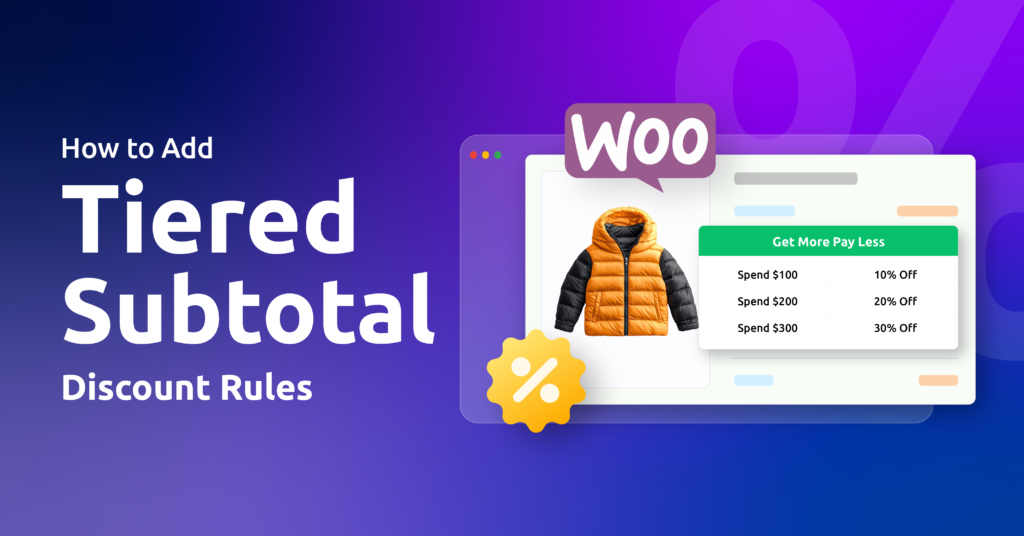
A tiered Subtotal discount refers to a dynamic pricing strategy based on the total cart value. Instead of flat discounts, it uses “ if-then ”($100-$200) to gamify the cart.
Example:
- If you spend $100 in cart subtotal, then you’ll get 10% off
- If you spend $150 in cart subtotal, then you’ll get 15% off
- If you spend $200 in cart subtotal, you’ll get 20%off
For example, a store can give 10% off when the cart subtotal reaches $100, 15% off at $150, and 20% off at $200 or more.
As customers add more products and increase their subtotal, a higher discount is automatically applied, encouraging bigger orders and increasing average order value.
You’re motivating customers to make intentional purchases step by step. Here, as the customer increases their order size, the more value you can reasonably offer to return.
Tiered Subtotal discounts encourage customers to spend a little more than their usual purchase, since the next level offers more value.
In this guide, you’ll learn about why tiered subtotal discounts work so well, how to add them to WooCommerce, best practices, real-life examples, and more.
Important distinction: A tiered discount refers to a discount based on quantity. Such as “ Buy 5 T-shirts, get 20% free.” Conversely, a tiered subtotal discount refers to a discount offered on the entire cart regardless of its items.
Table of Contents
How To Add Tiered Subtotal Discounts Using a Disco Plugin?
According to experts, using a dynamic pricing plugin is the best choice for 95% store owners. It provides a user-friendly interface, automatic calculations, and allows building complex rules without writing code.
For this phenomenon, you can use the Disco plugin for smart, scalable tiered pricing and promotional rules.
Here’s a step-by-step process for creating a tiered subtotal discount :
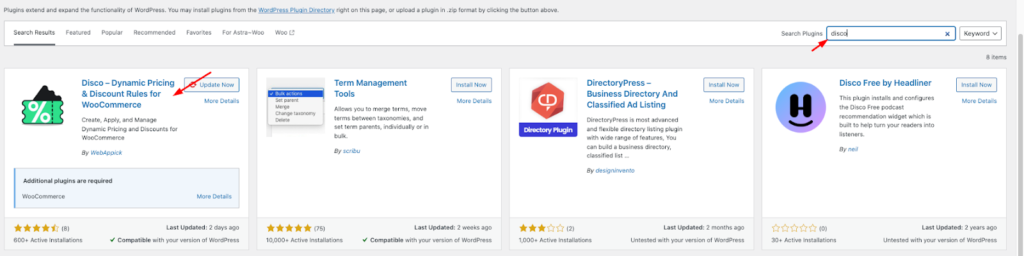
Step 1: Install and activate the Disco plugin
From your WordPress dashboard, go to → Plugins→Add Plugins → Disco
Step 2: Create a discount rule
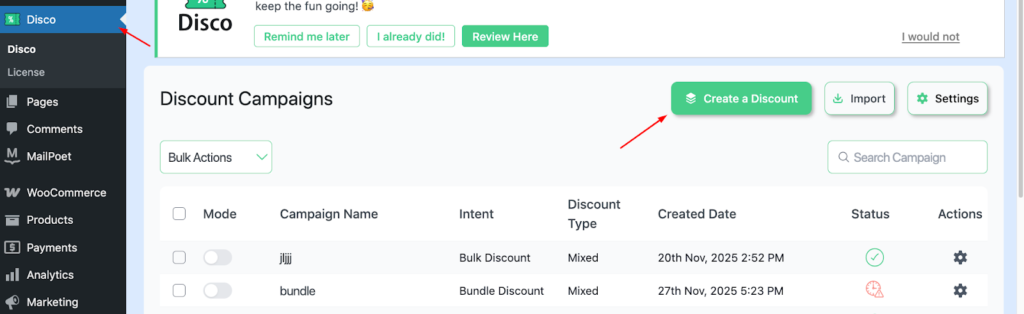
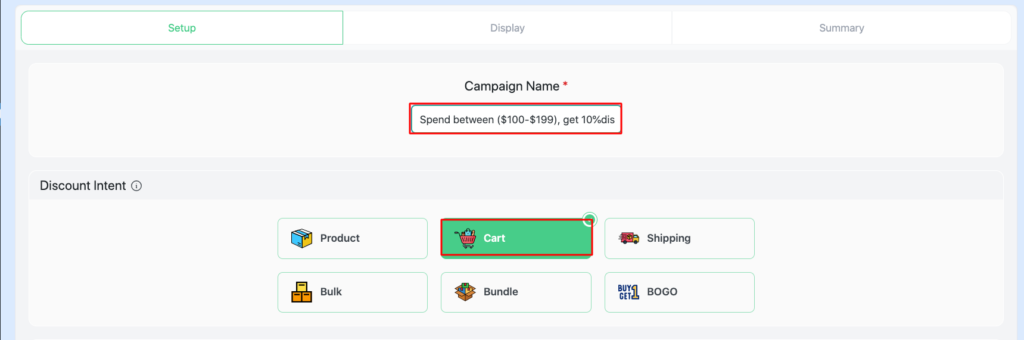
Step 3: Add a campaign name and choose your ” discount intent “
This acts as a unique identifier, making promotional rules easy to navigate. Add a campaign name, e.g., Spend between ($100-$199), get a 10%discount, Choose cart-based intent
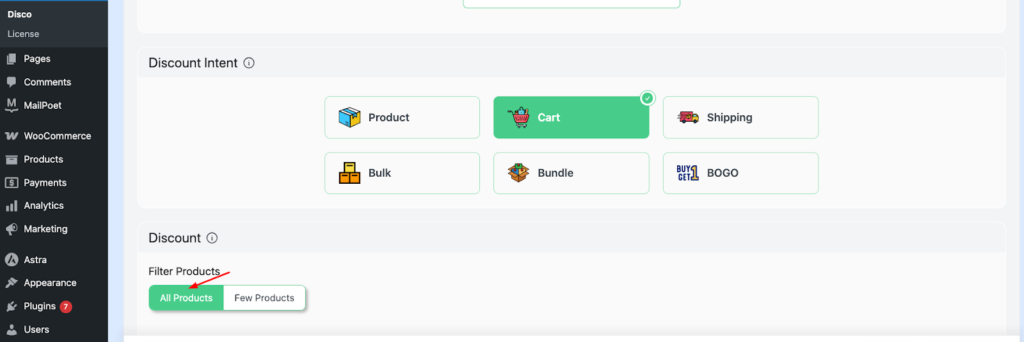
Step 4: Filter your products.
For this scenario, choose “ All products.”
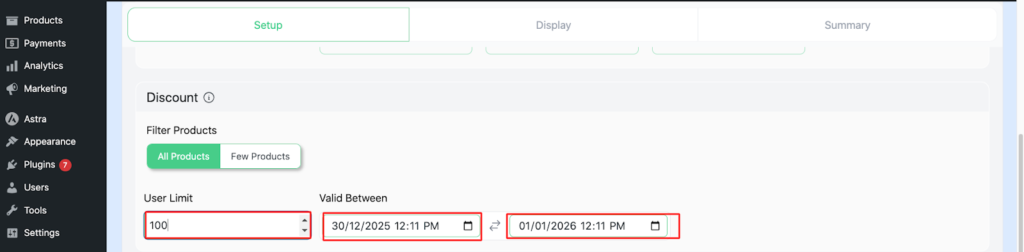
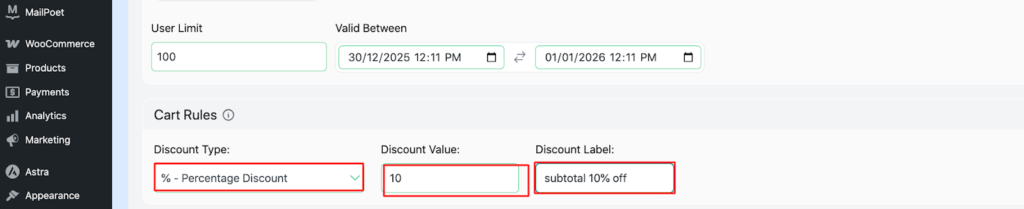
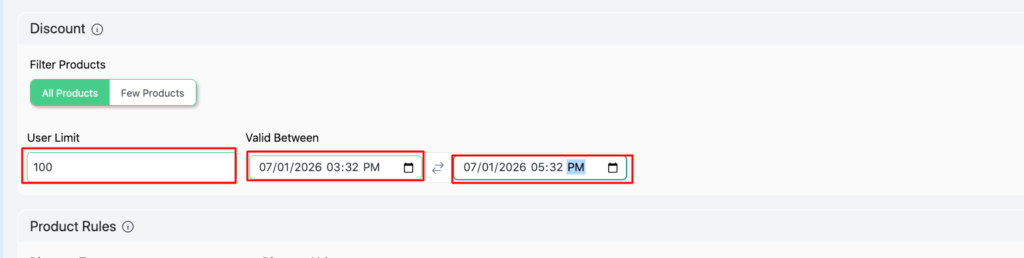
Step 5: Configure Usage limit and Validity date
Set the user limit to 100 (or any number you want ), set the Validity date from 30/12/2025 to 1/01/2026
Step 6: Configure Cart rules
Set Discount type- percentage discount, Discount Value -10, Discount label – subtotal 10% off
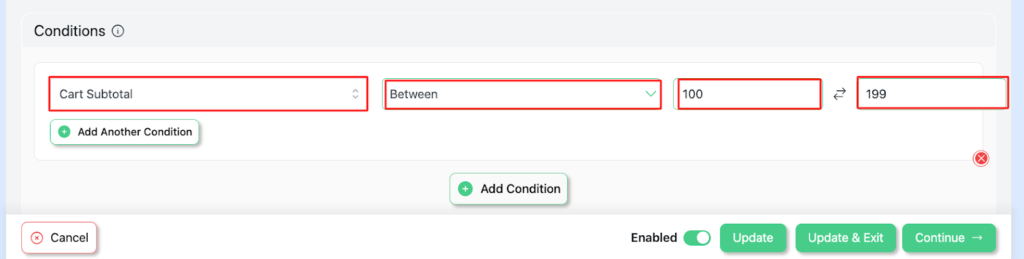
Step 7: Add conditions.
Select Cart Subtotal – between -(100-199)
Step 8: Save and Exit, visit your store to verify the discount
Your campaign has been launched successfully.
Similarly, create another campaign in Disco to have a Tiered Subtotal discount.
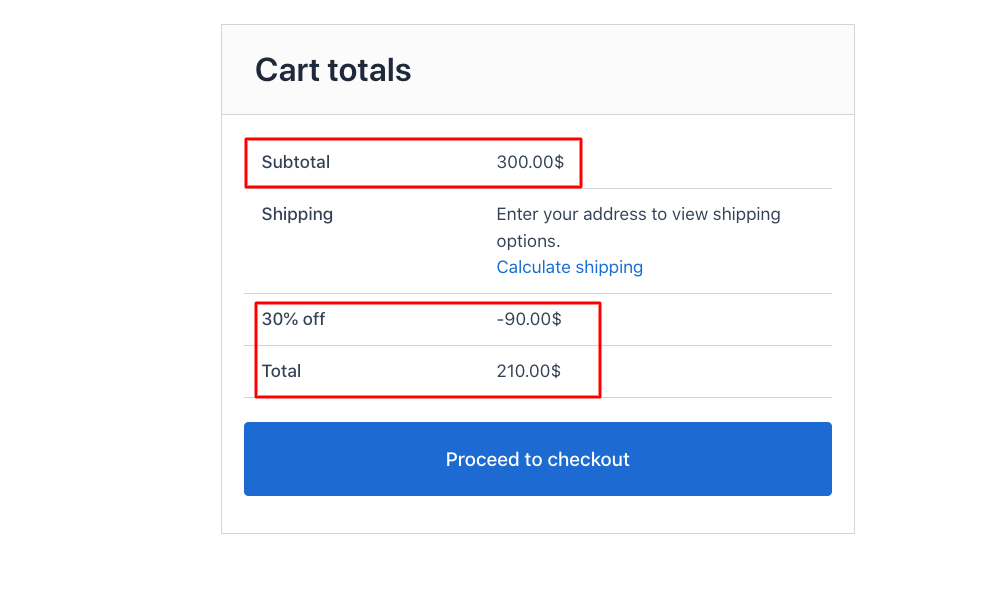
Here, set the conditions as Cart Subtotal – between ($200-$299). Then you’ll have results like this,

Following that create a similar campaign , keeping cart subtotal – between ($300-$399) ,
Best Practices for Maximum Conversion
The AOV plus threshold strategy
Setting the first discount tier too low would damage your profit. On the other hand, setting the tier above your current AOV works as a gentle nudge for your customers to add more items.
It is recommended that you set your lower tier 20-30% more than your current AOV. It should be like this :
- Tier 1: Spend $75, get 10% off
- Tier 2: Spend $100. Get 15% off
- Tier 3: Spend $ 200, Get 20% off
You can replace a single discount with a multi-tier discount ladder
- Tier 1: Spend $75, get 10% off
- Tier 2: Spend $150, get 10% off + free shipping
- Tier 3: Spend $225, get 15% off + gift
A Free Gift With Purchase (GWP) has more perceived value, and at the same time, it’s a great strategy to clear out high-margin accessories.
Gamify the Experience with Progress Bars
Every moment matters. The very reason why you should strive to make the shopping experience for the customers to be fun, interactive, motivating, and goal-driven.
By creating a visual progress bar for customers, you gamify their shopping experience. This shows the customers how close they are to the next tiered discount.
In other words, the visual progress bars work as a psychological trigger that motivates them to finish what they’ve started. (goal completion bias ) .It gives them a more rewarding experience, and they feel a sense of accomplishment among themselves.
This leads to increased Average Order Value, lower cart abandonment rates, and improved checkout momentum. The progress bar can be displayed on the cart page, the mini-cart sidebar, and the product upsell section.
Target Specific Customer Segments
Assign your customers to different roles; this will give them a sense of acknowledgement. And this serves as the perfect catalyst for improving customer lifetime value.
By segmenting your customers into different roles, such as new shoppers, wholesalers,
Loyalty members or geographic groups can create personalized pricing strategies that boost revenue while protecting profit margins.
It also helps to avoid issues like “ over discount “ or “under discount”. Wholesalers place larger orders and benefit themselves with high-tier discounts.
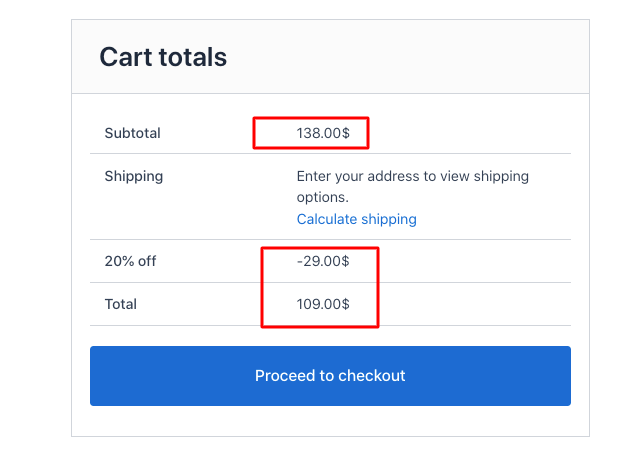
Here’s a step-by-step process for creating a role-based,cart-subtotal discount :
Discount type – Percentage discount, Discount value-20, Discount label- 20% off
- Add conditions.
Cart Subtotal – between (20-200)
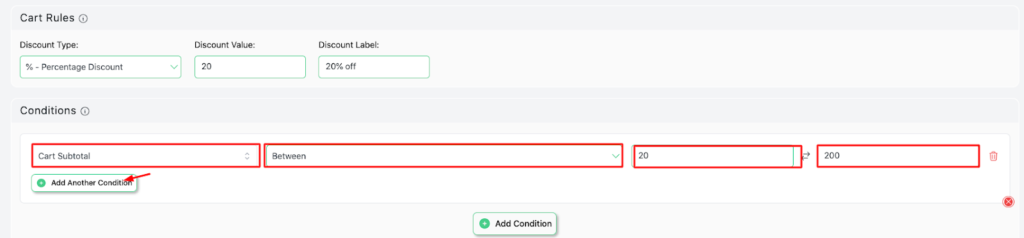
- Add another condition for more conditions
- User role – In list ( included ) – customer
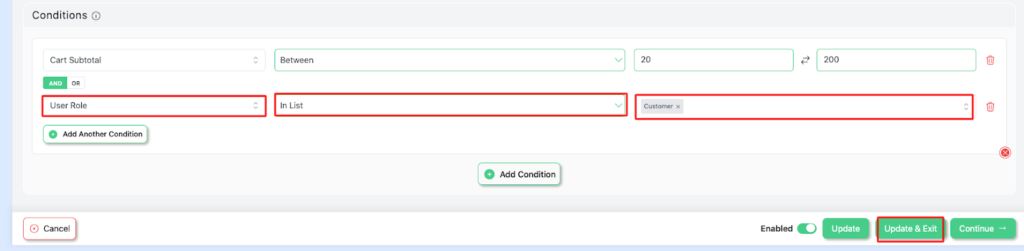
- Save and Exit
Run Promotions Using Limited-Time Tiered Subtotal Discounts
Time-limited Tiered Subtotal discounts could be used as a high-octane pricing strategy. It integrates time with tiered subtotal discounts to create a sense of urgency among customers.
Both the discount tiers and rewards are visible for a specific period, such as a weekend sale, seasonal promotion, holiday event, or product launch.
The urgency and scarcity of products increase the perceived value of the product. It fosters goal-driven motivation among customers. As a result, the store often witnesses higher conversion rates, larger cart subtotals, and more impulsive purchases.
Limited-time Subtotal discount Setup Steps :
- Add a Campaign name (e.g., Last 2 hours, Spend $100, get 20% off)
- Choose your discount intent (e.g, cart-based intent)
- Set User limit (e.g., 100) and Validity date From (07/01/2026, 3:52 PM to 07/01/2026 5:32 PM )
- Set Cart Rules
- Save and Exit, visit your store to verify the discount

Create more campaigns to complete the tier.
Wrap up
Tiered Subtotal discounts are a powerful Conversion Rate Optimization (CRO) strategy for turning browsers into high-value customers. At the same time, it is the most effective strategy for increasing Average Order Value.
Use descriptive campaign labels, well-defined customer segments, and time-bound promotions to protect margins. Apply real-time cart messages to nudge your customers. Adding progress prompts and gamification elements creates a more interactive, reward-driven shopping experience.
Automating cart subtotal discount helps your store differentiate itself from the rest, reduces cart abandonment, and builds long-term customer loyalty.