 Shanjida Haider
Geographical pricing, also referred to as “ location-based or regional pricing,” is the process of adjusting product prices based on a customer’s country, state, or region.
For example, if we consider a product’s esteemed value as $100 in the USA, the same product’s value will appear to an Indian customer as ₹6,399 (after 20% off)
Geographical pricing is just another attempt to benefit our society, even though we’re facing a different global economic reality.
Why Choose Location-Based Pricing in WooCommerce?
Due to differences in purchasing power, taxes, shipping costs, and market competition across the globe, maintaining a single worldwide price does not ensure fairness for everyone.
This leads to lost conversions in price-sensitive regions.
- Higher conversion rates across the global market: Customers are more likely to convert when their product prices align with local purchasing powers and expectations. This reduces sticker shocks and increases checkout completion.
- Better Profit Margin Protection: You can tailor premium pricing in high-income areas like the US or Europe. Then again, offer competitive discounts in Southeast Asia.
- Lower Cart Abandonment: Indian customers are often surprised by US pricing, leading to cart abandonment. This phenomenon can prevent 20–40% of such cases.
- Clears Inventory: It offers heavy discounts in low-demand regions and normal pricing in the high-demand areas.
- Supports seasonal stock clearance: Seasonal demand varies across different countries.
- Boosts AOV: It encourages higher-value purchases in price-sensitive markets (e.g., Southeast Asia).
How Pricing Based on Geographical Location Works in WooCommerce
WooCommerce doesn’t have a built-in system for pricing based on geographical location. You would need help from an advanced discount plugin, such as DISCO, that is compatible with your WooCommerce store.
WooCommerce identifies customers through their IP address. It considers some key factors before applying discounts :
- Country / Region targeting: It enables distinct prices across nations or broad areas. For example, if a product costs $500 in the US, offering a 15% discount to customers in India would help it compete with local rivals like Flipkart.
- State / Province targeting: This strategy aligns with local taxes, living costs, and demands.Such as applying a 10% discount on tech items in high-competition areas, while maintaining regular prices in Texas.
- Zip Code Targeting: It offers neighborhood-specific promotions, Such as: $15 off in California zip codes with high shipping costs, or exclusive deals in Manhattan 10001 to stimulate local online demand.
Step-by-step process for creating a price-based discount on the Disco plugin
Here are some examples of applying an advanced discount plugin for creating a price-based discount based on geographical location.
Price-based discount based on the Country
Note: The user needs to provide key details in their profile, such as country, zip code, and state/province, so that the plugin can effectively use the information.
And then follow this process step by step :
- From your WordPress dashboard, go to → Disco
- Click to → Create a Discount
- Add a campaign name
- Choose your discount intent
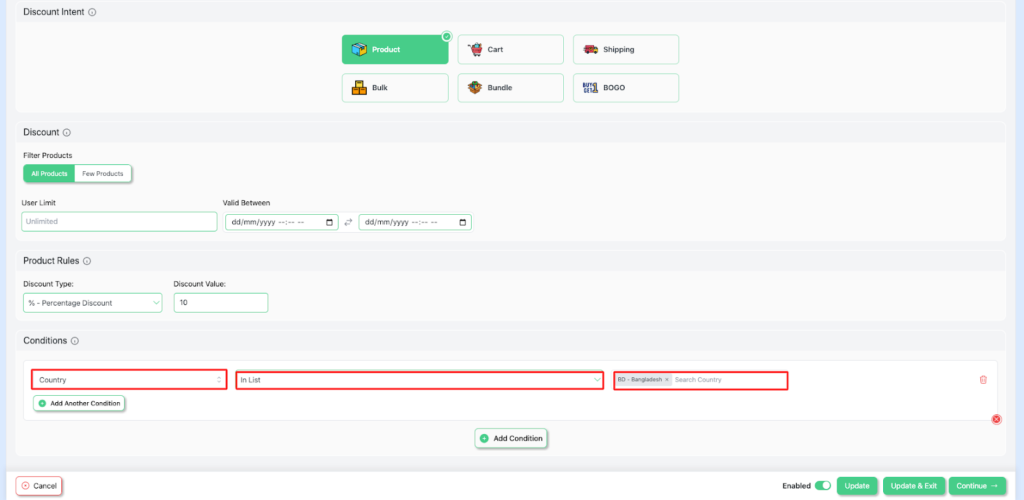
- Set the User limit to any number or leave it blank ( It will count as unlimited )
- Set the Validity date with a precise start date and an end date.
- Add conditions → country → Bangladesh ( Any country )
- Save and exit to start your campaign
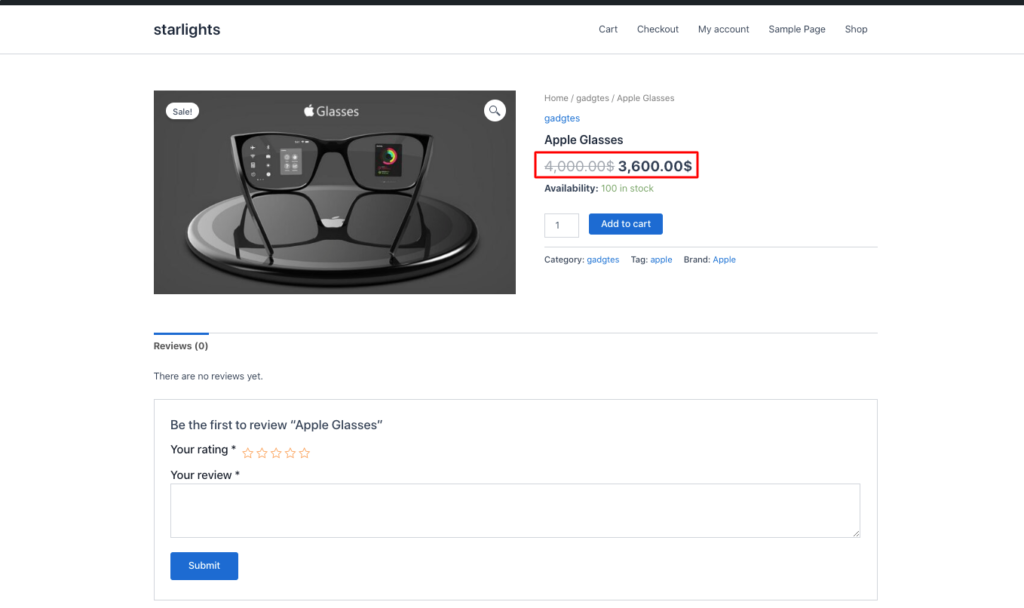
Price-based discount based on Zipcode
Similarly, if you want to have a pricing discount based on zipcode, follow all of these steps. And then –
- For this example, set the discount to 20% (or any number you wish).
Select → Discount type as Percentage discount →Discount value as 20.

- Then, in the Conditions section → zipode → does not contain → blank
- Click to save and exit to start your campaign.
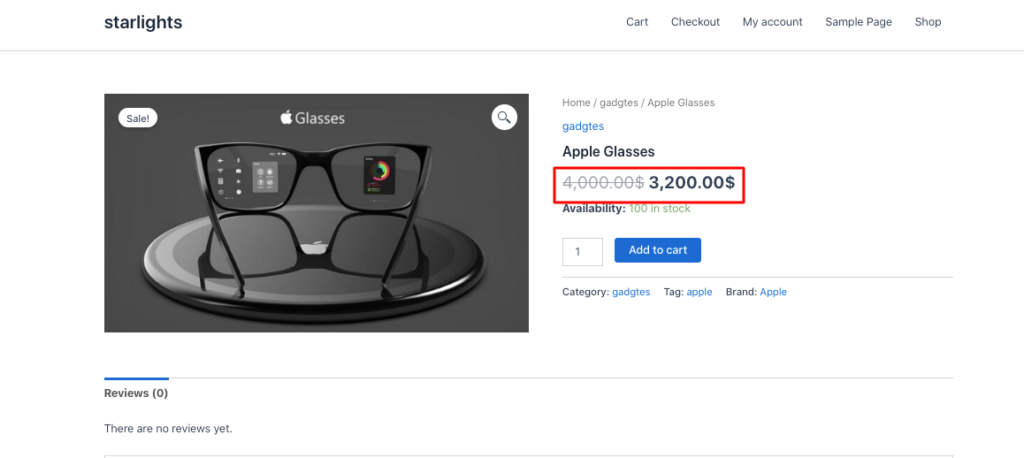
As a result, the product will be discounted by 20%.
Price-based discount based on the State
For this case,
- Set your discount type- percentage discount, discount value-30

- Set Conditions → state → India -Kerala
- Click to Save and Exit to complete your campaign

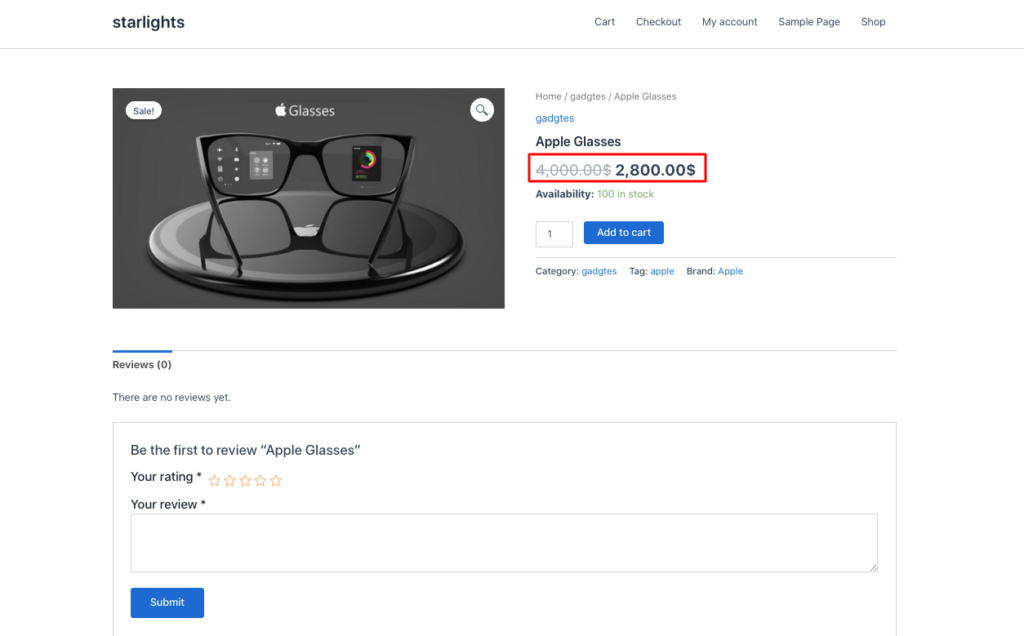
You can also blend geographical location with other conditions.
For example, you can choose a cart-based intent and set the cart subtotal condition equal to $200.
Best practices to avoid margin loss
Ignorance or haste might lead to dangerous consequences. Even during the marketing phase, we’ve to measure our steps cautiously, like a skilled chess player. In Chess, attacking alone isn’t enough; a player must also learn how to support their pieces.
In the same realm, offering large discounts without any strategy can end up making you bankrupt. Here are a few things you should try :
- Define clear pricing limits: It is essential to set dynamic pricing limits and a discount range per region. Using a plugin will make it easier.
- Observe shipping costs closely: Measure actual or estimated shipping costs and local tax differences for your location-based pricing strategy.
- Prevent overlapping discounts: Multiple discounts at once could be a silent profit killer. To prevent that, set your discount priorities right.
- Apply tiered discounts strategically: Select the specific locations where you want to apply your tiered /volume discounts. Environment, availability, etc, factors impact marketing.
- Run short, well-planned promotions: Short, well-crafted promotions can outperform longer, less focused ones.
FAQs
Does WooCommerce support location-based pricing by default?
It does not have built-in geolocation detection; it requires an advanced pricing-based plugin for location-based pricing.
Is geo-based pricing legal?
Yes, it fully adheres to consumer protection laws, tax regulations, and transparency standards.
Can location-based prices or discounts be combined with other discount rules?
With the Disco plugin, you can easily combine location-based pricing with other conditions. It lets you customize your pricing strategy with excellent features.
How do I set pricing based on the customer’s country or region in WooCommerce?
Install Disco or a similar advanced pricing plugin that prompts you to provide essential information. Then it will track your IP address and will allow you to create a discount with its sophisticated features.