Quick Summary:
Best all-in-one option: Disco Plugin by WebAppick
Best for native solution: WooCommerce Cart Notices, SkyVerge
Best for flexible targeting rules: Cart Notices, BeRocket
What sets Disco apart: Every other plugin handles only one piece of the puzzle. Disco solves five-cart notices, discount campaigns, bulk pricing, BOGO offers, and product badges all in a single solution.
Ever added a product to your cart, got distracted, and completely forgot about the fact that you were shopping? Your customers do that—all the time.
Here’s a hard-to-swallow pill: Most abandoned carts aren’t abandoned because they’re not interested. Baymard’s research across 50 studies shows that the average cart abandonment rate is 70.22%. In other words, seven out of ten people are lost from the equation.
But here’s the upside: A well-timed cart notice can act as the best nudge that can turn your customers’ “maybe later” mood to “ fine, take my money”.This guide covers the best WooCommerce cart notices plugin option available. On top of that, it tells you how to set them up and how to use them without making shoppers want to close that tab.
Before You Start
Here’s a quick minute of prep now that can save you hours of frustration later:
- Know your average order value (AOV): It’s important to know about your baseline first before you decide to set promotional thresholds. Setting your current AOV above 15-20% is considered the sweet spot, high enough to increase AOV and low enough to encourage your customers to purchase more.
- Define your core message: Before going through the plugin settings, write your notice. Even one short, precise sentence is enough. Such as: Add $8 more to get free shipping.
- Review your existing plugins: Take note of any active page builders, discount plugins, or checkout customization since that’s where potential compatibility issues lie.
Get these three things right to prevent most beginner mistakes.
What Are WooCommerce Cart Notices?
A WooCommerce cart notice is a dynamic, condition-based message that displays on the cart or checkout page when certain criteria are met, such as cart total, product quantity, or free shipping eligibility.
WooCommerce offers a built-in basic notice system for developers, which is functional but limited. However, dedicated plugins replace that with flexible triggers and promotional features designed to drive conversions.
Types of cart notices:
- Promotional: Highlights discounts, coupons, and limited-time deals.
- Urgency: Create urgency by reminding them about limited time and low stock.
- Free Shipping: Encourage shoppers to increase their cart values with messages like “ You’re $10 away from free shipping.”
- Upsell Notices: Recommend relevant add-ons and complementary purchases.
- Service/Trust: Highlight delivery dates, address common purchase issues before checkout, and return policies.
- Social Proof: “ 150 people bought this today.”
- Progress bar: Give shoppers the thrill of fulfilling visible goals.
Why Cart Notices Work?
High-converting cart notices rely on these 4 proven psychological triggers:
- Loss Aversion: Kahneman & Tversky’s Prospect Theory (1979) reports that customers are more motivated to work harder to avoid losing a benefit than to earn one.
- Scarcity: Cialdini’s research on the scarcity principle found that limited availability of products increases their perceived value. But it only applies when the scarcity is genuine.
- Paradox of choice: Iyengar & Lepper’s jam study (2000) found that a single focused message outperforms multiple competing messages. It can increase conversions by helping remove decision fatigue.
- Urgency: A 2025 peer-reviewed study in the Critical Review of Social Sciences Studies claimed that a deadline encourages customers to make faster purchase decisions.

What to Look for in a Plugin?
Any plugin can list a dozen features. But what truly matters is this:
Are they really effective?
Before installing any plugin, look for these essentials:
- Conditional logic: Targeting depth. In other words, trigger notices based on cart total, product, category, and customer role.
- Mobile responsiveness: The cart notice layout must remain usable for smaller screens; otherwise, it may damage conversions.
- Compatibility: Seamless integration with Elementor, Divi, and WooCommerce blocks.
- Performance: Fast performance is essential to avoid cart abandonment rates.
- Maintenance: Select a plugin that provides regular updates, active support, and compatibility with current WooCommerce themes.
Best WooCommerce Cart Notice Plugins (2026)
| Plugin | Price | Free Version | Best for | Conditional logic | Auto-apply discounts |
| Disco | Free/$69yr | Yes | All-in-one promotional discounts+ Cart notices | Advanced | Yes |
| BeRocket | Free | Yes | Basic cart notices+ simple setup | Moderate | No |
| SkyVerge | $49/yr | No | Dynamic personalized variables | Moderate | No |
| YITH | $59.99/yr | Limited | Existing YITH users | Limited | No |
1: Disco — Dynamic Pricing & Discount Rules by WebAppick
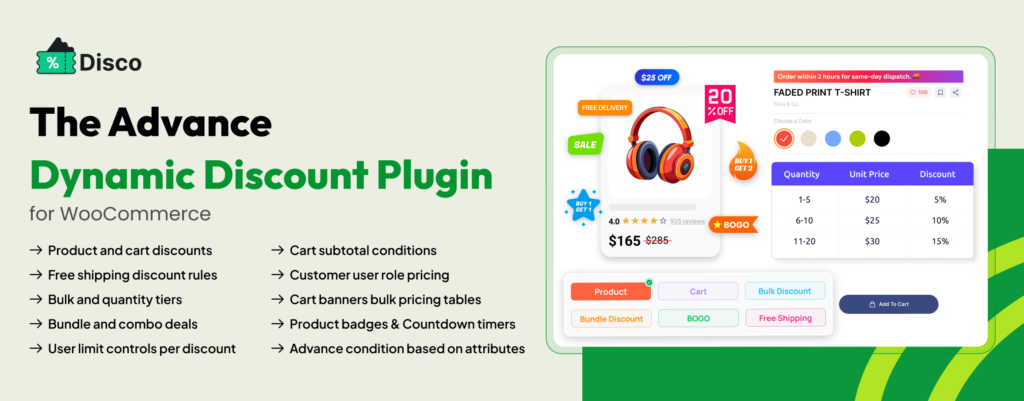
Disco is a dynamic WooCommerce plugin that automates discounts, promotions, cart contents, and custom behavior. Instead of relying on coupons, Disco is configured with predefined rules to apply discounts automatically at the cart or checkout stage.
Core Architecture
- Rule Engine: Disco creates promotions in real time based on cart conditions, including products, categories, quantities, and customer roles. The discounts are applied automatically when certain criteria are met.
- Real-Time Promotion Sync: Cart notices and discounts are linked together. This ensures that the customer sees the most relevant message according to promotions.
- Dynamic Pricing Layer: Disco offers advanced discount strategies without changing your product data. Such as quantity discounts, BOGO offers, promotional pricing, and so on.
- Scheduling Engine: You can customize your promotion’s start and end dates in the Disco dashboard; it will then automatically activate and expire accordingly.
Feature Set
- Automatic discounts: Applies discounts automatically the moment customers qualify for the conditions. No need for coupon codes, no hassle with extra steps, and zero friction at checkout.
- BOGO and Advanced Promotions: It allows you to create Buy One Get One deals,category-based promotions, and free product promotions.
- Bulk and Tiered Pricing System: Encourages higher purchase orders with quantity-based discounts. Set quantity-based discounts, such as 1-5 items → Regular price, 6-10 items → 10% off, 15+ items → 20% off. Pricing recalculates the moment customers add or remove items from their cart.
- User Role Pricing: Offers specialized discounts based on customer roles, such as wholesalers, members, or VIP customers.
- Scheduled Promotional Campaigns: Set a timeframe for your promotional campaigns and run them on autopilot.
- Gift and Shipping Rules: Make customers feel valued with gifts and shipping incentives.
- Countdown Timers (Pro): Add genuine urgency for limited-time promotions and sales.
- Visual Rule Builder: Disco provides a visually appealing interface with zero coding and a friendly rule builder.
Use Cases
- Perfect for stores that require automated discounts.
- Ideal for B2B businesses with role-based pricing and customer-specific discounts.
- Best for growing e-commerce brands that regularly launch promotions, flash sales, and limited-time offers.
- Great for agencies managing multiple WooCommerce stores and pricing strategies.
Strengths
- Discounts are applied automatically without requiring coupon codes.
- Supports advanced discounts and pricing with a wide range of promotional strategies.
- Cart notices and discount automation work together in a single system.
- Eliminates the need for multiple plugins, replacing them with one unified system that offers multiple promotional campaigns: BOGO offers, bulk discounts, role pricing, gifts, and shipping incentives.
- Enables time-sensitive campaigns that can be scheduled and automated in advance.
- Easy-to-use visual builder that makes advanced promotions accessible to non-technical users.
- Encourages larger order value without adding checkout friction.
- Equally effective for B2C and B2B stores.
Limitations
- Stores that require basic cart messages might feel overwhelmed with such a feature-heavy solution.
- Advanced campaigns require additional setup and testing.
- Managing an extensive rule set can be time-consuming.
- Advanced features require conditional logic and promotion workflow.
- Countdown timers are only available in the Pro version.
Best For
- Ideal for stores running multiple campaigns.
- Merchants running volume discounts or quantity-based pricing.
- Wholesale and B2B businesses with customer-specific pricing requirements.
- Brands that frequently run seasonal sales, flash sales, and scheduled campaigns.
- Merchants looking to increase average order value and conversions
- Agencies that are responsible for managing pricing strategies for multiple WooCommerce stores.
- Businesses that seek to replace coupon-based promotions with automated discount rules.
2: Cart Notices for WooCommerce by BeRocket
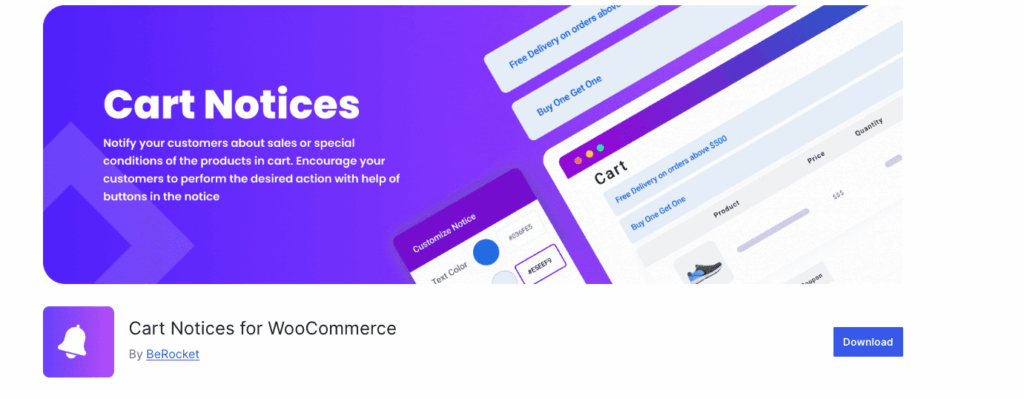
BeRocket is a lightweight WooCommerce cart notice plugin that displays conditional messages. It provides easy-to-configure targeted messages based on cart conditions without the complexity of feature-heavy solutions.
Core Architecture
- Visual Notice Builder: Provides a visual editor to create custom messages with rich content elements, such as images, formatting, and buttons. This requires no code.
- Cart-Based Conditions: Evaluates cart notices based on minimum order values, free shipping goals, and order limits.
- Product and Category Triggers: Displays cart messages when customers add specific products or categories to the cart.
- Time-Control Module: Triggers notices automatically based on defined date ranges or business deadlines.
Feature Set
- WYSIWYG Notice Editor: More than just a text-based notice plugin, it provides fully formatted notices with text styling, images, and buttons. It enables non-technical users to create professional-looking messages
- Smart Cart Targeting: Personalize cart notices based on cart value rules (below, above, or within a range). Encourage large orders by showing how close customers are to unlocking the free shipping thresholds.
- Product-Category Logic: Displays relevant notices based on specific products, selected product categories, or cart composition.
- Deadline-Based Notices: Restrict notice visibility with promotional deadlines.
- Campaign-Specific Notices: Tailor your messages based on the visitor’s traffic source.
- Flexible Placement Options: Place your notices beyond standard cart and checkout locations using shortcodes.
- Built-In CTA Buttons: Add CTA buttons that drive clicks and conversations.
Compatibility
Actively maintained with regular updates and fully compatible with current WooCommerce versions at the time of writing (2026).
Use Cases
- Store owners who need simple, targeted cart messages.
- Merchants who want to encourage customers to reach free shipping or minimum order incentives.
- Displaying campaign-specific promotional notices and announcements.
- WooCommerce beginners looking for a quick, low-complexity setup.
Strengths
- Offers free core features.
- No ecosystem lock-in, giving merchants greater flexibility.
- One of the quickest plugins with minimal learning curve.
- Lightweight architecture that keeps management simple.
- Flexible notice placement with shortcode support.
Limitations
- No role-based targeting available in the free version.
- Limited custom designs; advanced styling requires custom CSS.
- Lacks native analytics or performance reporting.
Best For
Ideal for beginners or small stores that need simple, dependable cart notices without advanced pricing logic or technical configuration.
3:WooCommerce Cart Notices by SkyVerge
A well-established cart notice developed by SkyVerge that prioritizes reliability, personalization, and native WooCommerce compatibility. It focuses on doing core cart messaging rather than feature bloat.
Core Architecture
- Dynamic Content Engine: Create personalized messages that automatically use real-time customer and cart information.
- Condition Framework: Displays relevant messages based on cart totals, products, and geographic location.
- Multi-active campaigns: Enable multiple active notices to run concurrently without interfering with one another.
- Native WooCommerce Framework: Designed specifically for WooCommerce’s core workflow for consistent performance and compatibility.
Feature Set
- Dynamic Notice Variables: Personalize notices with live data such as customer name, cart totals, and discount progress indicators.
- Smart Display Rules: Display messages based on cart composition, spending thresholds, and geographical location.
- Shortcode Placement: Use shortcode support for displaying cart notices wherever they are most effective.
- Deadline-Based Messaging: Create time-sensitive notices to maintain urgency.
- Multi-Notice Support: Manage multiple notices without disrupting other active campaigns.
Compatibility
Requires PHP 7.4+, WordPress 5.6+, WooCommerce 3.94+, WooCommerce Blocks, and HPOS. It is exclusively available through the WooCommerce Marketplace.
Compatibility Notice:
This plugin hasn’t been updated since March 2024; store owners must verify its compatibility with the latest platform releases.
Best For
Ideal for stores that value stability, support quality, and personalization over advanced marketing automation features.
4: YITH WooCommerce Cart Messages

A straightforward cart messaging solution developed by YITH that displays promotional and informational messages to shoppers. It complements the broader YITH ecosystem, while remaining a relatively minimal standalone feature set.
Core Architecture
- Straightforward Rule Builder: Trigger messages based on cart value, specific products, or predefined schedules.
- Seamless Plugin Compatibility: Integrates naturally with other YITH solutions for a more connected WooCommerce experience.
- Lightweight Customization: Offers basic styling settings to customize cart notices with minimal effort.
Feature Set
- Product and Category Triggers: Displays targeted messages when certain products or product categories are detected in the cart.
- Flexible Scheduling Rules: Schedule notices based on your preferred selection of timeframes.
- Cart Value Rules: Activate messages according to predefined cart spending thresholds.
- Cross-plugin Functionality: Enhances functionality working alongside other YITH rewards, wishlist, and pricing extensions.
- Essential Design Customization: Fine-tune notice colors, text, and background styling to align with your store’s branding.
- Multi-Language Compatibility: Fully compatible with WPML and Polylang to support a multilingual shopping experience.
Compatibility.
Compatible with WordPress 3.5.1 and with up-to-date WordPress environments. Requires PHP 7.4.8 or above. The plugin was tested on a standard LAMP setup featuring MYSQL 8.0.15 and a 256 MB memory limit.
Use Cases
- Running simple promotional messages, highlighting discounts, offers, and promotional announcements.
- Extending functionality within other YITH tools.
- Delivering basic cart messages and announcements.
Strengths
- The free version offers essential features for many basic use cases.
- Strong compatibility with other YITH plugins.
- User-friendly interface for beginners.
- Supports multilingual store setups.
Limitations
- Offers fewer basic targeting rules than dedicated cart messaging solutions.
- The user interface is somewhat outdated compared to contemporary plugins.
- Several key features require updating to the paid version.
Best For
WooCommerce stores that rely on the YITH plugin suite and need straightforward cart messaging without requiring advanced campaign building tools.
How to Set Up WooCommerce Cart Notices With the Disco Plugin?
Before You Start
Requirements
- WordPress Version 5.8 or above
- WooCommerce 5.0 or above (tested with WooCommerce 9.x or WordPress 6.9
- PHP 7.4 or higher (verify your version from Dashboard → Tools → Site Health )
- Install the Disco plugin by WebAppick
Prepare in Advance
- Your store’s free shipping target amount.
- A short promotional message with urgency, such as: “ Spend $10 more and get free shipping.”
No developer? No problem. Follow these steps and set up your first cart notice in minutes :
Step 1: Create your first rule
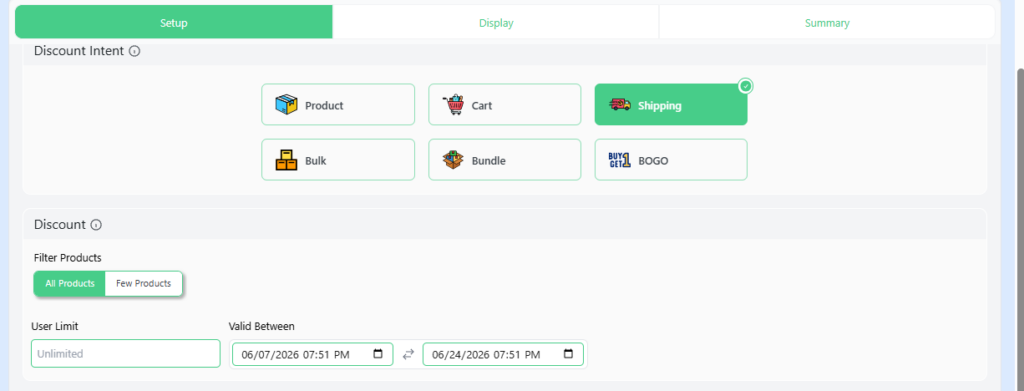
Go to your Disco menu from the WordPress dashboard and add a new rule. Select your discount type as “ cart -based” or “ free shipping.” Select your desired products and finalize campaign dates. Set your discount type and percentage.
Step 2: Set conditions
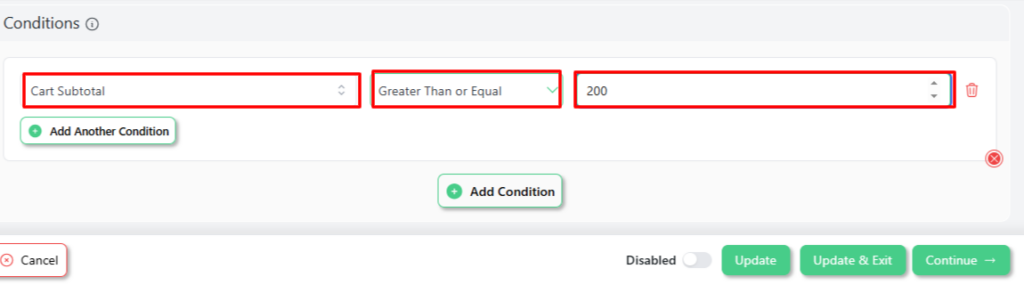
Select Cart Subtotal→ greater than or equal to → [your threshold amount].
Step 3: Enable Cart Notice
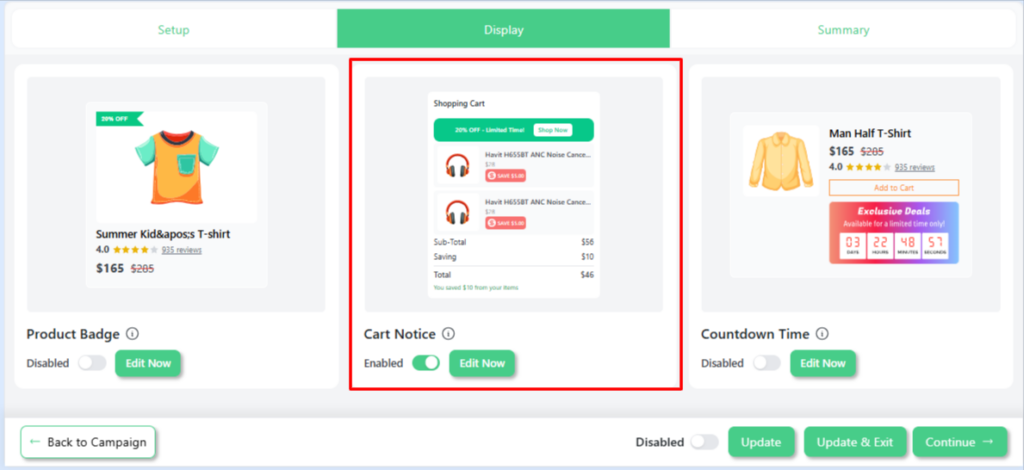
Navigate to the Display tab, select Cart Notice, and then turn it on.
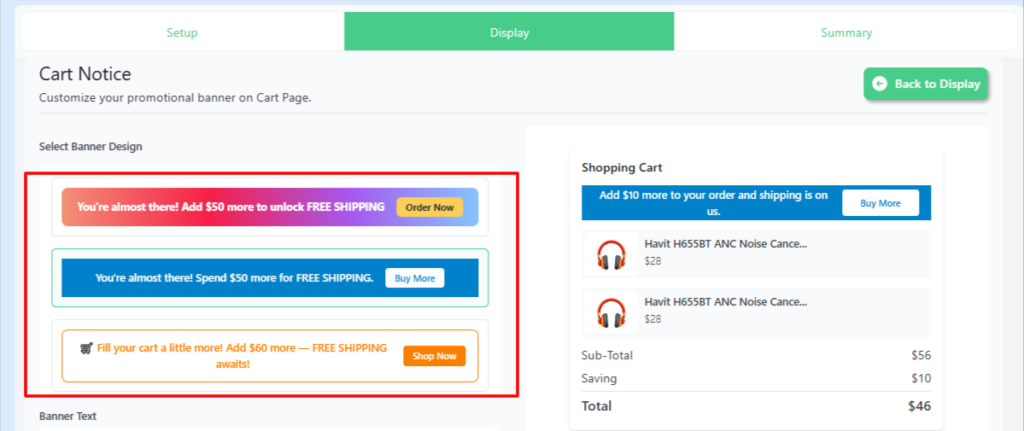
Step 4: Choose your banner
Select your preferred banner design that aligns with your brand.
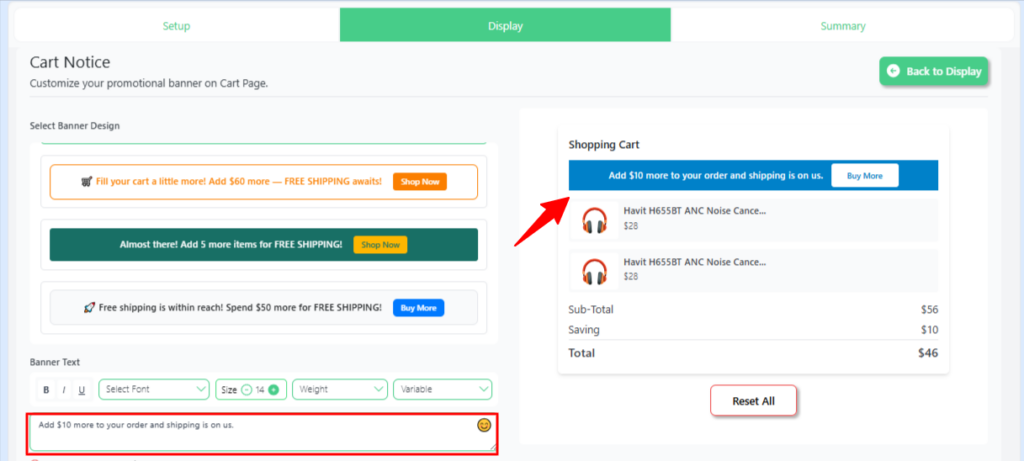
Step 5: Write banner text
Add your promotional message with a dynamic placeholder. So that each shopper sees a personalized cart notice based on their cart contents.
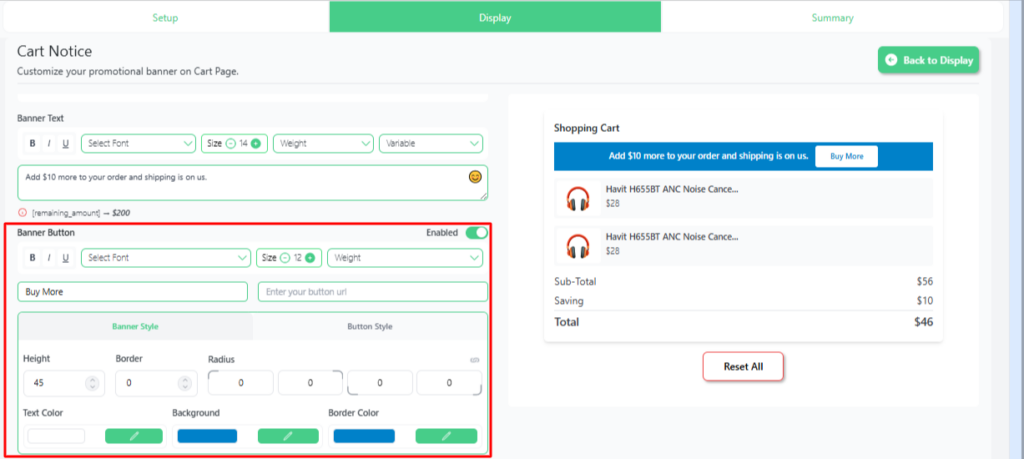
Step 6:Configure and customize your text
Fine-tune your banner’s settings, design, and appearance to match your store.
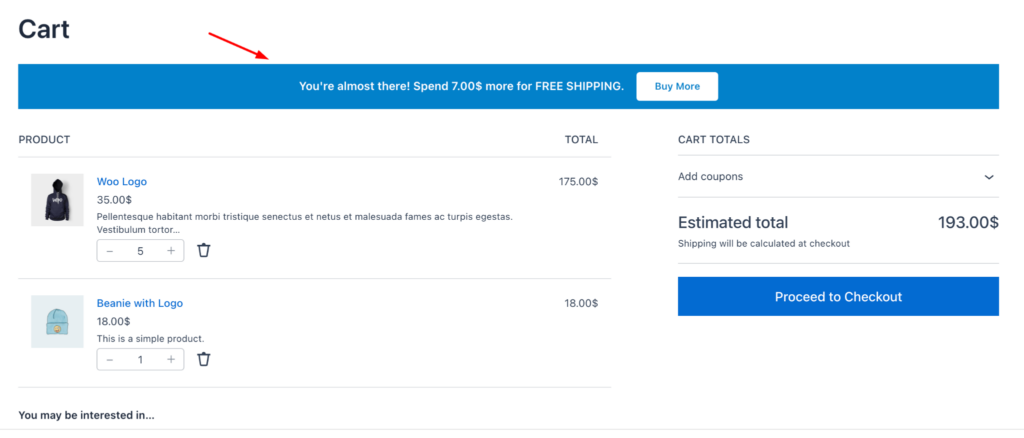
Step 7: Save and Publish
Finalize your settings and make the cart notice live on your store.
For more comprehensive instructions and advanced configuration steps, please refer to the documentation: How to display a cart notice in WooCommerce
How Do You Optimize Cart Notices for Higher Conversions?
If you had room for just one cart notice, what would it be? Rome wasn’t built in a day, but your best cart notice can be. Lead with your shipping threshold notice first and watch shoppers follow through.
Research from the Baymard Institute confirms that unexpected shipping costs are among the leading reasons shoppers abandon their carts.
The words inside the notice are doing the heavy lifting, not the plugin. Direct, action-driven copy outperforms generic statements.
| Generic | Conversion-focused |
| Free shipping available! | Add $8 more and the shipping is on us |
| Limited stock | Only 2 items left at this price |
| Special offer inside | 20% discount applied automatically at checkout |
Conclusion
Start small, think Big. One plugin, one notice, and one metric to track.
Install Disco for free, write a clear shipping-threshold message, run a mobile test, and check your Average Order Value two weeks later. That’s your entire strategy.
For deeper research: Baymard Institute Checkout Usability Research. It’s free and open to read, no signup required.
FAQ
How do I customize my WooCommerce notices?
How do I add a cart notice in WooCommerce?
The process is straightforward. Install Disco → create a rule → set your condition → write your message → save. For the full walkthrough, check out “How to display a cart notice in WooCommerce.”
How do I reduce cart abandonment in WooCommerce?
Don’t overthink your first step. Start with a free shipping threshold notice. It directly addresses the number-one abandonment trigger identified by Baymard Institute. Follow it up with a genuine low-stock urgency as a second choice. Then keep your checkout process clean by making shipping costs visible from the start.
What are the best plugins for WooCommerce cart notices?
How do I hide the “product has been added to your cart” message in WooCommerce?
To prevent duplicate notifications, add this to your theme’s: functions.php: add_filter('wc_add_to_cart_message_html', '__return_false');
Alternatively, check for a built-in plugin that provides a simple toggle to disable the default WooCommerce notice
Additional Resources
Disco
- Disco Official Documentation
- How to Display a Cart Notice in WooCommerce
- Disco Pricing and Plans
- Disco on WordPress.org
Plugins
- BeRocket Cart Notices for WooCommerce — WordPress.org
- WooCommerce Cart Notices by SkyVerge — WooCommerce Marketplace
- YITH WooCommerce Cart Messages — YITH.com
Research and Psychology
- Kahneman & Tversky — Prospect Theory, Econometrica (1979)
- Iyengar & Lepper — When Choice Is Demotivating, Journal of Personality and Social Psychology (2000)
- Cialdini — Influence: Principles of Persuasion
- Psychological Triggers in Online Shopping — Critical Review of Social Sciences Studies (2025)
- Baymard Institute — Cart Abandonment Rate Statistics
- Baymard Institute — Checkout Usability Research
- Talia Wolf — Emotional Targeting Framework, GetUplift