What Is Role-Based Pricing in WooCommerce? (+ Setup Guide)

Shanjida Haider
Content Writer
Last Updated:
9 min read
What Is Role-Based Pricing in WooCommerce? (+ Setup Guide)
💡

Quick Answer :

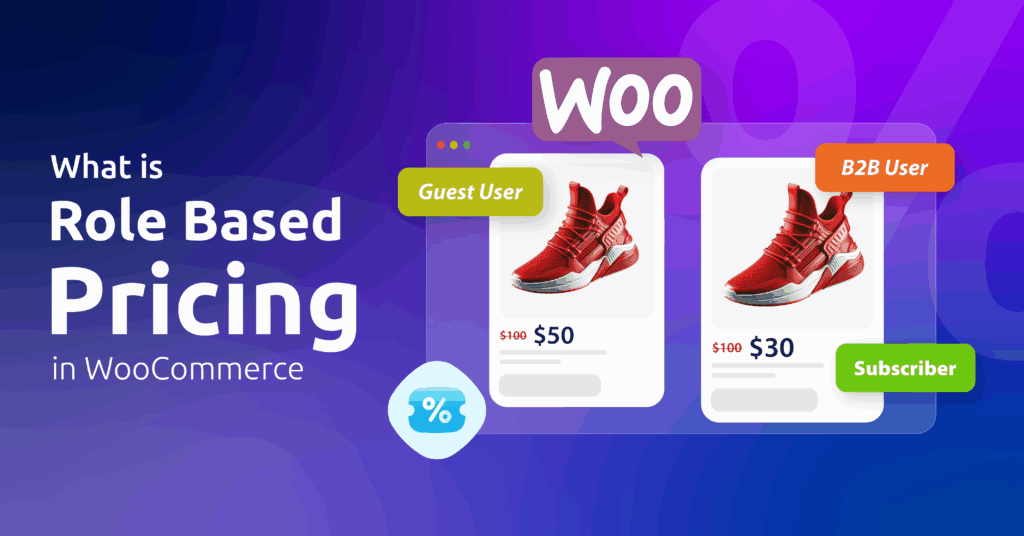
Role-based pricing in WooCommerce is a dynamic pricing strategy based on the user’s role on your e-commerce website, such as wholesalers, retailers, regular customers, or VIP customers. Store owners also refer to this as role-based discounting, since the same setup can show a percentage discount instead of a fixed custom price.

As an alternative to static prices, it shows different results for different customer types.

For example, a wholesale buyer might get a 15% discount over the regular price. A VIP member might get special privileges over other customers.

It’s essential for B2B ecommerce and membership stores. This lets you offer exclusive discounts to loyal customers while your standard pricing stays the same for everyone else.

Why Does Role-Based Pricing Matter in WooCommerce?

“Acknowledgment” is itself one of our primitive desires.

By giving customers exclusive pricing roles, you validate their loyalty and give them a distinct sense of privilege and respect.

Here, every person is assigned to a distinct role (e.g., Wholesaler, Retailer, VIP Customer).

Role-based pricing is a method that lets you set custom pricing or discount rules based on user roles.

This is also a great strategy for meeting customers’ unique needs while staying ahead in a competitive market.

Although WooCommerce includes basic features like regular price and sale price, it lacks a native role-based pricing system.

Fortunately, there’s an advanced discount plugin like Disco that adds both role-based pricing and role-based discounts on top of WooCommerce’s built-in tools.

Key Roles in WooCommerce

Before we dive in, here are some key terms you’ll need to know.

  • Customer: Automatically assigned to anyone who makes a purchase.
  • Shop Manager: Supervises day-to-day operations, but not full WordPress site settings.
  • Administrator: The most powerful role on WordPress. Has access to and control over every aspect.
  • Subscriber: Assigned when a user registers on a blog or newsletter.
  • Editor: In charge of all content-related work.
  • Author: Creates and publishes written work, develops ideas, and so on.
  • Wholesale Buyer: Purchases goods in large quantities and resells them to retailers.
  • Contributor: Writes and edits their own content but does not have the authority to publish it.
📝

Note:

These are the basic user roles WooCommerce provides. If you want custom roles, you can add more with plugins like User Role Editor or MemberPress.

Introducing Disco – Role-Based Discount Plugin for WooCommerce

Frame 32 1

The Disco plugin is a role-based pricing plugin for WooCommerce that lets you create and automate dynamic discounts based on user roles.

You can assign roles like Customer, Subscriber, Contributor, Author, Editor, or Administrator and apply tailored discounts, for example, “15% off for VIP members.”

Disco also supports custom product visibility and pricing, showing different prices for guest users vs. registered customers. Non-logged-in users see messages like “Log in for Wholesaler price list,” which encourages more B2B registrations.

Role-Based Pricing vs. Role-Based Discounts: What’s the Difference?

People often use “role-based pricing” and “role-based discount” to describe the same setup, and in WooCommerce, they usually are. The real difference is how the price appears to the shopper.

Role-based pricing sets a specific price for a user role. A Wholesaler might see $8 per unit while a Retailer sees $12, with no percentage shown anywhere.

A role-based discount instead applies a percentage or fixed amount off the regular price for a given role, so a VIP customer sees “20% off” rather than a flat new price.

Both approaches rely on the same underlying setup: a user role, a set of products or categories, and a rule that ties them together. Whether you configure it as a fixed price or a discount usually comes down to how you want to present the offer, not a difference in what the plugin can do.

Types of Role-Based Pricing in WooCommerce

Tiered Role-Based Discounts

With the Disco plugin, you can create tiered role-based discounts that apply different discount levels to different user roles.

It encourages bulk buying and rewards loyalty at the same time. It’s also a great strategy for clearing out overstock and building long-term trust.

This naturally increases Average Order Value (AOV), conversion rates, and repeat orders.

For example:

User RoleConditionDiscount
SubscriberBuy 2–5 items5% off
SubscriberBuy 6–10 items10% off
Wholesale BuyerBuy 20+ items15% off

Role-Specific Product Access Settings

These access settings let store owners control which user role can view or purchase specific products.

This is a good way to keep wholesale pricing confidential, since publicly revealing it could undermine your market position. It also keeps specialized products, components, or bulk items hidden from guest users.

For example:

  • Regular-priced products stay visible to regular customers.
  • Limited-edition products may be available exclusively to VIP customers.
  • Discounted bulk products may be shown only to Wholesale Buyers.

This improves the user experience, maintains pricing privacy, and simplifies store management.

Time-Sensitive Role Promotions

With the Disco plugin, it’s easy to set a discount with both a timeframe and a user role attached.

For example: “VIP members get 50% off for the next 3 hours.”

Time-sensitive role promotions create a psychological trigger of urgency, tapping into FOMO (Fear Of Missing Out). This directly boosts conversion rates.

Store owners can tailor promotions around the exclusivity of a role, for example: “20% off for subscribers, offer ends tonight.”

This approach tends to bring in better organic traffic, better user management, and stronger brand authority over time.

Combining Role-Based and Conditional Logic

Disco’s multi-conditional discount rules let you combine user roles with stock, category, or purchase-behavior conditions.

For example:

  1. Wholesale Buyers get 15% off products with stock greater than 5.
  2. Subscribers get a 20% discount if they buy 4 skincare products.

This protects your profit margins while maximizing Average Order Value (AOV). It also keeps your discounts strategic instead of random.

Exclusive Complimentary Shipping for Specific User Roles

This is a strong way to reduce cart abandonment, secure large B2B orders, and build customer loyalty.

Unexpected extra costs are the single biggest reason shoppers abandon checkout: in Baymard Institute’s own research, 39% of surveyed users pointed to shipping fees, taxes, or other last-minute charges as the reason they left. On the flip side, free shipping is a strong purchase driver: SellersCommerce’s free shipping data shows 70% of shoppers say free shipping is the reason they shop online in the first place.

To put this into practice, combine the right roles with the right conditions. For example:

  1. Wholesale buyers get free shipping on bulk orders.
  2. VIP Members get free shipping on all orders.
  3. Loyalty tier-3 customers get free shipping.

The Disco plugin automates this, builds loyalty, improves conversions, and personalizes the shopping experience.

BOGO Deals

This promotional strategy is effective across ecommerce and retail marketing. It offers customers an extra product for free or at a discount.

It’s a strong way to increase Average Order Value (AOV), boost sales, and clear inventory. Consumer behavior research has found that when discount sizes are large, shoppers pay more attention to BOGO deals and choose them more often than a mathematically equivalent percentage discount, and you can make them exclusive to top-tier customer roles.

For example:

  • Buy 10 boxes of candles, get 2 boxes free, exclusive for Wholesale buyers.
  • Buy 1 premium skincare product, get 1 free, for VIP members only.

How to Set Up Role-Based Pricing (or Discounts) in WooCommerce with Disco

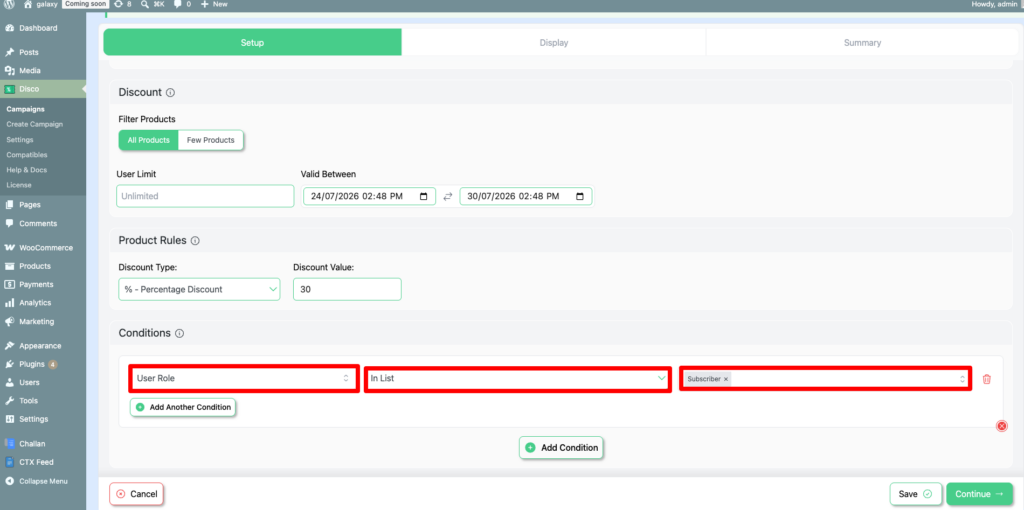
Setting up role-based pricing follows the same basic flow whether you want a fixed price by role or a percentage discount by role:

  1. Install and activate the Disco plugin from the WordPress plugin repository.
  2. Create a new discount rule from the Disco dashboard.
  3. Choose the user role or roles the rule applies to, such as Wholesale Buyer or Subscriber.
  4. Select the products, categories, or entire catalog the rule should cover.
  5. Set the price or discount type: a fixed price per role for straightforward custom pricing, or a percentage/fixed-amount discount if you want the original price to stay visible with a markdown.
  6. Add extra conditions if needed, such as a minimum quantity or a start and end date for time-sensitive promotions.
  7. Save the rule and test it by logging in as a user with that role.

For a more detailed explanation, please refer to our guide on How to Offer Role-Based Pricing in WooCommerce.

role based dashboard

Wrap Up

The Disco WooCommerce plugin makes running a role-based pricing or discount campaign much easier. It gives you a reliable way to set custom pricing, bulk discounts, and dynamic pricing adjustments by user role, without touching a line of code.

Benefits of Using Role-Based Pricing for My Store

Role-based pricing is an excellent strategy for turning a single-chain retailer into a multi-tier platform. Here are the benefits:

  • Simplified management: Applying different prices or discounts to user roles on the same product avoids duplicating listings.
  • Encourages new accounts: Unlocking better prices behind a role gives visitors a reason to register.
  • Supports a B2B sales structure: You can offer different pricing to different customers while keeping that pricing information private.
  • Competitive advantage: Role-based price and discount variations set your store apart from competitors selling at one flat rate.
  • Marketing flexibility: It’s easier to test pricing and promotions segment by segment.
  • Profitability optimization: It helps maximize margins and overall profitability

FAQs ( Frequently Asked Questions ) 

Can I apply role-based pricing to specific product categories or individual products?

Yes, you can do both. You can tailor your offers to all products, specific items, or individual products, based on your preferences. 

Is Role-Based Pricing a built-in feature of WooCommerce?

No, it isn’t a built-in feature. You can utilize WooCommerce’s basic features, for instance, sale price and regular price. For more variation, you need to use an external plugin.

 Is it possible to exclude certain user roles from a pricing rule?

Yes, indeed. You can add or subtract any user roles you want. e.g., running a sitewide discount and excluding wholesalers from the discount. 

Can I schedule role-based pricing rules or run promotions for a limited time?

Several discount plugins make it easier to run promotions for a limited time. You can use those to tailor your promotions the way you desire. 

Is role-based pricing the same as a role-based discount? 

They’re closely related. Role-based pricing sets a specific price for a user role, while a role-based discount shows a percentage or amount off the regular price for that role. Most role-based pricing plugins, including Disco, let you configure either one.

How do I set up a user role discount in WooCommerce?

Install a role-based pricing plugin, create a discount rule, assign it to one or more user roles, choose the products it applies to, and set the discount type. See the setup steps earlier in this article for the full walkthrough.

Written by

Shanjida Haider

Shanjida Haidar is an emerging writer whose work blends metaphor, introspection, and refined narrative craft. Formerly known by the pseudonym “Eriza Alica,” she has authored five titles on Wattpad and further developed her voice through consistent, reflective blogging. She is currently pursuing a master’s degree in English Language Teaching at the University of Dhaka, with academic interests spanning language education, child development, philosophy, and psychology. Professionally, Shanjida works as a WooCommerce Writer at WebAppick. She remains committed to continuous growth—both as a writer and as an educator—striving to produce work that is purposeful, insightful, and resonant.

Leave a Comment

Ready to Boost Your WooCommerce Sales?

Join 700+ store owners using the best WooCommerce discount plugin. Start free or go Pro for BOGO, bulk discounts, and dynamic pricing.

14-Day Money-Back Guarantee • 5-Year Loyalty Rewards • Lifetime Updates