WooCommerce can restrict a markdown to one category, but only inside a coupon, and a coupon does nothing until somebody types its code. Want every item in Shoes showing 10% off on the shop page? Core WooCommerce has no setting for that.
A WooCommerce category discount works best when it targets the category itself rather than a hand-picked product list. New arrivals land in Shoes next month and inherit the price without anyone touching the rule, and the same condition can be flipped to mean “everything except Shoes”.
The coupon route: category targeting behind a code
Core WooCommerce handles this through coupons (WooCommerce coupon documentation). Open Marketing, then Coupons, then Add new coupon, set an amount, and go to Usage restriction. Product categories limits where the code works; Exclude categories keeps it away from others.
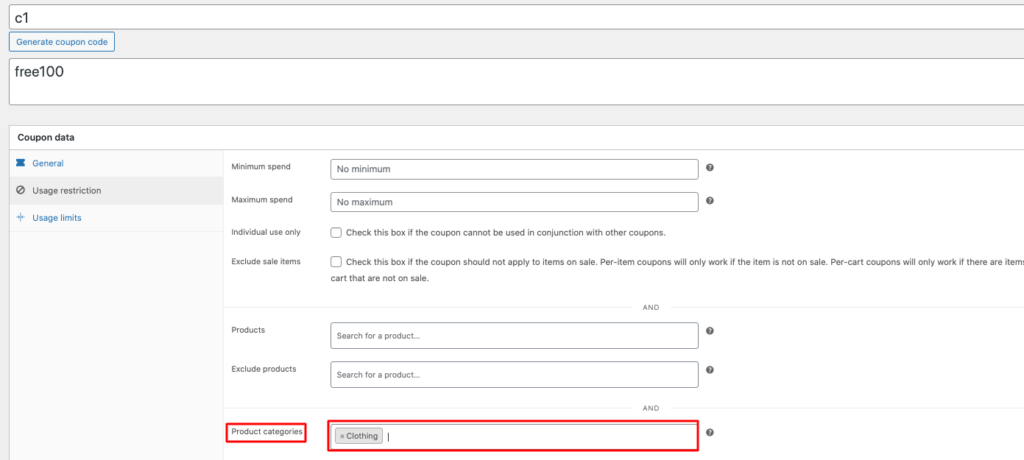
That suits codes you send in a newsletter. Shop-page prices stay untouched, though, and visitors who never see the code never get the saving.
Set up an automatic WooCommerce category discount in Disco
Disco runs equivalent category targeting as a campaign that fires by itself, no code involved, and product campaigns cost nothing. These steps follow Disco’s own category example:
- From the WordPress menu, open Disco and click Create a Discount.
- Name it (say, “10% off Shoes”) and choose Product as the discount intention.
- Under Discount, select All products; the category arrives through a condition instead.
- In Product rules, pick percentage or fixed and enter the value.
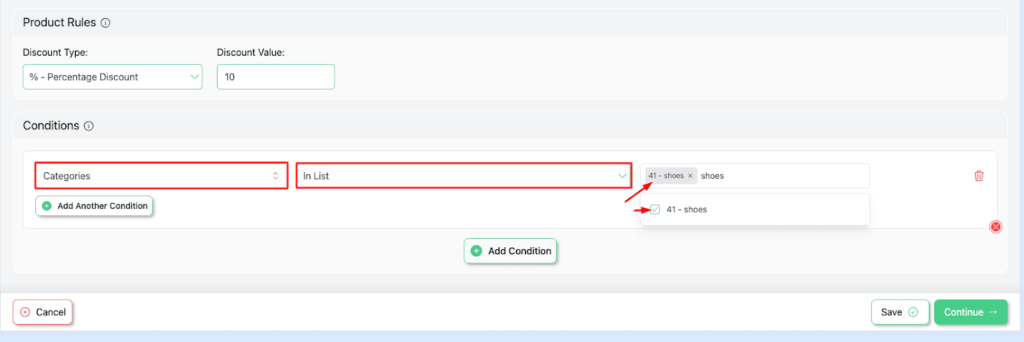
- Click Add condition, choose Categories, set In List, and add Shoes.
- Save and exit, then open Shoes in a private browser window.
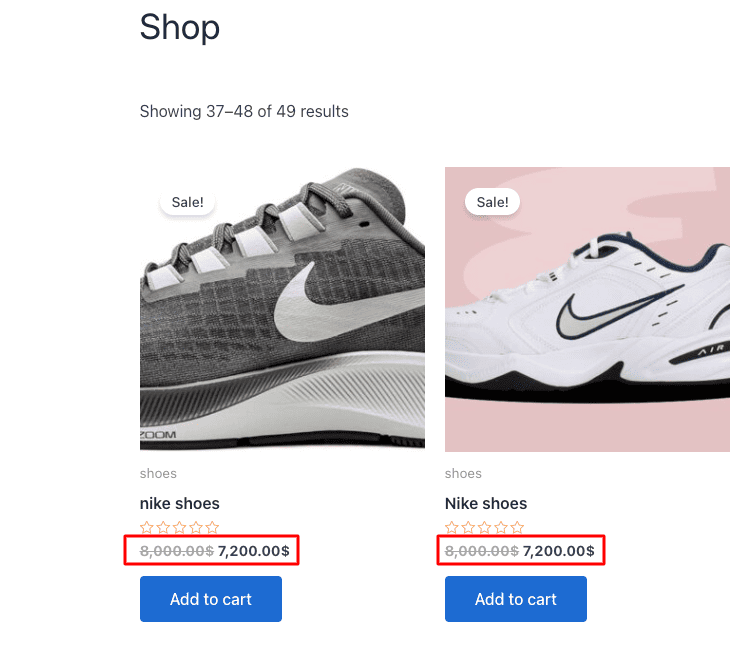
With strikethrough display switched on for the shop and product pages (Disco has per-page settings), each Shoes product shows its original price crossed out beside the new one, while everything outside the category keeps its regular price. Give the campaign a start and end date if the sale should switch itself off.
Discount everything except one category
Flip the operator when a storewide sale needs one exception. Disco’s documentation describes Not In List as exclusion: put a category there and every product in your store qualifies except that category’s items.
That’s the tidier way to run “20% off sitewide, new arrivals excluded” or a promotion that has to skip a category you can’t mark down. Coupons manage it too, through Exclude categories, but again only for shoppers holding the code.
Add a second condition to a category discount
A Categories condition sits beside other conditions in one campaign. Here’s what each pairing costs:
| Pairing | Example | Plan |
|---|---|---|
| Category + user role | 15% off Bags for logged-in wholesale accounts | Free |
| Category + cart subtotal | 10% off Gadgets when the cart passes $100 | Free |
| Category + quantity tiers | Bulk campaign on Books, 20% off from the third copy | Free |
| Free shipping for a category | Shipping campaign limited to Skincare | Free |
| Buy from one category, get from another | Buy Shoes, get 50% off one Accessory | Pro (BOGO) |
| Category + order history | First-time buyers only, on Kids | Pro |
Two rows behave differently from a price cut. That shipping campaign adds a $0 Free Shipping rate to the whole order once a qualifying item sits in the cart, listed beside your other rates, rather than zeroing one product’s postage. Inside a bulk campaign, whichever tier matches applies to every unit on that cart line, so “20% off from the third copy” means all three copies at 20% off.
Wholesale setups are covered under role-based pricing in WooCommerce, thresholds in WooCommerce cart discounts, tiers in WooCommerce bulk discounts, and postage offers in free shipping after a set amount.
Begin with one category and one campaign, check an item inside it and one outside, then layer the second condition. Get Disco free for category campaigns, or see Disco Pro pricing if you need BOGO across categories.
FAQ
Can I discount one WooCommerce category without a coupon?
Not in core WooCommerce. Coupons can be limited to categories but need a code. Disco applies a category discount automatically through a Categories condition, and product campaigns are free.
How do I exclude a category from a storewide sale?
Use the Categories condition with Not In List. The campaign then covers every product except that category.
Is a buy-from-one-category, get-from-another deal free?
No. Buy X Get Y across categories is a BOGO campaign, which needs Disco Pro.