Take 20% off a $40 shirt and the shopper saves $8 on that shirt. Take 20% off a $200 cart and they save $40 on the order, whatever it holds. Same number, two very different promotions, because each percentage is measured against something else.
A WooCommerce percentage discount reduces a price by a share of its value rather than a fixed sum. You can apply it to individual product prices, to the cart as a whole, or through a coupon code, and the right choice depends on what the percentage should be calculated from.
Decide what a WooCommerce percentage discount applies to
Three bases cover nearly every case:
- Product prices. Each qualifying item shows its reduced price on the shop and product pages before anyone reaches the cart. Suits storewide sales and category promotions.
- The cart. The reduction is worked out on the cart once it qualifies, often above a spending threshold. Suits “20% off orders over $150”.
- A coupon. Core WooCommerce subtracts the percentage only after a shopper types the code. Suits newsletter and partner offers.
Pick the base first. The tool and the settings follow from it.
Percentage off product prices with Disco
Product campaigns with percentage discounts are part of the free Disco plugin. A storewide 15% sale takes these steps:
- In the Disco menu, click Create a Discount and name the campaign.
- Choose Product as the discount intent.
- Under Discount, keep All Products, or switch to Few Products and search for the items you want.
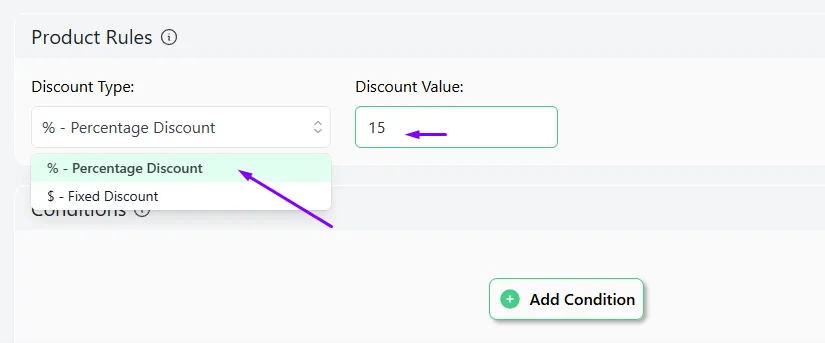
- In Product Rules, set Discount Type to Percentage Discount and type 15 as the value.
- Optionally set start and end dates in Valid Between so the sale switches itself on and off.
- Click Save & Exit to start the campaign.
For 20% off, the only change is typing 20 in step 4. Shoppers then see the original price crossed out beside the reduced one, and that strikethrough display is free too.

To limit the sale to one department, add a Categories condition, as the WooCommerce category discount guide shows. Our WooCommerce bulk discounts guide covers bigger percentages at higher quantities, which need a bulk campaign instead.
Percentage off the whole cart
Choose Cart instead of Product as the intent, set Percentage Discount in Cart Rules, and add a Cart Subtotal condition such as Greater Than or Equal 150. This is free in Disco as well. Our WooCommerce cart discounts guide has the full walkthrough, including how to test both sides of the threshold.
Percentage coupon codes
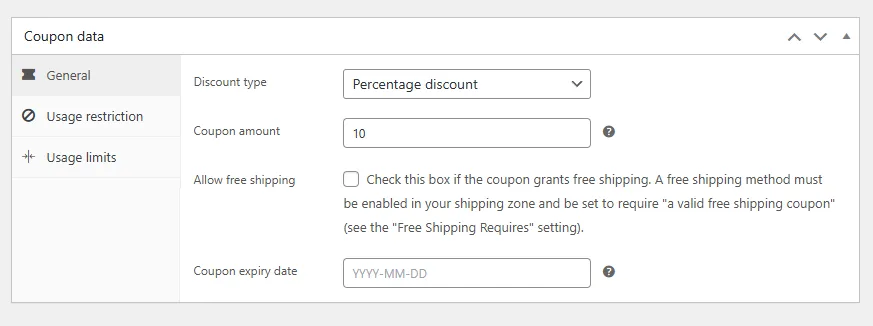
Core WooCommerce needs no plugin for this route. Under Marketing, then Coupons, add a coupon, set Discount type to Percentage discount, and enter the amount. Usage restriction lets you require a minimum spend or limit the code to certain products and categories.
The reduction only happens for shoppers who have the code and enter it at checkout.
Printing the percentage on the product’s sale badge is a display question rather than a pricing one; we explain it separately in show the percentage on the sale badge for anyone after that look.
Decide the base, set the number, and check one product and one cart before you announce it. Get Disco free for automatic percentage discounts, or see Disco Pro pricing for design blocks and BOGO.
Related guide: How to Increase Price by Percentage in WooCommerce?
FAQ
How do I add a 20% discount in WooCommerce?
Create a Disco product campaign, choose Percentage Discount and enter 20, then save. For a code-based offer, create a WooCommerce coupon with the Percentage discount type and an amount of 20.
Can two percentage discounts add up on one product?
No. Disco product campaigns don’t add together. When two apply to the same product, a store-wide setting picks either the lowest or the highest discount.
Is a percentage discount free in Disco?
Yes. Percentage discounts on products and on the cart work in the free plugin, along with scheduling and the crossed-out price display.