Black Friday 2026 falls on Friday, November 27, and Cyber Monday on November 30. That gives a WooCommerce Black Friday sale four days that count, plus any early-access window you open beforehand. Weak offers are seldom what breaks. Timing is: a sale that switches on at the wrong hour, or two discounts colliding to produce a price nobody chose. So give each window its own scheduled campaign, and settle which discount wins before anything goes live.
Your WooCommerce Black Friday 2026 calendar
Each row is one scheduled campaign with its own start and end.
| Window | 2026 dates | What to schedule |
|---|---|---|
| Early access | Mon Nov 23 to Thu Nov 26 | Members-only or logged-in-only pricing |
| Black Friday | Fri Nov 27 | Your headline offer, storewide or by category |
| Weekend | Sat Nov 28 to Sun Nov 29 | Repeat the headline deal, or switch to tiered or free shipping |
| Cyber Monday | Mon Nov 30 | A separate offer with its own end time |
Early-access dates are only a suggestion. The rest follow from US Thanksgiving, the fourth Thursday of November, which this year is November 26.
Four schedules sound like more work than one. Yet a single long sale, edited by hand on Saturday morning, is exactly how Friday’s price survives into Monday.
How to schedule a Black Friday campaign in Disco, step by step
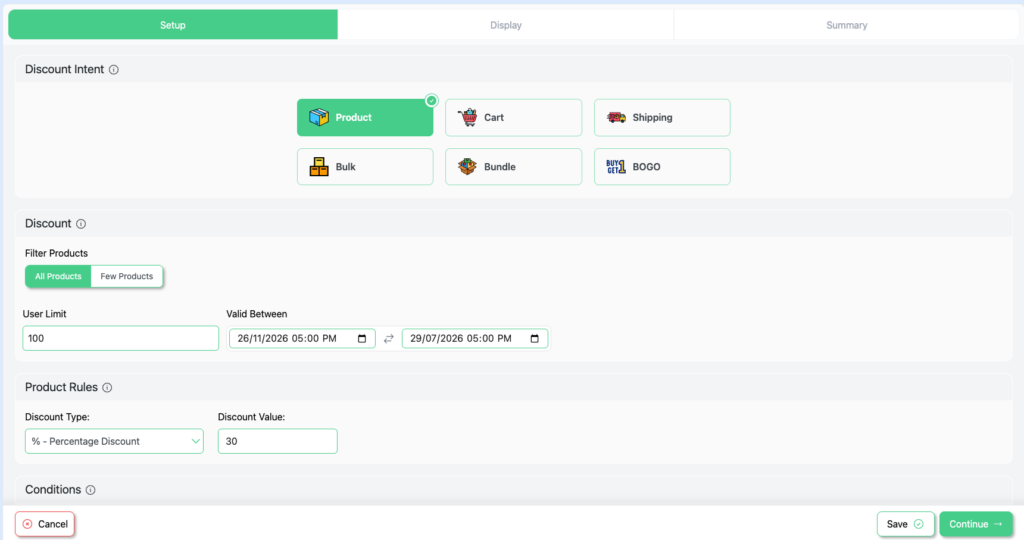
Every Disco campaign comes down to four decisions: type, discount, conditions, and an optional start and end date. Scheduling ships in the free plugin.
- Install free Disco from WordPress.org and activate it.
- In WordPress, open Settings, then General, and confirm the timezone matches your store’s local time. Step 8 then proves the switch-on hour before it matters.
- Click Create a Discount and choose its type. Headline offers usually take the product type (a percentage or fixed amount off chosen items or categories) or the cart type.
- Set the discount: percentage, fixed amount, or fixed amount per cart item.
- Add conditions when only some carts or shoppers qualify, such as a minimum subtotal or a user role.
- Enter both dates. With a start but no end, the discount keeps running after the sale is over.
- Save, then repeat for the next window.
- Before launch, schedule a throwaway test on one inexpensive product to begin minutes ahead, then watch it switch on and off in your storefront.
Afterwards, deactivate each Black Friday campaign before deleting it, because Disco won’t delete an active one. Or keep them switched off as next year’s templates.
Decide which discount wins before campaigns overlap
Black Friday week is when most shops juggle several Disco campaigns simultaneously. Your everyday category campaign keeps running, early access hasn’t expired, and the headline deal begins at midnight.
Product campaigns don’t add together. When more than one matches an item, a single store-wide setting decides whether the lowest or highest qualifying discount applies, and there is no priority order to arrange. A 20% Black Friday product campaign and a 10% everyday category campaign on the same item give 20% or 10%, depending on that setting, never 30%.
Coupons create the second overlap. Disco can run alongside WooCommerce coupons, or you can switch it to “Disco only”, which rejects every WooCommerce coupon, including codes already sitting in subscribers’ inboxes. If your Black Friday email carries a code, leave coupons on.
Then test. A store owner on the WordPress.org forum set 5% off from a $100 subtotal and 10% off from $250, and reported: “when the 10% Discount Campaign is enabled, the 5% campaign stops working” (thread). Support reproduced it and released a fix, and the thread is resolved. Its real lesson is timing: build everything that will be live simultaneously, push a few carts through on a staging copy, and finish before November 27, while surprises are still cheap to fix.
Black Friday campaign ideas, and which Disco tier runs each
| Idea | What you build in Disco | Tier |
|---|---|---|
| Save more per item as quantity grows | Bulk (tiered quantity) campaign | Free |
| Early access for members or logged-in shoppers | User role or logged-in condition | Free |
| Deals only for first-time or returning buyers | Customer-history condition | Pro |
| Buy one, get one | BOGO / Buy X Get Y | Pro |
| Free shipping over a cart total | Free-shipping campaign plus subtotal condition | Free |
| Sale badges, countdown timers, cart banners | Design blocks | Pro |
Tiered (bulk) quantity discounts
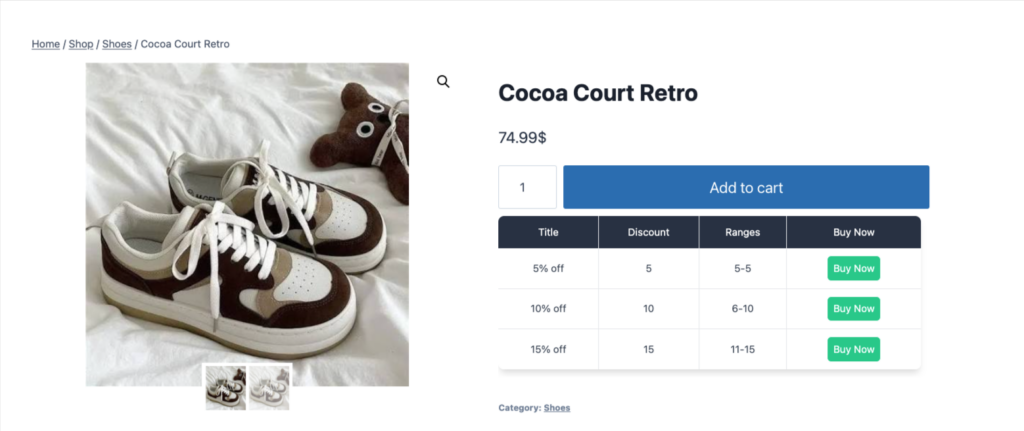
Bulk pricing lowers the unit price as quantity rises: for example, 5% off two items, 10% off three, 15% off four or more. It’s free in Disco, and on Black Friday it reserves your deepest cut for your biggest orders. Displaying those tiers as a product-page table is a Pro design block (see show discounts in a tiered pricing table). Free users can spell the breaks out in a description or banner instead.
Early access for a customer role or logged-in shoppers
Early access is an ordinary schedule with one condition attached. Free Disco can restrict it to a user role, or to logged-in shoppers instead of guests. Restricting it to first-time buyers, or to people who have ordered before, needs a customer-history condition, and those are Pro.
BOGO / Buy X Get Y
BOGO is Pro, and how to set up a BOGO offer in WooCommerce walks through configuration. It shifts saving from price to quantity, which suits goods people buy in pairs or as gifts.
Free shipping
Shipping campaigns are free, thresholds included: “free shipping on orders over $75” is just a shipping campaign with a subtotal condition. Know what shoppers will see. Once their cart qualifies, Disco adds a $0 “Free Shipping” rate covering the whole order, listed beside your other rates. It can’t waive shipping on one product while charging for the rest, nor take a percentage off delivery. The cart message telling shoppers how much more to add before delivery becomes free is part of a Pro design block.
Badges, countdown timers and cart banners
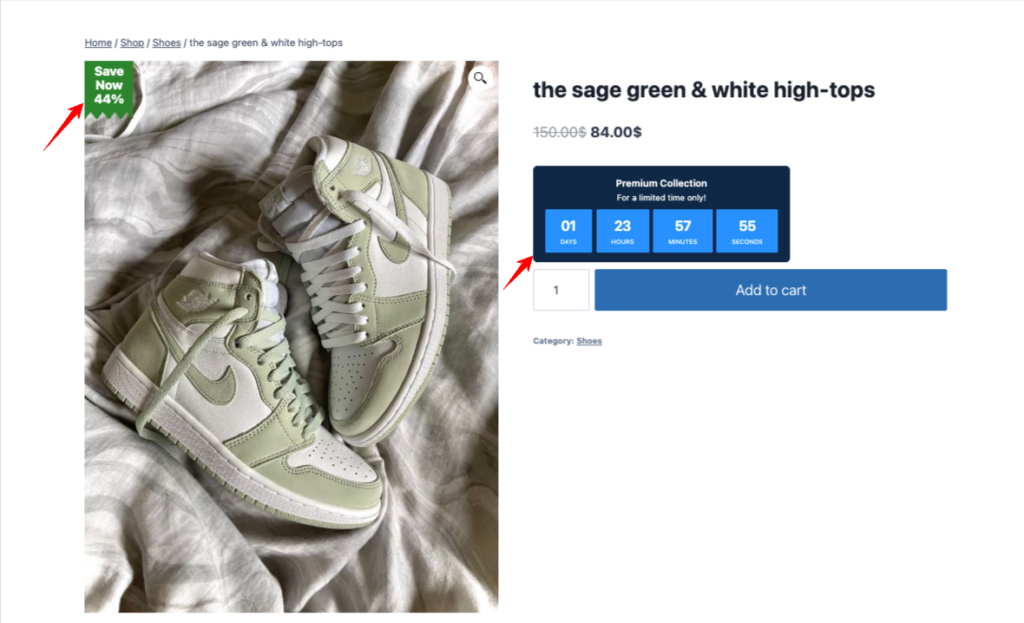
All three are Pro design blocks. A WooCommerce sale badge marks reduced items in your shop grid, while countdown timers for WooCommerce sales show how long a window has left. Neither changes a price. They make a scheduled discount visible to people browsing.
Cyber Monday: end, extend or swap
Give Cyber Monday its own campaign and end time, even when it repeats Friday’s offer. For formats beyond these four windows, see other ways to run a sale in WooCommerce. Extending Black Friday instead? Move its end date on Sunday and look at your shop just after midnight. Swapping offers means the weekend sale should stop at the minute Cyber Monday starts, so nothing overlaps.
Build every campaign this week, with start and end dates, and push test carts through each pair that will run together. A clash found in October costs one setting change; the same clash on November 27 means editing prices while orders arrive. Start with the free Disco plugin, and check Disco Pro pricing if BOGO or design blocks are part of your plan.
FAQ
When is Black Friday 2026?
Friday, November 27, 2026. Cyber Monday follows on Monday, November 30, 2026.
Can I schedule WooCommerce Black Friday discounts in advance?
Yes. Any Disco campaign can take a start and an end date, and scheduling is part of the free plugin. Set both dates, and check your WordPress timezone first.
Do Disco discounts work with WooCommerce coupons?
Yes, while coupons stay switched on. “Disco only” mode rejects every WooCommerce coupon, so keep it off if your Black Friday emails include a code.
Is BOGO free in Disco?
No, BOGO / Buy X Get Y requires Pro. Bulk (tiered) discounts, free-shipping campaigns and scheduling are free.
Will my Black Friday prices show in Google Shopping feeds?
Not through Disco. It applies discounts live in the shop and cart and doesn’t write them into WooCommerce’s sale price field, so product feeds and structured data keep showing the regular price.