This setting decides how WooCommerce coupon codes and Disco campaigns work together in your store. You can let them both run at the same time, or choose to use only one of them.
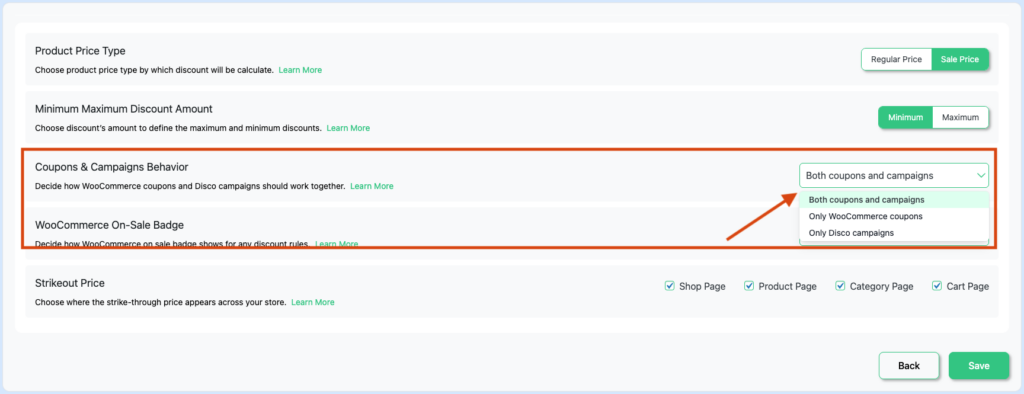
How to Change It #
- Go to Disco → Settings
- Find Coupons & Campaigns Behavior
- Select one of the three options from the dropdown
- Click Save
Options #
| Option | What It Does | When to Use |
| Both coupons and campaigns | Both WooCommerce coupons and Disco campaigns work at the same time. | Default setting. Shoppers can use a coupon code and still benefit from active Disco campaign discounts. |
| Only WooCommerce coupons | Disco campaigns are completely disabled. Only WooCommerce coupon codes work. | Use this if you want to rely entirely on coupon codes and turn off all Disco automatic discounts. |
| Only Disco campaigns | WooCommerce coupons are disabled. Only Disco campaigns apply discounts. | Use this if you want Disco campaigns to be the only discount method and prevent shoppers from using coupon codes. |
📌 The default is “Both coupons and campaigns”. If you have never changed this setting, both WooCommerce coupons and Disco campaigns are active at the same time.
Both Coupons and Campaigns #
WooCommerce coupons and Disco campaigns both work independently. A shopper can apply a coupon code at checkout and also benefit from any active Disco campaign discount at the same time.
Only WooCommerce Coupons #
All Disco campaigns are turned off. No automatic discounts are applied — not on product prices, not in the cart, and not on shipping. Shoppers can still use WooCommerce coupon codes as normal.
⚠️ Selecting this option disables ALL Disco campaigns across your entire store — including Product, Bulk, Cart, BuyXGetY, and Shipping campaigns.
Only Disco Campaigns #
WooCommerce coupon codes are disabled. Shoppers cannot apply any coupon at checkout. Only Disco campaigns apply discounts automatically.
⚠️ Selecting this option invalidates all WooCommerce coupons store-wide. Any shopper who tries to enter a coupon code will see it rejected.
📌 Note: Changing this setting takes effect immediately after saving — no need to republish your campaigns.


